Dictionaries

Introduction to Python for Developers

Jasmin Ludolf

Senior Data Science Content Developer

Ingredients list

ingredients = ["pasta", "tomatoes", "garlic", "basil", "olive oil", "salt"]

# Ingredient quantities (in grams) quantities = [500, 400, 15, 20, 30, 5]
Introduction to Python for Developers

Dictionary

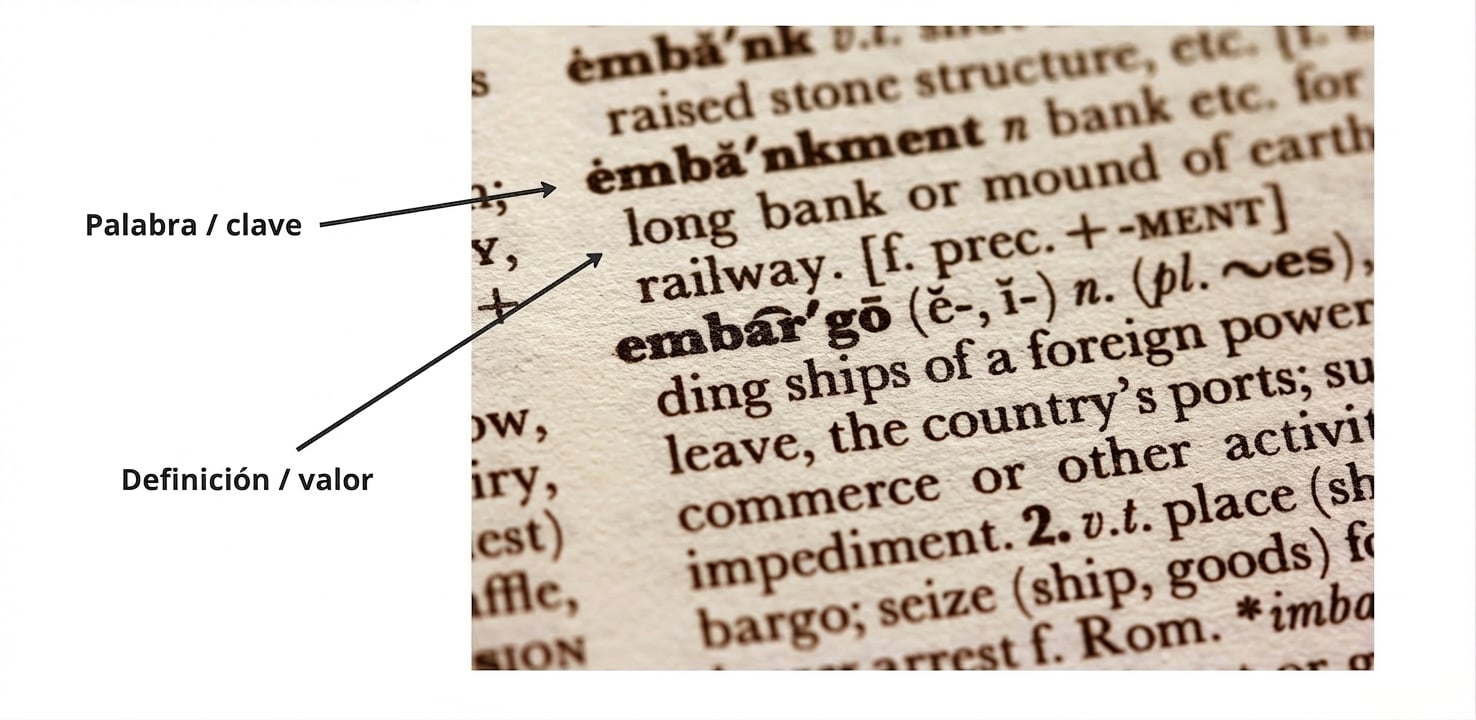
  • Dictionary = key-value pairs

Dictionary annotated with the word (key) and definition (value)

1 https://unsplash.com/@sandym10
Introduction to Python for Developers

Why use dictionaries?

  • username
  • email
  • preferences


  • ip_address
  • location

$$

  • Recipe scaler: link ingredients to quantities

User info

Computer network

1 User image by Bilobaba Vladimir, Aviavlad; https://unsplash.com/@jjying
Introduction to Python for Developers

Creating a dictionary

# Creating a dictionary
recipe = 
Introduction to Python for Developers

Creating a dictionary

# Creating a dictionary
recipe = {
Introduction to Python for Developers

Creating a dictionary

# Creating a dictionary
recipe = {"pasta"
Introduction to Python for Developers

Creating a dictionary

# Creating a dictionary
recipe = {"pasta":
Introduction to Python for Developers

Creating a dictionary

# Creating a dictionary
recipe = {"pasta": 500
Introduction to Python for Developers

Creating a dictionary

# Creating a dictionary
recipe = {"pasta": 500,
Introduction to Python for Developers

Creating a dictionary

# Creating a dictionary
recipe = {"pasta": 500,
          "tomatoes": 400,
Introduction to Python for Developers

Creating a dictionary

# Creating a dictionary
recipe = {"pasta": 500,
          "tomatoes": 400, 
          "garlic": 15,
          "basil": 20, 
          "olive oil": 30,
          "salt": 5
Introduction to Python for Developers

Creating a dictionary

# Creating a dictionary
recipe = {"pasta": 500,
          "tomatoes": 400, 
          "garlic": 15,
          "basil": 20, 
          "olive oil": 30,
          "salt": 5}
Introduction to Python for Developers

Accessing a value based on the key

  • Dictionaries are ordered

    • Allows values to be accessed by subsetting on the key
  • How much pasta do we need?

# Find the ingredient's quantity
print(recipe["pasta"])
500
Introduction to Python for Developers

Accessing all values

# Get all values from a dictionary
print(recipe.values())
dict_values([500, 400, 15, 20, 30, 5])
Introduction to Python for Developers

Accessing all keys

# Retrieve all keys in a dictionary
print(recipe.keys())
dict_keys(['pasta', 'tomatoes', 'garlic', 'basil', 'olive oil', 'salt'])
Introduction to Python for Developers

Viewing an entire dictionary

# Print the dictionary
print(recipe)
{'pasta': 500, 'tomatoes': 400, 'garlic': 15, 'basil': 20, 'olive oil': 30,
'salt': 5}
# Get all items (key-value pairs)
print(recipe.items())
dict_items([('pasta', 500), ('tomatoes', 400), ('garlic', 15), ('basil', 20), 
('olive oil', 30), ('salt', 5)])
Introduction to Python for Developers

Adding a key-value pair

# Add a new key-value pair
recipe["parmesan"] = 50
print(recipe)
{'pasta': 500, 'tomatoes': 400, 'garlic': 15, 'basil': 20, 'olive oil': 30,
'salt': 5, 'parmesan': 50}
Introduction to Python for Developers

Updating a value

print(recipe)
{'pasta': 500, 'tomatoes': 400, 'garlic': 15, 'basil': 20, 'olive oil': 30,
'salt': 5, 'parmesan': 50}
# Updating a value associated with an existing key
recipe["pasta"] = 1000
print(recipe)
{'pasta': 1000, 'tomatoes': 400, 'garlic': 15, 'basil': 20, 'olive oil': 30,
'salt': 5, 'parmesan': 50}
Introduction to Python for Developers

Duplicate keys

# Creating a dictionary with a duplicate key
recipe = {"pasta": 500, "garlic": 5, 
          "garlic": 15, "basil": 20, 
          "olive oil": 30, "salt": 5}

# Print the duplicate key's value print(recipe["garlic"])
15
Introduction to Python for Developers

Let's practice!

Introduction to Python for Developers

Preparing Video For Download...