Einführung in Apache Airflow mit Python
Mike Metzger
Data Engineer
schedule startbarrunningfailedsuccess

Beim Planen eines DAGs sind wichtig:
start_date – Datum/Uhrzeit für den ersten DAG-Runend_date – Optionales Ende für neue DAG-Instanzenstart_date und end_date nutzen ein datetime(year, month, day)-Objekt, z. B.: from pendulum import datetime
start_date=datetime(2026, 4, 10, tz="UTC")
schedule steht für:
start_date und end_datecron-Syntax, Presets oder timedeltas
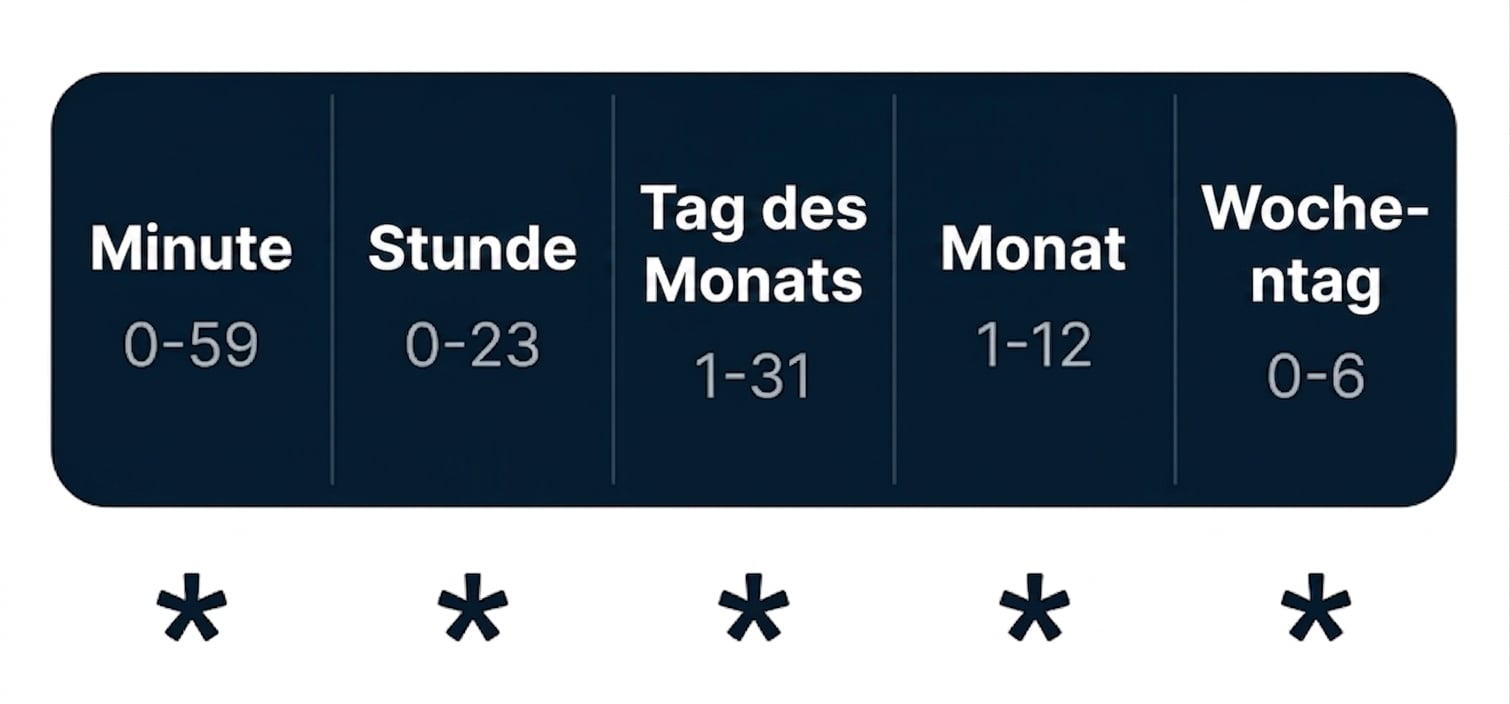
* steht für jedes Intervall (z. B. jede Minute, jeden Tag)
0 12 * * * # Täglich um 12:00 Uhr
* * 25 2 * # Jede Minute am 25. Februar
0,15,30,45 * * * * # Alle 15 Minuten
Presets:
Cron-Äquivalent:
0 * * * *0 0 * * *0 0 * * 00 0 1 * *0 0 1 1 *Airflow hat drei spezielle schedule-Presets:
None – Nie planen, für manuell ausgelöste DAGs@once – Nur einmal planen@continuous – Startet sofort nach Ende des vorherigen Laufspendulum.duration nutzbarduration(hours=6)duration(minutes=30)from pendulum import duration
@dag(
dag_id="example_dag"
schedule=duration(days=2)
)
schedule:@dag(
dag_id="example_dag",
schedule="0 12 * * *"
)
@dag(
dag_id="example_dag",
schedule="@daily"
)
Beim Planen eines DAGs gilt:
start_date + schedule'start_date': datetime(2026, 2, 25, tz="UTC")
'schedule': @daily
Frühester Startzeitpunkt: 26. Februar 2026
Einführung in Apache Airflow mit Python