CSS-Selektoren

Web Scraping in Python

Thomas Laetsch

Data Scientist, NYU

Rosetta CSStone

  • / durch > ersetzen (außer am Anfang)
    • XPath: /html/body/div
    • CSS-Selektor: html > body > div
  • // durch Leerzeichen ersetzen (außer am Anfang)
    • XPath: //div/span//p
    • CSS-Selektor: div > span p
  • [N] durch :nth-of-type(N) ersetzen
    • XPath: //div/p[2]
    • CSS-Selektor: div > p:nth-of-type(2)
Web Scraping in Python

Rosetta CSStone

XPATH

xpath = '/html/body//div/p[2]'

CSS

css = 'html > body div > p:nth-of-type(2)'
Web Scraping in Python

Attribute in CSS

  • Für Klassen nutze einen Punkt .
    • Beispiel: p.class-1 wählt alle p-Elemente mit class-1
  • Für IDs nutze ein Rautezeichen #
    • Beispiel: div#uid wählt das div mit id gleich uid
Web Scraping in Python

Attribute in CSS

Absätze innerhalb der Klasse class1 auswählen:

css_locator = 'div#uid > p.class1'

Alle Elemente mit Klassenattribut class1 auswählen:

css_locator = '.class1'
Web Scraping in Python

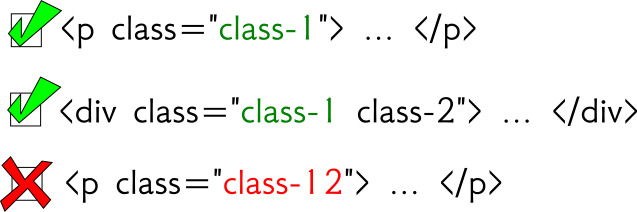
Klassenstatus

css = '.class1'

Alt-Text: Klassenauswahl nur per CSS-Klasse

Web Scraping in Python

Klassenstatus

xpath = '//*[@class="class1"]'
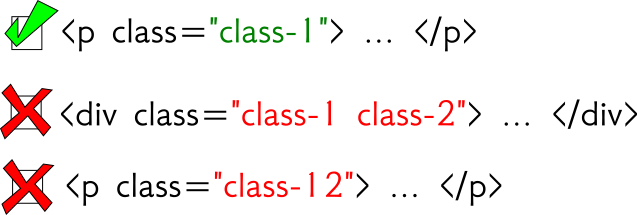
Alt-Text: Klassenauswahl mit XPath (genau)

Web Scraping in Python

Klassenstatus

xpath = '//*[contains(@class,"class1")]'
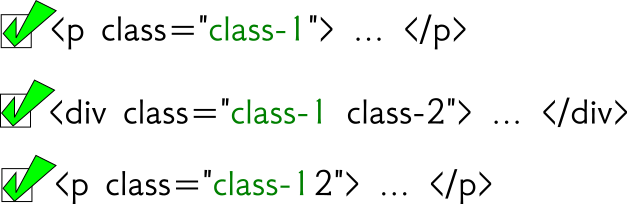
Alt-Text: Klassenauswahl mit XPath (enthält)

Web Scraping in Python

Selektoren mit CSS

from scrapy import Selector 

html = '''
<html>
  <body>
    <div class="hello datacamp">
      <p>Hello World!</p>
    </div>
    <p>Enjoy DataCamp!</p>
  </body>
</html>
''' 
sel = Selector( text = html )
>>> sel.css("div > p")
out: [<Selector xpath='...' data='<p>Hello World!</p>'>] 

>>> sel.css("div > p").extract()
out: [ '<p>Hello World!</p>' ]
Web Scraping in Python

C(SS) you soon!

Web Scraping in Python

Preparing Video For Download...