Comparaisons quantitatives : graphiques à barres

Introduction à la visualisation de données avec Matplotlib

Ariel Rokem

Data Scientist

Médailles olympiques

,Gold, Silver, Bronze
United States, 137, 52, 67
Germany, 47, 43, 67
Great Britain, 64, 55, 26
Russia, 50, 28, 35
China, 44, 30, 35
France, 20, 55, 21
Australia, 23, 34, 25
Italy, 8, 38, 24
Canada, 4, 4, 61
Japan, 17, 13, 34
Introduction à la visualisation de données avec Matplotlib

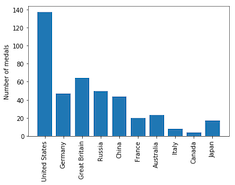
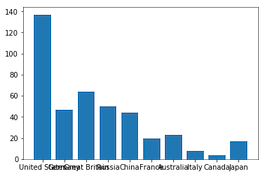
Médailles olympiques : visualisation des données

medals = pd.read_csv('medals_by_country_2016.csv', index_col=0)

fig, ax = plt.subplots()
ax.bar(medals.index, medals["Gold"]) plt.show()
Introduction à la visualisation de données avec Matplotlib

Interlude : faire pivoter les étiquettes des graduations

fig, ax = plt.subplots()
ax.bar(medals.index, medals["Gold"])

ax.set_xticklabels(medals.index, rotation=90) ax.set_ylabel("Number of medals")
plt.show()
Introduction à la visualisation de données avec Matplotlib

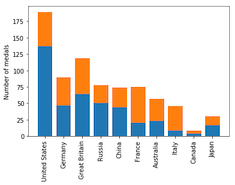
Médailles olympiques : visualisation des autres médailles

fig, ax = plt.subplots
ax.bar(medals.index, medals["Gold"])

ax.bar(medals.index, medals["Silver"], bottom=medals["Gold"])
ax.set_xticklabels(medals.index, rotation=90) ax.set_ylabel("Number of medals") plt.show()

Introduction à la visualisation de données avec Matplotlib

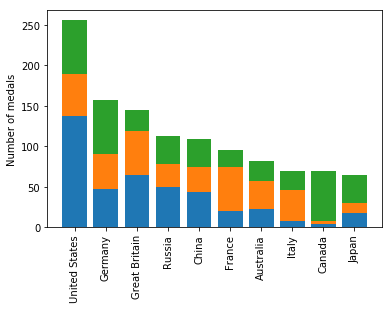
Médailles olympiques : visualisation des trois médailles

fig, ax = plt.subplots
ax.bar(medals.index, medals["Gold"])

ax.bar(medals.index, medals["Silver"], bottom=medals["Gold"])

ax.bar(medals.index, medals["Bronze"], bottom=medals["Gold"] + medals["Silver"])
ax.set_xticklabels(medals.index, rotation=90) ax.set_ylabel("Number of medals") plt.show()
Introduction à la visualisation de données avec Matplotlib

Graphique à barres empilées

Introduction à la visualisation de données avec Matplotlib

Ajouter une légende

fig, ax = plt.subplots
ax.bar(medals.index, medals["Gold"])
ax.bar(medals.index, medals["Silver"], bottom=medals["Gold"])
ax.bar(medals.index, medals["Bronze"],
       bottom=medals["Gold"] + medals["Silver"])

ax.set_xticklabels(medals.index, rotation=90)
ax.set_ylabel("Number of medals")
Introduction à la visualisation de données avec Matplotlib

Ajouter une légende

fig, ax = plt.subplots
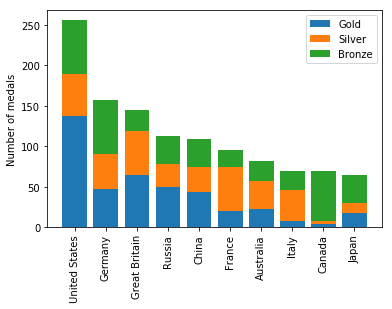
ax.bar(medals.index, medals["Gold"], label="Gold")
ax.bar(medals.index, medals["Silver"], bottom=medals["Gold"], 
       label="Silver")
ax.bar(medals.index, medals["Bronze"],
       bottom=medals["Gold"] + medals["Silver"], 
       label="Bronze")

ax.set_xticklabels(medals.index, rotation=90)
ax.set_ylabel("Number of medals")

ax.legend() plt.show()
Introduction à la visualisation de données avec Matplotlib

Graphique à barres empilées avec légende
Introduction à la visualisation de données avec Matplotlib

Créez un diagramme à barres !

Introduction à la visualisation de données avec Matplotlib

Preparing Video For Download...