Exécution de conteneurs Docker

Présentation de Docker

Tim Sangster

Software Engineer @ DataCamp

Condition préalable

Commande Utilisation
nano <file-name> Ouvre <file-name> dans l'éditeur de texte nano
touch <file-name> Crée un fichier vide avec le nom spécifié
echo "<text>" Affiche <text> sur la console
<command> >> <file> Ajoute la sortie de <command> à la fin de <file>
<command> -y Répondre automatiquement « oui » à tous les prompts provenant de <command>
Présentation de Docker

L'interface CLI Docker

  • L'interface de ligne de commande Docker transmettra des instructions au démon Docker.
  • Chaque commande commence par docker.

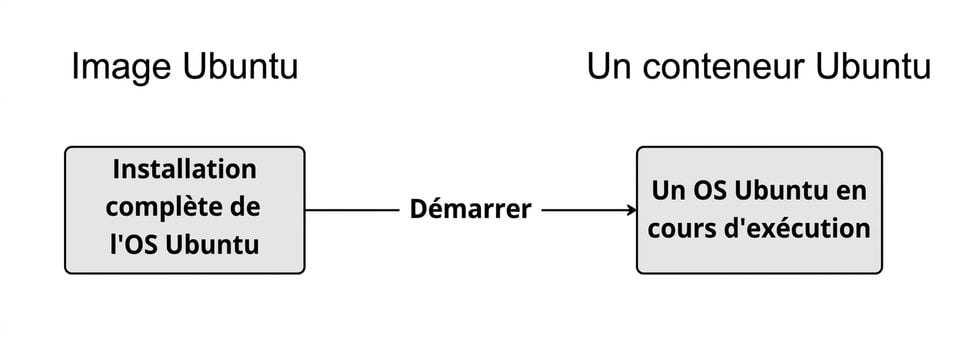
L'image nommée Ubuntu avec une installation complète du système d'exploitation Ubuntu peut être lancée pour créer un système d'exploitation Ubuntu fonctionnel avec lequel nous pouvons interagir à l'aide d'un shell.

Présentation de Docker

Sortie du conteneur Docker

docker run <image-name>
docker run hello-world
Hello from Docker!

To generate this message, Docker took the following steps:
1. The Docker client contacted the Docker daemon.
2. The Docker daemon created a new container from the hello-world image which runs
 the executable that produces the output you are currently reading.
3. The Docker daemon streamed that output to the Docker client, which sent it to 
 your terminal.
Présentation de Docker

Sélection de la sortie du conteneur Docker

docker run <image-name>
docker run ubuntu
repl@host:/# docker run ubuntu

repl@host:/#
Présentation de Docker

Un conteneur Docker interactif

En ajoutant -it à docker run, nous obtiendrons un shell interactif dans le conteneur démarré.

docker run -it <image-name>
docker run -it ubuntu
repl@container:/#
repl@container:/# exit
exit
repl@host:/#
Présentation de Docker

Exécution d'un conteneur détaché

En ajoutant -d à docker run, le conteneur s'exécutera en arrière-plan, ce qui nous permettra de reprendre le contrôle du shell.

docker run -d <image-name>
docker run -d postgres
repl@host:/# docker run -d postgres
4957362b5fb7019b56470a99f52218e698b85775af31da01958bab198a32b072
repl@host:/#
Présentation de Docker

Affichage et arrêt des conteneurs en cours d'exécution

docker ps
repl@host:/# docker ps
CONTAINER ID   IMAGE      COMMAND                  CREATED  
4957362b5fb7   postgres   "docker-entrypoint.s…"   About a minute ago
STATUS              PORTS      NAMES
Up About a minute   5432/tcp   awesome_curie
docker stop <container-id>
repl@host:/# docker stop cf91547fd657
cf91547fd657
Présentation de Docker

Résumé des nouvelles commandes

Utilisation Commande
Lancer un conteneur docker run <image-name>
Lancer un conteneur interactif docker run -it <image-name>
Démarrer un conteneur détaché docker run -d <image-name>
Afficher les conteneurs en cours d'exécution docker ps
Arrêter un conteneur docker stop <container-id>
Présentation de Docker

Passons à la pratique !

Présentation de Docker

Preparing Video For Download...