SLA et reporting dans Airflow

Introduction à Apache Airflow en Python

Mike Metzger

Data Engineer

SLA

Qu’est-ce qu’un SLA ?

  • SLA signifie « Service Level Agreement »
  • Dans Airflow, durée attendue d’exécution d’une tâche ou d’un DAG
  • Un « SLA Miss » survient quand la tâche / le DAG dépasse ce délai
  • En cas de manquement, un e-mail est envoyé et un log est enregistré.
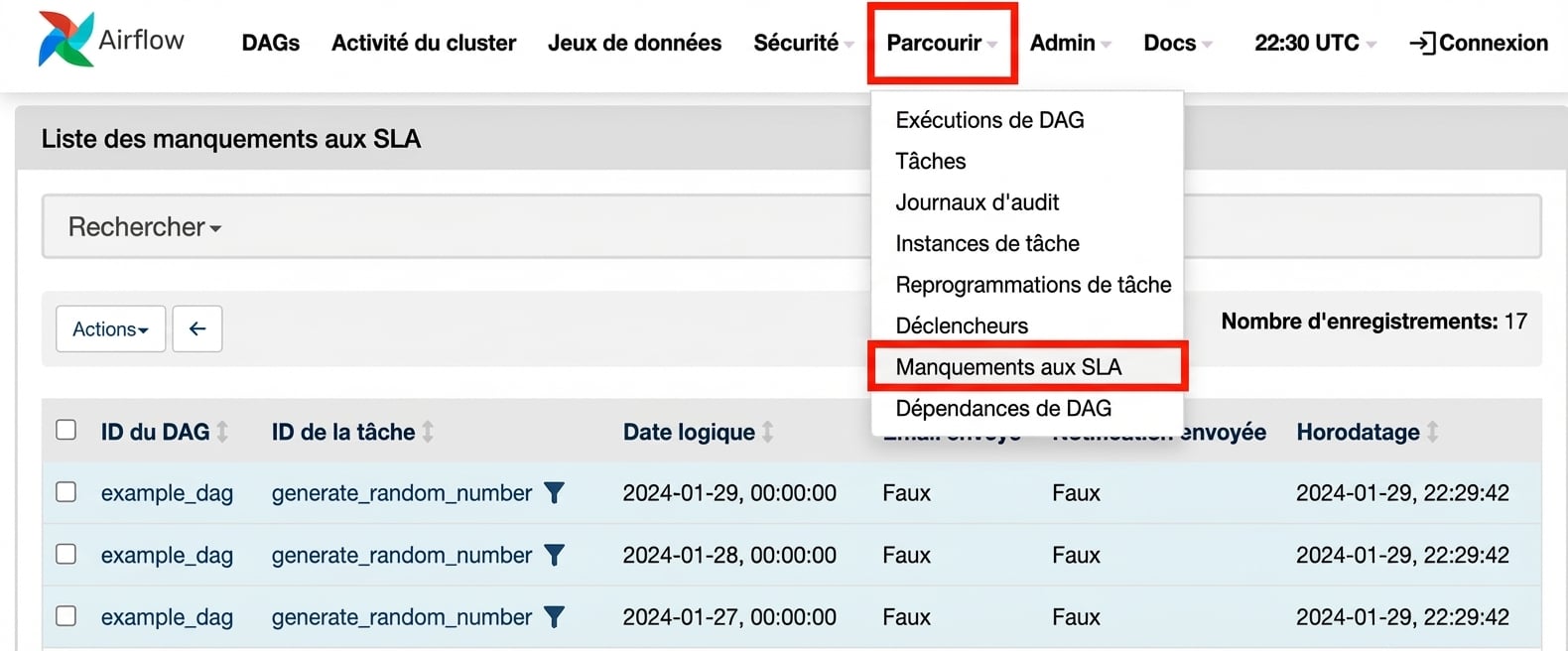
  • Vous pouvez voir les manquements SLA dans l’interface web.
Introduction à Apache Airflow en Python

SLA manqués

  • Sous Browse > SLA Misses

Vue « SLA Misses »

Introduction à Apache Airflow en Python

Définir des SLA

  • Via l’argument 'sla' de la tâche

    task1 = BashOperator(task_id='sla_task', 
                       bash_command='runcode.sh',
                       sla=timedelta(seconds=30),
                       dag=dag)
    
  • Dans le dictionnaire default_args

    default_args={
     'sla': timedelta(minutes=20),
     'start_date': datetime(2023,2,20)
    }
    dag = DAG('sla_dag', default_args=default_args)
    
Introduction à Apache Airflow en Python

Objet timedelta

  • Dans la bibliothèque datetime
  • Import via from datetime import timedelta
  • Accepte days, seconds, minutes, hours, weeks comme arguments
    timedelta(seconds=30)
    timedelta(weeks=2)
    timedelta(days=4, hours=10, minutes=20, seconds=30)
    
Introduction à Apache Airflow en Python

Reporting général

  • Options pour succès / échec / erreur
  • Clés dans le dictionnaire default_args
default_args={
  'email': ['[email protected]'],
  'email_on_failure': True,
  'email_on_retry': False,
  'email_on_success': True,
  ...
}
  • Dans les DAG via l’EmailOperator
Introduction à Apache Airflow en Python

Passons à la pratique !

Introduction à Apache Airflow en Python

Preparing Video For Download...