MCP and LLMs: Prompts and Resources

Introduction to Model Context Protocol (MCP)

James Chapman

AI Curriculum Manager, DataCamp

Resources and Prompts in the LLM Flow
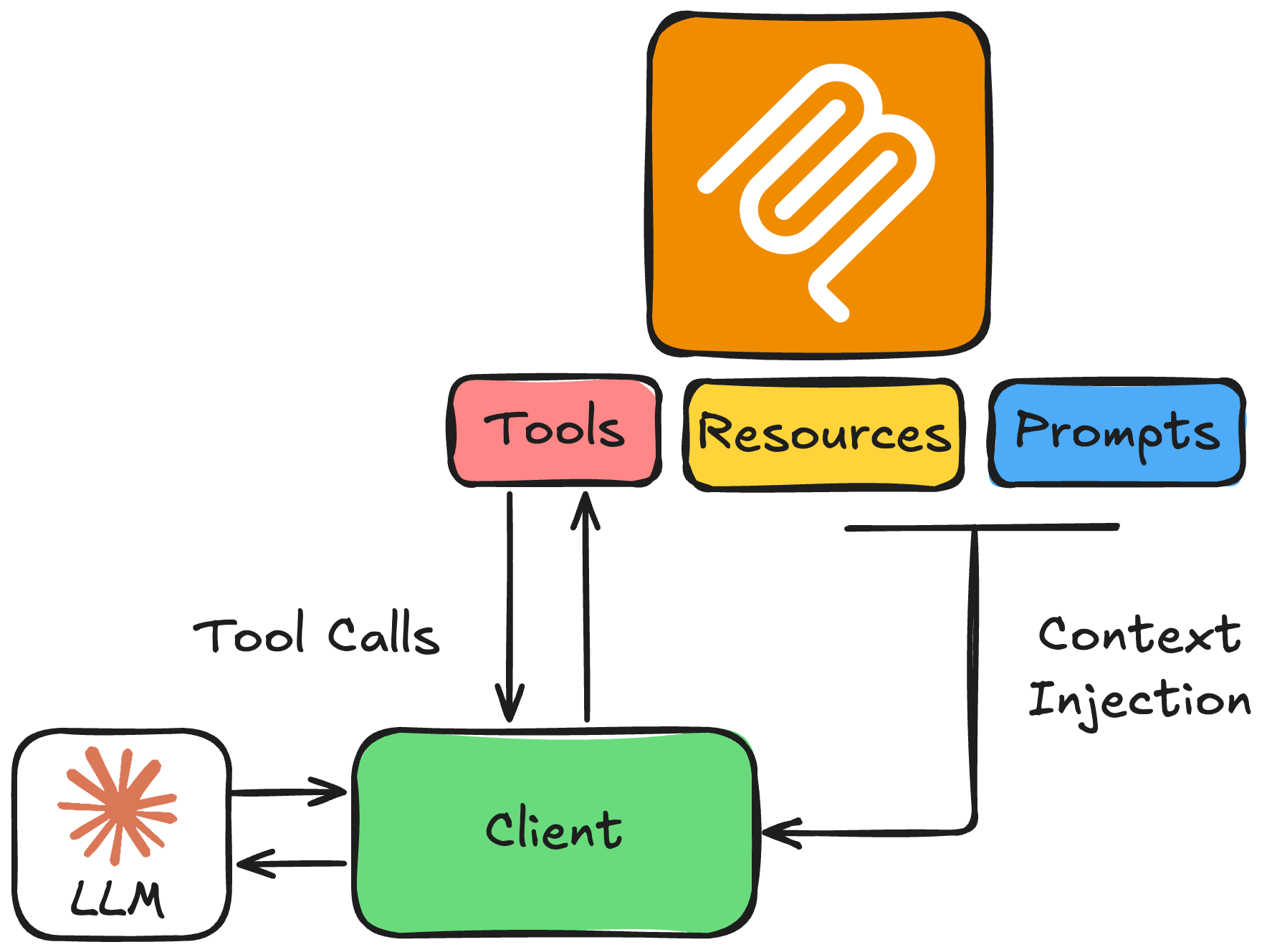
 

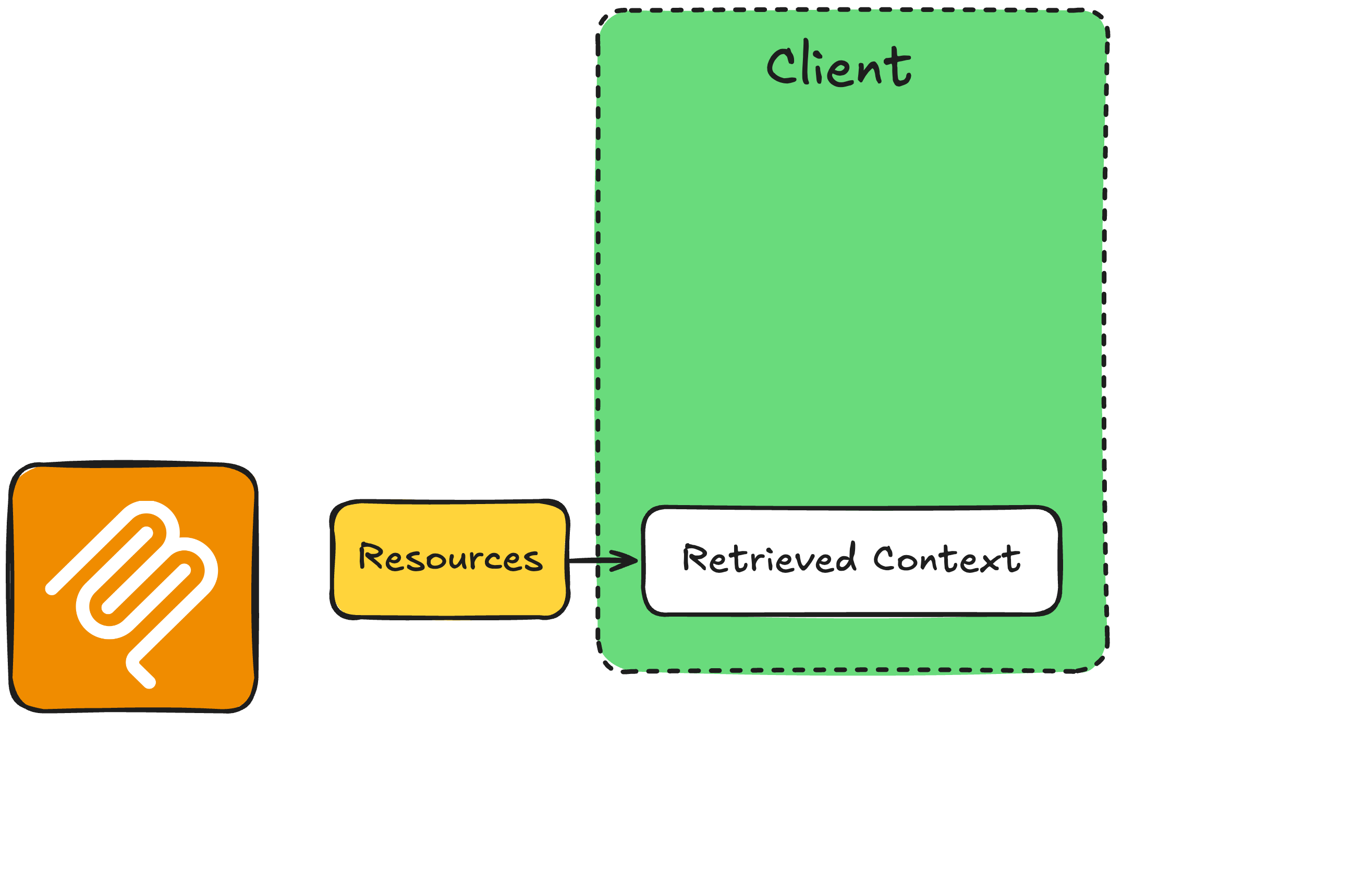
  • Resources: read-only context
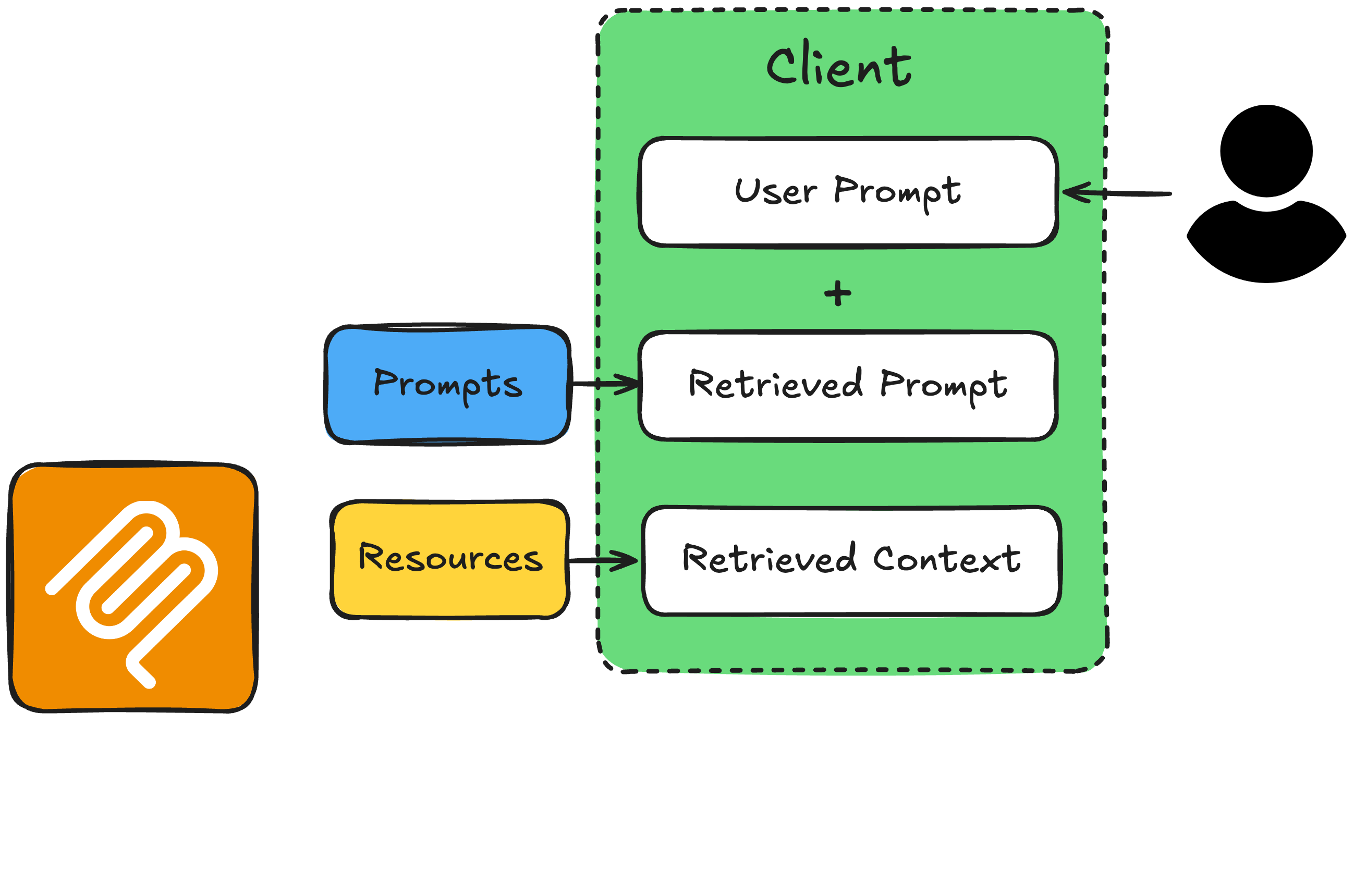
  • Prompts: instruction templates to set the behavior and optimize the model for the task


→ Continue with the OpenAI Responses API


llm_primitives.png

Introduction to Model Context Protocol (MCP)

The Prompt-Resource Workflow


prompt_resource_workflow1.png

Introduction to Model Context Protocol (MCP)

The Prompt-Resource Workflow


prompt_resource_workflow2.png

Introduction to Model Context Protocol (MCP)

The Prompt-Resource Workflow


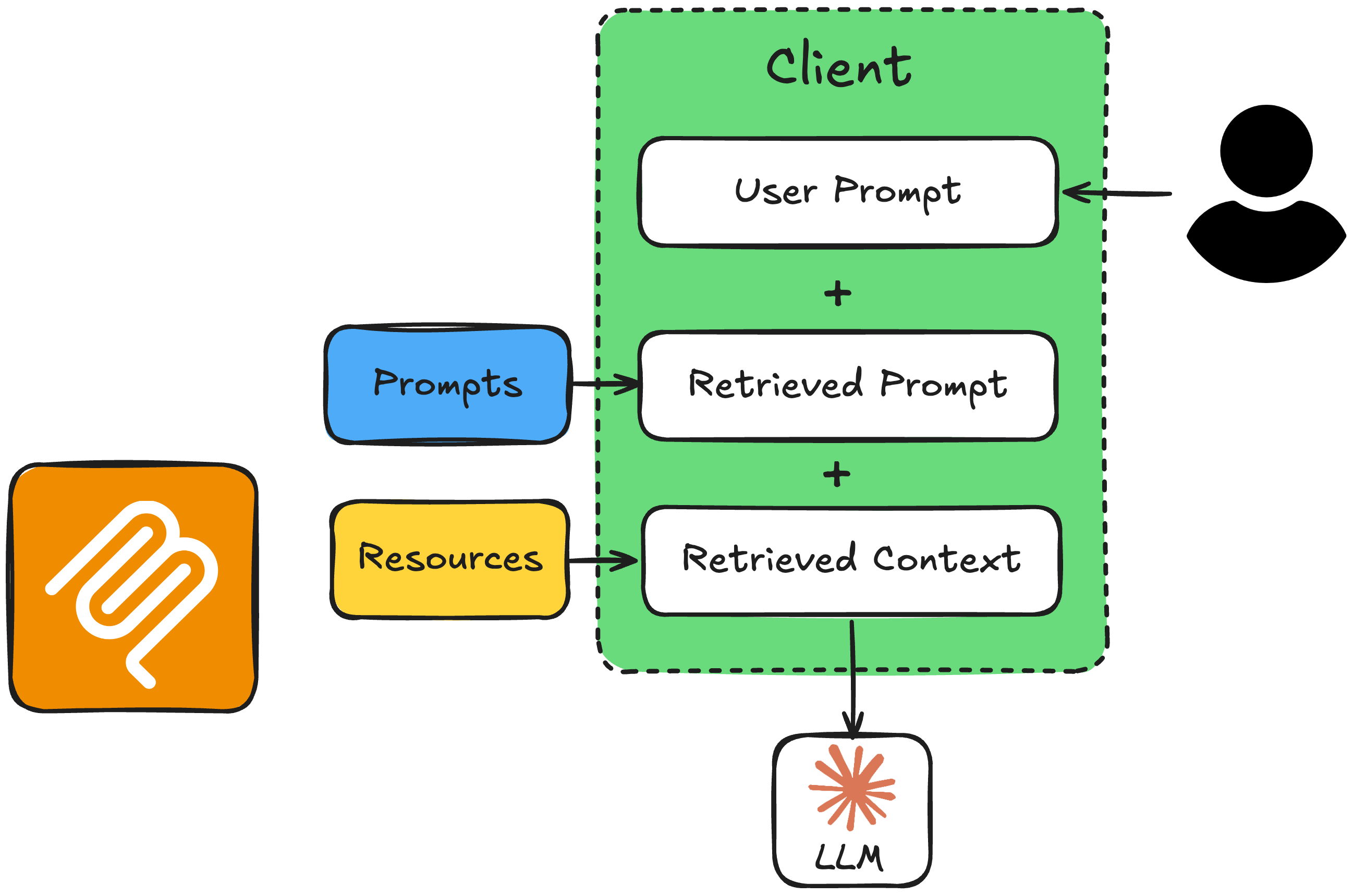
prompt_resource_workflow3.png

Introduction to Model Context Protocol (MCP)

The Prompt-Resource Workflow


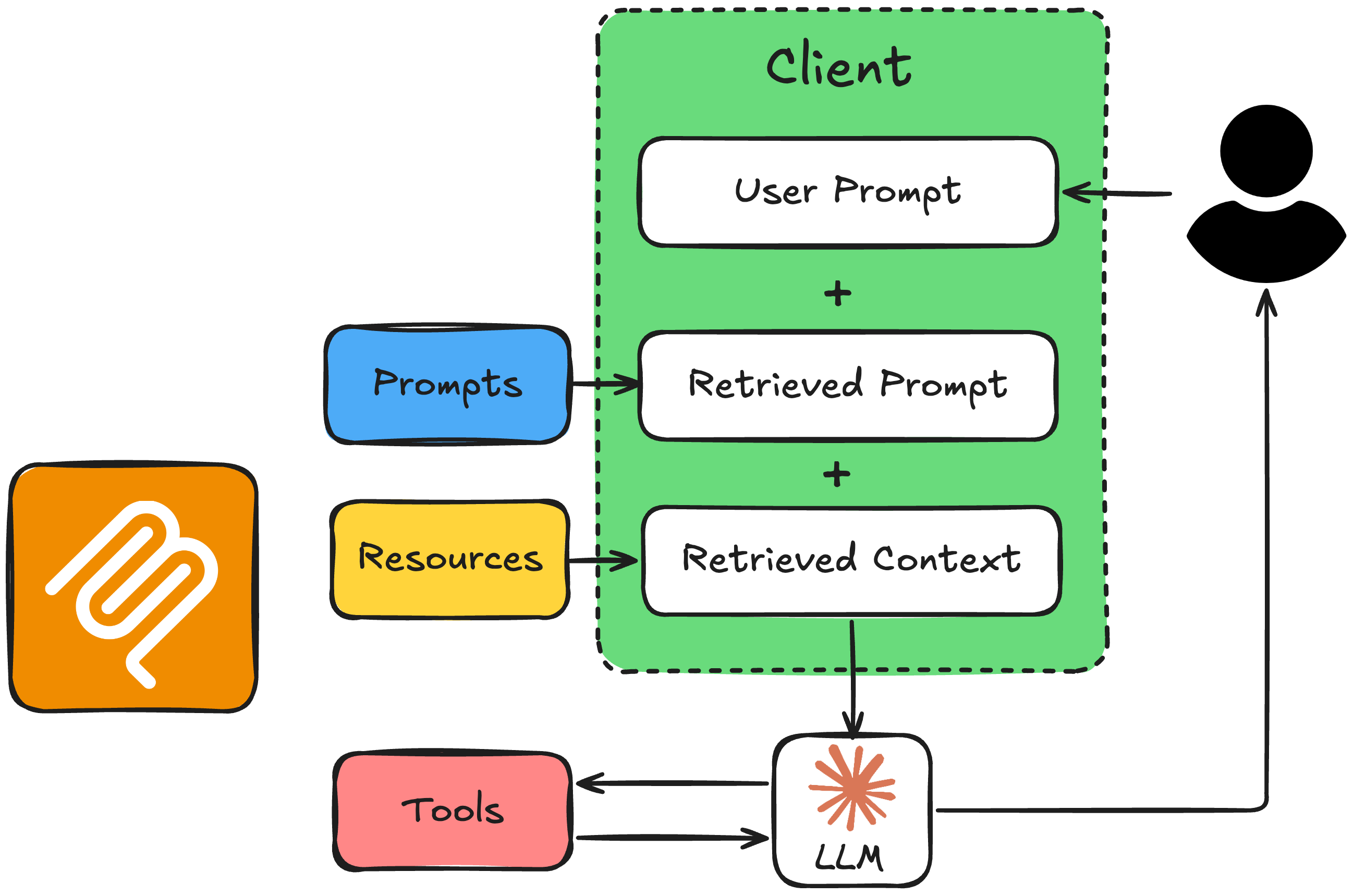
prompt_resource_workflow4.png

Introduction to Model Context Protocol (MCP)
from mcp.server.fastmcp import FastMCP

mcp = FastMCP("Timezone Converter")

@mcp.tool()
def convert_timezone(date_time: str, from_timezone: str, to_timezone: str) -> str:
    # ...

@mcp.resource("file://locations.txt")
def get_locations() -> str:
    # ...

@mcp.prompt(title="Timezone Conversion")
def convert_timezone_prompt(timezone_request: str) -> str:
    # ...

if __name__ == "__main__":
    mcp.run(transport="stdio")
Introduction to Model Context Protocol (MCP)

Client Helper Functions


  • read_resource(resource_uri): fetches a resource's contents by URI
  • read_prompt(prompt_name, user_input): fetches the prompt template with the user's request injected
Introduction to Model Context Protocol (MCP)

1. Fetch Resource and Prompt

async def get_context_from_mcp(user_query: str) -> tuple[str, str]:
    """Fetch resource content and prompt text from the MCP server."""
    params = StdioServerParameters(command=sys.executable, args=["timezone_server.py"])

    async with stdio_client(params) as (reader, writer):
        async with ClientSession(reader, writer) as session:
            await session.initialize()

# Get the resource (supported locations) resource_result = await session.read_resource("file://locations.txt") resource_text = resource_result.contents[0].text
# Get the prompt with the user's query prompt_result = await session.get_prompt("convert_timezone_prompt", arguments={"timezone_request": user_query}) prompt_text = prompt_result.messages[0].content.text
return resource_text, prompt_text
Introduction to Model Context Protocol (MCP)

2. Build the System Message and Call the LLM

async def call_llm_with_context(user_query: str):
    """Call the LLM with resource and prompt context from MCP."""

resource_text, prompt_text = await get_context_from_mcp(user_query)
# Combine prompt (task + rules + user request) with resource (supported locations) full_prompt = prompt_text + "\n\nSupported locations:\n" + resource_text
client = AsyncOpenAI(api_key="<OPENAI_API_TOKEN>") response = await client.responses.create( model="gpt-4o-mini", input=full_prompt, tools=openai_tools, # from get_tools_from_mcp(), formatted for OpenAI )
Introduction to Model Context Protocol (MCP)

3. Handling the Response

    output = response.output[0]

if output.type == "message": print(f"\nAssistant: {output.content[0].text}") return str(output.content[0].text)
if output.type == "function_call": args = json.loads(output.arguments) result = await call_mcp_tool(output.name, args) followup = await client.responses.create( model="gpt-4o-mini", input=[ {"role": "user", "content": user_query}, output, {"type": "function_call_output", "call_id": output.call_id, "output": result} ], ) # ... then print the assistant's reply from followup.output
Introduction to Model Context Protocol (MCP)

Example: Ambiguous Request

if __name__ == "__main__":
    asyncio.run(call_llm_with_context("What time is it in Canada?"))
Assistant: Canada has several time zones. Which city or region do you mean?
For example, Toronto, Vancouver, or Halifax?
Introduction to Model Context Protocol (MCP)

Example: Clear Request

if __name__ == "__main__":
    asyncio.run(call_llm_with_context("It is 9:50 AM in the UK in January. What
        time is it in Lisbon, Portugal?"))
Assistant: It's 9:50 AM in Lisbon as well.
Introduction to Model Context Protocol (MCP)

Recap: Resources and Prompts with the LLM


prompt_resource_workflow4.png

Introduction to Model Context Protocol (MCP)

Let's practice!

Introduction to Model Context Protocol (MCP)

Preparing Video For Download...