Glückwunsch

Git für Fortgeschrittene

George Boorman

Curriculum Manager, DataCamp

Branches

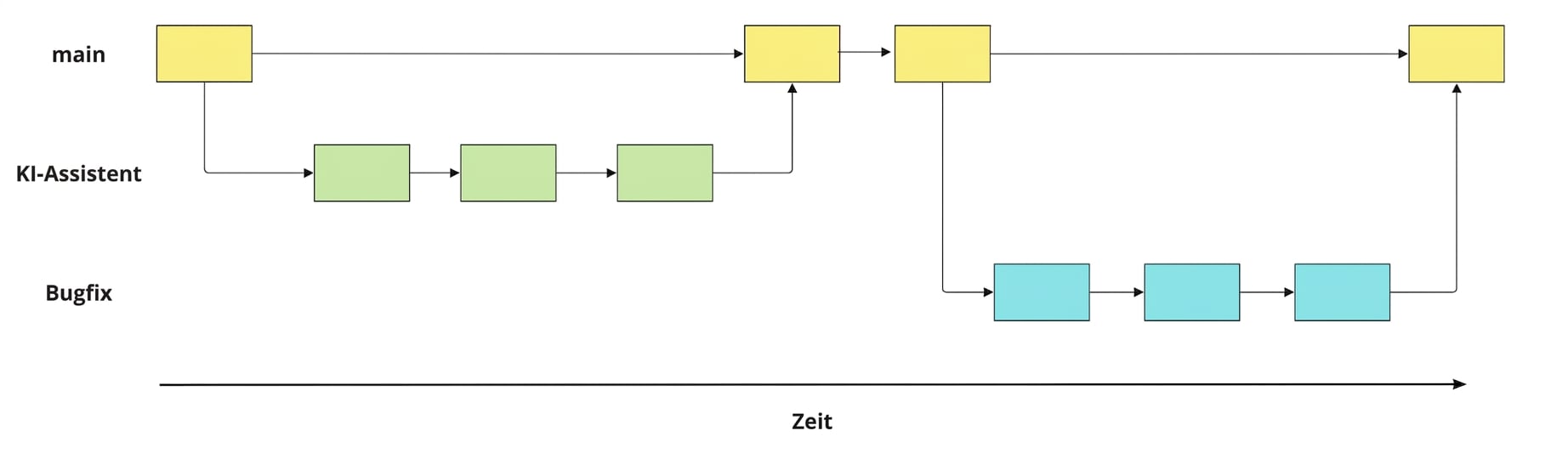
Bild eines Bugfix-, KI-Assistent- und Hauptzweigs mit Commits und Merges

Git für Fortgeschrittene

Mit Branches arbeiten

  • Alle Branches auflisten
git branch
  • Zu vorhandenem Branch wechseln
git switch hotfix
  • Neue Branch erstellen und zu diesem wechseln
git switch -c hotfix
  • Zwei Branches vergleichen
git diff main hotfix
  • Branch umbenennen
git branch -m hotfix bugfix
  • Branch löschen
git branch -d hotfix
Git für Fortgeschrittene

Branches mergen

  • Von main aus ai-assistant mit main mergen:
git merge ai-assistant
  • Aus einem anderen Branch: git merge source destination
git merge ai-assistant main
  • Umgang mit Merge-Konflikten
Git für Fortgeschrittene

Mit Remote-Repositorys arbeiten

  • Klonen eines Remote-Repositorys
git clone https://github.com/datacamp/project
  • Informationen zu allen Remotes abrufen
git remote -v
  • Neues Remote hinzufügen
git remote add george https://github.com/george_datacamp/repo 
Git für Fortgeschrittene

Lokale und Remote-Repos synchronisieren

git fetch origin
git pull origin
git push origin documentation
Git für Fortgeschrittene

Was kommt als Nächstes?

Git für Fortgeschrittene

Lass uns üben!

Git für Fortgeschrittene

Preparing Video For Download...