Numeric variables in Bash

Introduction au scripting Bash

Alex Scriven

Data Scientist

Numbers in other languages

Numbers are not built in natively to the shell like most REPLs (console) such as R and Python

In Python or R you may do:

>>> 1 + 4
5

It will return what you want!

Introduction au scripting Bash

Numbers in the shell


Numbers are not natively supported:

(In the terminal)

1 + 4
bash: 1: command not found
Introduction au scripting Bash

Introducing expr


expr is a useful utility program (just like cat or grep)

This will now work (in the terminal):

expr 1 + 4
5

Nice stuff!

Introduction au scripting Bash

expr limitations

expr cannot natively handle decimal places:

(In terminal)

expr 1 + 2.5
expr: not a decimal number: '2.5'

Fear not though! (There is a solution)

Introduction au scripting Bash

Introducing bc

bc (basic calculator) is a useful command-line program.

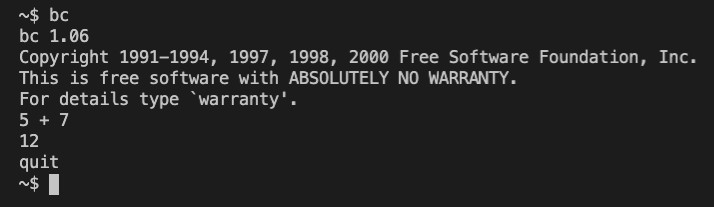
You can enter it in the terminal and perform calculations:

Using BC program in shell

Introduction au scripting Bash

Getting numbers to bc


Using bc without opening the calculator is possible by piping:

echo "5 + 7.5" | bc
12.5
Introduction au scripting Bash

bc scale argument

bc also has a scale argument for how many decimal places.

echo "10 / 3" | bc
3
echo "scale=3; 10 / 3" | bc

Note the use of ; to separate 'lines' in terminal

3.333
Introduction au scripting Bash

Numbers in Bash scripts

We can assign numeric variables just like string variables:

dog_name='Roger'
dog_age=6

echo "My dog's name is $dog_name and he is $dog_age years old"

Beware that dog_age="6" will work, but makes it a string!

My dog's name is Roger and he is 6 years old
Introduction au scripting Bash

Double bracket notation

A variant on single bracket variable notation for numeric variables:

expr 5 + 7
echo $((5 + 7))
12
12

Beware this method uses expr, not bc (no decimals!)

Introduction au scripting Bash

Shell within a shell revisited

Remember how we called out to the shell in the previous lesson?

Very useful for numeric variables:

model1=87.65
model2=89.20

echo "The total score is $(echo "$model1 + $model2" | bc)"
echo "The average score is $(echo "($model1 + $model2) / 2" | bc)"
The total score is 176.85
The average score is 88
Introduction au scripting Bash

Let's practice!

Introduction au scripting Bash

Preparing Video For Download...