Tipos de datos y excepciones en Java
Jim White
Java Developer
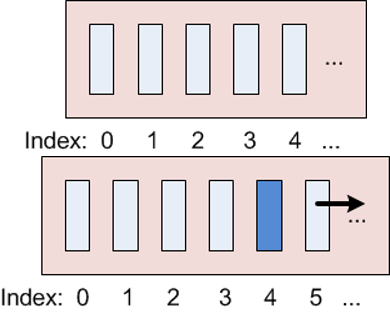
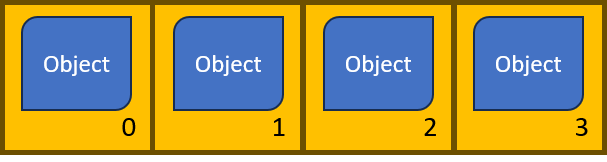
List, subinterfaz de CollectionListArrayList: lista redimensionable, indexada (como los arrays), ordenada
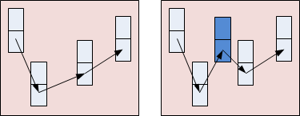
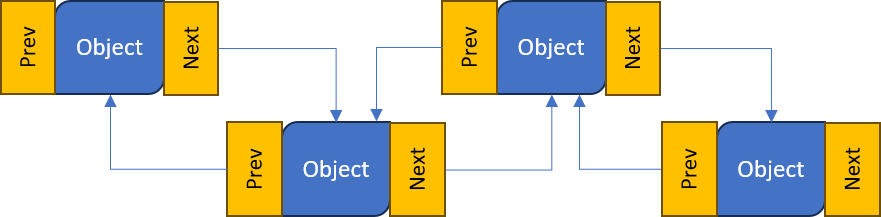
LinkedList: objetos conectados por enlaces al siguiente y anterior.
new y usa genéricos para indicar el tipo de contenido.add(object).get(index)ArrayList tiene índice basado en cero.set(index, object).remove(index).clear().size()import java.util.ArrayList; ... ArrayList<String> animals = new ArrayList<String>();animals.add("horse"); animals.add("cow"); animals.add("horse"); // Duplicates allowedString c = animals.get(1); // c="cow" animals.set(1, "chicken");// Removes the first horse animals.remove(0); // Removes all objects animals.clear();animals.size();
ArrayList<Integer> list = new ArrayList<Integer>();
list.add(new Integer(5));
list.add(6); // 6 se envuelve automáticamente en Integer y luego se añade
Object como tipo parametrizadoArrayList<Object> list = new ArrayList<Object>(); // Permite cualquier objeto
list.add(new Integer(5)); // Añade un Integer
list.add(6); // Añade un Integer usando autoboxing
list.add("Hello"); // Añade un String
ListArrayList<String> animals = new ArrayList<String>();
animals.add("horse");
animals.add("cow");
animals.add("chicken");
for (String animal : animals) { // for-each para recorrer todo el ArrayList
System.out.println(animal);
}
horse
cow
chicken
List (como ArrayList) puede mostrarse con printlnArrayList<String> animals = new ArrayList<String>();
animals.add("horse");
animals.add("cow");
animals.add("chicken");
System.out.println(animals); // Muestra todos los elementos del ArrayList
ArrayList<Object> list = new ArrayList<Object>();
list.add(5);
list.add("Hello");
System.out.println(list); // Muestra todos los elementos del ArrayList
[horse, cow, chicken]
[5, Hello]
LinkedList se construye igual que ArrayListLinkedList tiene los mismos métodos que ArrayListimport java.util.LinkedList;
...
LinkedList<String> cars // Create a new ...
= new LinkedList<String>(); // ... LinkedList
cars.add("Ford"); // Add an object to the list
cars.add("Mercedes");
String c = cars.get(1);
cars.set(1, "Toyota"); // Replace an object
System.out.println(cars); // Display the list
cars.remove(0); // Remove an object
cars.clear(); // Remove all objects
cars.size(); // Get the list length
[Ford, Toyota]
addFirst() añade al inicio de la listaaddLast() añade al finalremoveFirst() elimina del inicioremoveLast() elimina del finalcars.addFirst("Fiat"); // Add to the beginning
cars.addLast("BMW"); // Add the the end
cars.removeFirst(); // Remove the first object
cars.removeLast(); // Remove the last object
ArrayList y LinkedList se ven igualesListArrayList y LinkedList (o cualquier List) son las mismasList depende del usoArrayList:list.get(11))
LinkedList:list.get(11))
Tipos de datos y excepciones en Java