The Explore-Plan-Code Workflow

Software Development with Claude Code

Dani Zysman

AI Curriculum Manager @ DataCamp

The "Dive In" Problem

Iceberg: prompt above waterline, hidden complexity below

Software Development with Claude Code

The Workflow

Flowchart: Init → Explore → Plan → Code

Software Development with Claude Code

API Project Overview

music-analytics-api/
  app.py           # Application entry point
  routes.py        # API endpoints
  models.py        # Artist/Album models
  analytics.py     # Statistics functions
  middleware.py    # Request logging
  config.py        # Session settings

A simple Music Analytics API with existing patterns we need to respect.

Software Development with Claude Code

CLAUDE.md: Project Memory

CLAUDE.md:

  • Gives Claude persistent context about your project
  • Claude reads it automatically every session
  • No need to re-explain your setup each time
Software Development with Claude Code

Start with /init

> /init
Music Analytics API
A Flask-based REST API for music data analytics.

Project Structure
- app.py       Flask application entry point
- routes.py    API endpoint definitions
- analytics.py Statistical analysis functions

Coding Conventions
- Use type hints for function parameters
- Include docstrings for all public functions
- Follow PEP 8 style guidelines
Software Development with Claude Code

Plan Mode

  • Toggle with Shift+Tab or type /plan
  • Once a plan is generated, press Ctrl+G to visualize, approve, review, or edit it
Software Development with Claude Code

Skipping Planning

> Add a /api/login endpoint that creates a session for a user
from flask import jsonify, request
from flask_login import LoginManager, login_user
from app import app

login_manager = LoginManager(app)
@app.route('/api/login', methods=['POST'])
def login():
    """Handle user login and create session."""
    data = request.get_json()
    user = User.query.filter_by(username=data['username']).first()
    if user and user.password == data['password']:
        login_user(user)
        return jsonify({'status': 'success'})
    return jsonify({'error': 'Invalid credentials'}), 401
Software Development with Claude Code

Plan First, Then Code

> /plan Add a /api/login endpoint that creates a session for a user
Plan: Add POST /api/login endpoint

Context
The music analytics API has session infrastructure in place
(flask_session, SECRET_KEY, session already imported in routes)
but no authentication.

Files to Modify
- models.py:  add User class, UserStore class, user_store singleton
- routes.py:  expand import, add login route

No changes needed to app.py, config.py, middleware.py, or analytics.py.
Software Development with Claude Code

Extended Thinking

> think about how to add authentication to this API
Software Development with Claude Code

Levels of Thinking

Command Reasoning Depth
think Basic reasoning
think more Extended reasoning
think a lot Comprehensive reasoning
think longer Extended time reasoning
ultrathink Maximum reasoning
Software Development with Claude Code

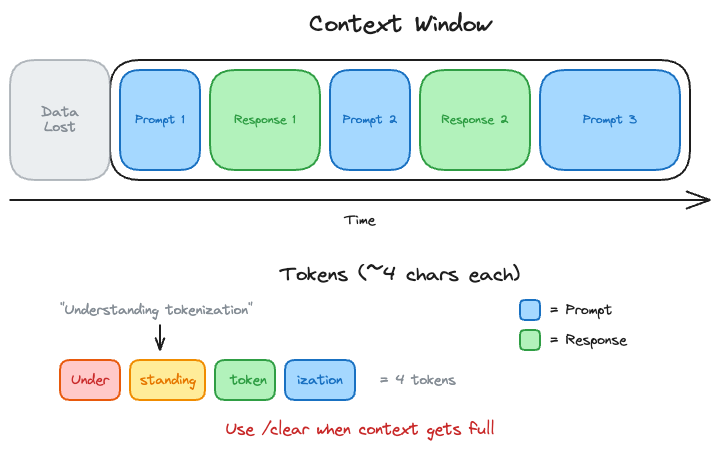
Managing Context Window and Tokens

excalidraw: Context window filling with prompts and responses, showing token breakdown

  • "Context window exceeded" → session is too long, use /clear
  • Claude prioritizes recent conversation when context gets full
Software Development with Claude Code

The Complete Workflow

Flowchart: /init → Explore → Plan → Review → Code → Test

Software Development with Claude Code

Let's Practice!

Software Development with Claude Code

Preparing Video For Download...