Génération de texte

Introduction à l’IA générative dans Snowflake

James Cha-Earley

Senior Developer Advocate, Snowflake

Gérer les réponses aux avis d'hôtel

Hôtel sur la côte au coucher du soleil

1 Image générée avec Google Gemini 2.5 Pro
Introduction à l’IA générative dans Snowflake

summarize()

long_review = """
This hotel was nothing short of amazing. The best views; the best location;
and the best staff. It's clean; conveniently located to other restaurants
on the strip; although we ate at the restaurants on site and each was so good
there's really no reason to leave. Ohhh the views. The beach was free of seaweed; 
amazingly clean and plenty of space; it wasn't crowded at all. 
Stay here; you will not regret it. Did I mention how comfortable the beds were. 
Yes save yourself trouble and stay here. It's really perfect.
"""

from snowflake.cortex import summarize summarized_review = summarize(text=long_review)
Introduction à l’IA générative dans Snowflake

Imprimer le résumé

print(summarized_review)
The hotel exceeded expectations with stunning views, exceptional staff,
comfortable beds, and top-notch on-site dining, making it a perfect and 
highly recommended stay.
Introduction à l’IA générative dans Snowflake

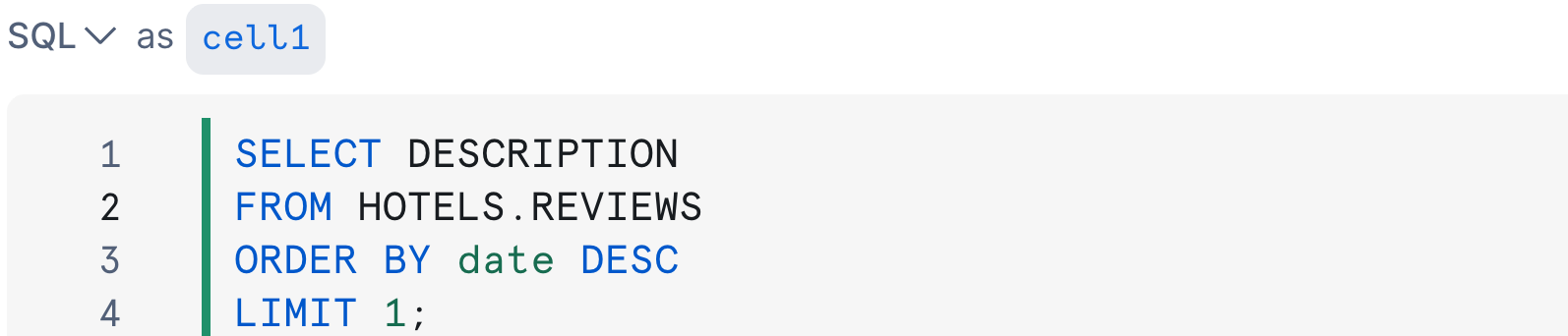
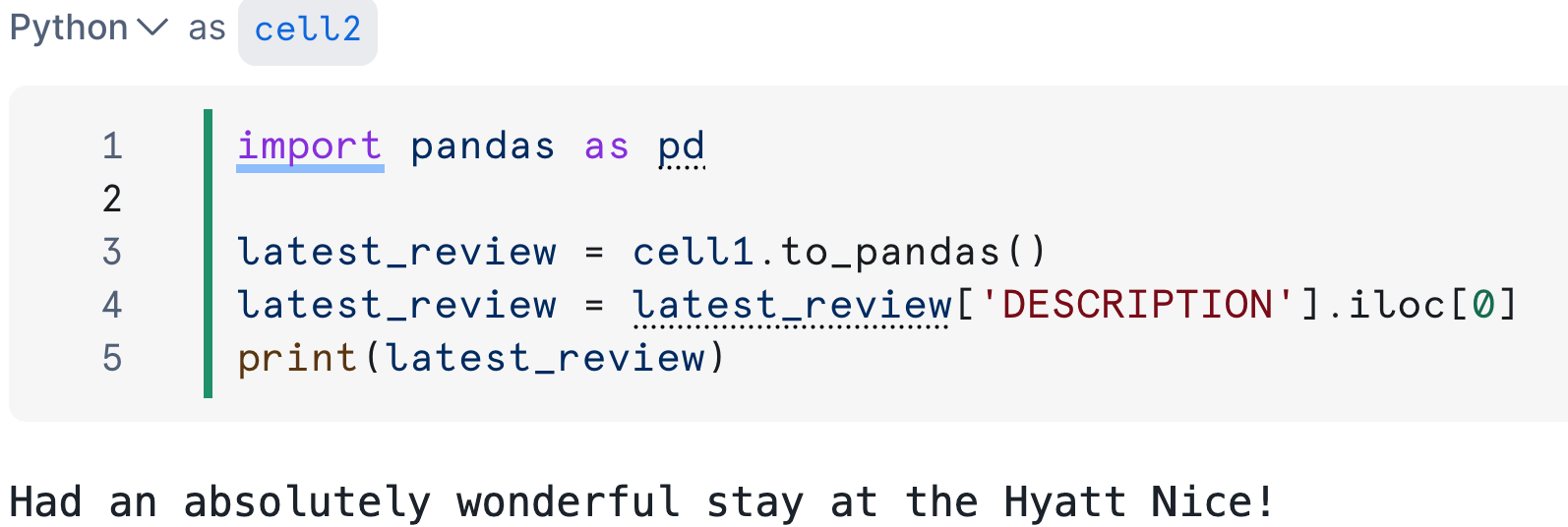
Extraction depuis une base de données
Requête SQL dans la cellule1

Code Python dans la cellule2

Introduction à l’IA générative dans Snowflake

Générer une réponse

from snowflake.cortex import complete


prompt = f"Write a short response to this hotel review: {latest_review}."
# Pass the prompt response = complete(prompt=prompt,
Introduction à l’IA générative dans Snowflake

Générer une réponse

from snowflake.cortex import complete


prompt = f"Write a short response to this hotel review: {latest_review}."
# Specify the model response = complete(prompt=prompt, model='llama3.1-8b',
Introduction à l’IA générative dans Snowflake

Générer une réponse

from snowflake.cortex import complete


prompt = f"Write a short response to this hotel review: {latest_review}."
# Set the temperature - control predictability of output response = complete(prompt=prompt, model='llama3.1-8b', options={ 'temperature':0.3,
Introduction à l’IA générative dans Snowflake

Générer une réponse

from snowflake.cortex import complete


prompt = f"Write a short response to this hotel review: {latest_review}."
# Limit the number of tokens with max_tokens response = complete(prompt=prompt, model='llama3.1-8b', options={ 'temperature':0.3, 'max_tokens':150 } )
Introduction à l’IA générative dans Snowflake

Voir la réponse

print(response)
Thank you so much for sharing your wonderful experience at the Hyatt Nice! 
We're thrilled to hear that you had a fantastic stay with us.
  • Fast, flexible, authentic
Introduction à l’IA générative dans Snowflake

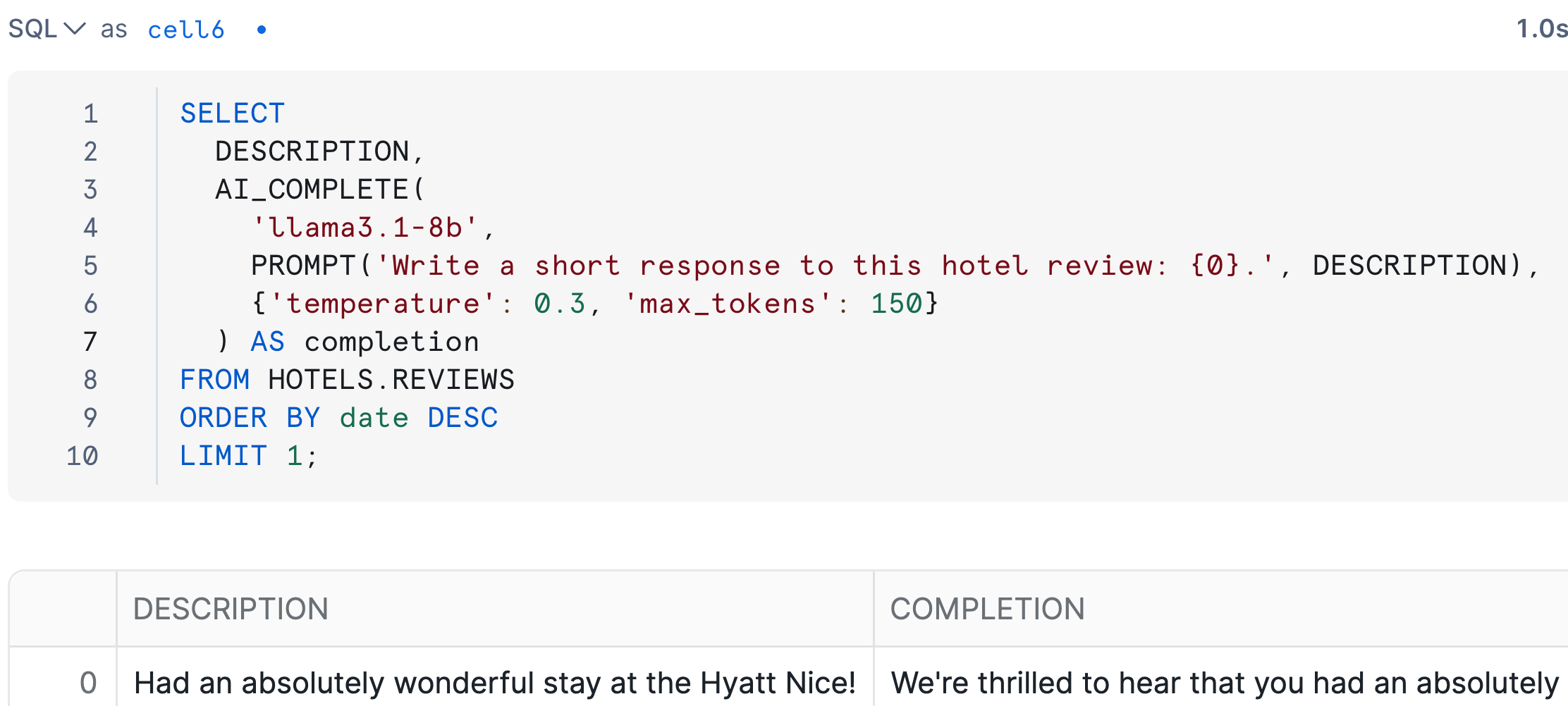
Génération de texte avec AI_COMPLETE()

SELECT
  DESCRIPTION,
  AI_COMPLETE(

'llama3.1-8b',
PROMPT('Write a short response to this hotel review: {0}.', DESCRIPTION),
{'temperature': 0.3, 'max_tokens': 150}
) AS completion FROM HOTELS.REVIEWS ORDER BY date DESC LIMIT 1;
Introduction à l’IA générative dans Snowflake

Sortie dans le notebook Snowflake

Sortie AI_COMPLETE() dans le notebook Snowflake

  • AI_COMPLETE() est disponible par défaut
Introduction à l’IA générative dans Snowflake

Génération de texte dans Snowflake

-- Coding in SQL cells
AI_COMPLETE(
  'llama3.1-8b',
  PROMPT('Write a short response 
          to this hotel review: {0}.', 
          DESCRIPTION),
  {'temperature': 0.3, 
   'max_tokens': 150}
    )
  • Générer du texte pour un lot de lignes
# Coding in Python cells
complete(
    model='llama3.1-8b', 
    prompt = f"""Write a short response
        to this hotel review: 
        {latest_review}.""",
    options={'temperature':0.3,
             'max_tokens':150}
    )
  • Utiliser pour enchaîner des workflows multi-étapes
Introduction à l’IA générative dans Snowflake

Passons à la pratique !

Introduction à l’IA générative dans Snowflake

Preparing Video For Download...