Basic operations

Introduzione a TensorFlow in Python

Isaiah Hull

Visiting Associate Professor of Finance, BI Norwegian Business School

What is a TensorFlow operation?
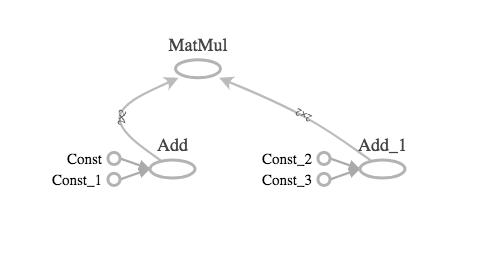
The image shows operations and tensors in a TensorFlow graph, as drawn by TensorBoard. Two pairs of matrices are combined using the add operation. The resulting sums are then multiplied.

Introduzione a TensorFlow in Python

What is a TensorFlow operation?

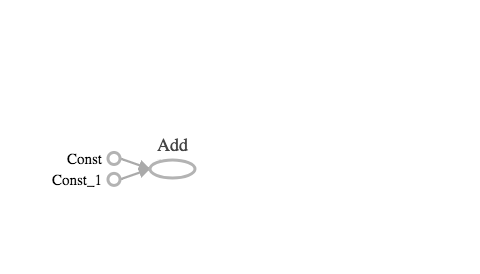
The image shows operations and tensors in a TensorFlow graph, as drawn by TensorBoard. One add operation is shown.

Introduzione a TensorFlow in Python

What is a TensorFlow operation?

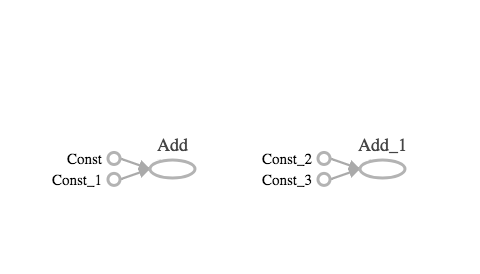
The image shows operations and tensors in a TensorFlow graph, as drawn by TensorBoard. Two add operations are shown.

Introduzione a TensorFlow in Python

What is a TensorFlow operation?

The image shows operations and tensors in a TensorFlow graph, as drawn by TensorBoard. Two pairs of matrices are combined using the add operation. The resulting sums are then multiplied.

Introduzione a TensorFlow in Python

Applying the addition operator

#Import constant and add from tensorflow
from tensorflow import constant, add

# Define 0-dimensional tensors
A0 = constant([1])
B0 = constant([2])
# Define 1-dimensional tensors
A1 = constant([1, 2])
B1 = constant([3, 4])
# Define 2-dimensional tensors
A2 = constant([[1, 2], [3, 4]])
B2 = constant([[5, 6], [7, 8]])
Introduzione a TensorFlow in Python

Applying the addition operator

# Perform tensor addition with add()
C0 = add(A0, B0)
C1 = add(A1, B1)
C2 = add(A2, B2)
Introduzione a TensorFlow in Python

Performing tensor addition

  • The add() operation performs element-wise addition with two tensors

  • Element-wise addition requires both tensors to have the same shape:

    • Scalar addition: $1+2=3$
    • Vector addition: $[1,2]+[3,4]=[4,6]$
    • Matrix addition: $\begin{bmatrix} 1 & 2 \\ 3 & 4 \end{bmatrix} + \begin{bmatrix} 5 & 6 \\ 7 & 8 \end{bmatrix} = \begin{bmatrix} 6 & 8 \\ 10 & 12 \end{bmatrix}$
  • The add() operator is overloaded

Introduzione a TensorFlow in Python

How to perform multiplication in TensorFlow

  • Element-wise multiplication performed using multiply() operation

    • The tensors multiplied must have the same shape
    • E.g. [1,2,3] and [3,4,5] or [1,2] and [3,4]
  • Matrix multiplication performed with matmul() operator

    • The matmul(A,B) operation multiplies A by B
    • Number of columns of A must equal the number of rows of B
Introduzione a TensorFlow in Python

Applying the multiplication operators

# Import operators from tensorflow
from tensorflow import ones, matmul, multiply

# Define tensors
A0 = ones(1)
A31 = ones([3, 1])
A34 = ones([3, 4])
A43 = ones([4, 3])

  • What types of operations are valid?
    • multiply(A0, A0), multiply(A31, A31), and multiply(A34, A34)
    • matmul(A43, A34), but not matmul(A43, A43)
Introduzione a TensorFlow in Python

Summing over tensor dimensions

  • The reduce_sum() operator sums over the dimensions of a tensor
    • reduce_sum(A) sums over all dimensions of A
    • reduce_sum(A, i) sums over dimension i
# Import operations from tensorflow
from tensorflow import ones, reduce_sum

# Define a 2x3x4 tensor of ones
A = ones([2, 3, 4])
Introduzione a TensorFlow in Python

Summing over tensor dimensions

# Sum over all dimensions
B = reduce_sum(A)

# Sum over dimensions 0, 1, and 2
B0 = reduce_sum(A, 0)
B1 = reduce_sum(A, 1)
B2 = reduce_sum(A, 2)
Introduzione a TensorFlow in Python

Let's practice!

Introduzione a TensorFlow in Python

Preparing Video For Download...