Ricerca semantica con Pinecone

Database vettoriali per Embeddings con Pinecone

James Chapman

Curriculum Manager, DataCamp

Motori di ricerca semantica

  1. Crea embedding e inserisci i documenti in un indice Pinecone
  2. Crea l’embedding della query utente
  3. Interroga l’indice con l’embedding della query
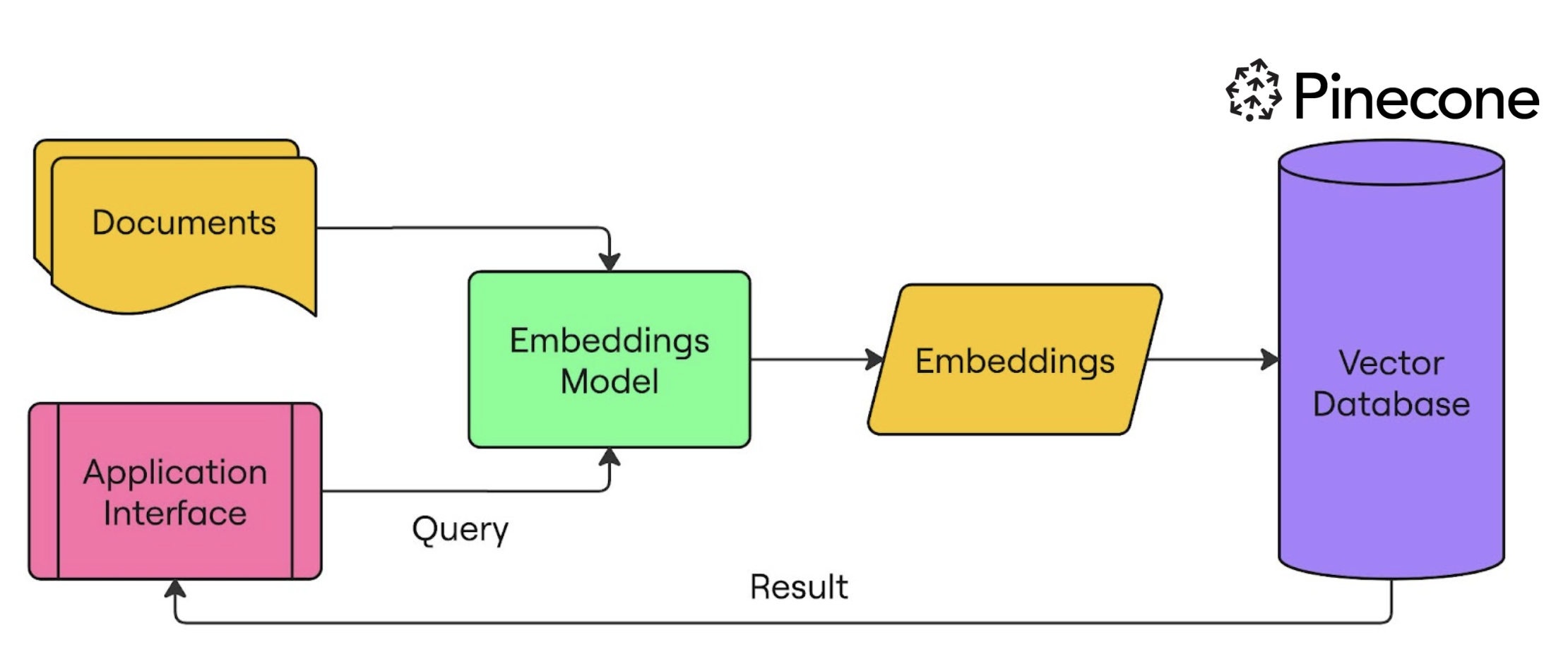
ricerca semantica

Database vettoriali per Embeddings con Pinecone

Configurare Pinecone e OpenAI per la ricerca semantica

from openai import OpenAI
from pinecone import Pinecone, ServerlessSpec

client = OpenAI(api_key="OPENAI_API_KEY")
pc = Pinecone(api_key="PINECONE_API_KEY")


pc.create_index( name="semantic-search-datacamp",
dimension=1536,
spec=ServerlessSpec(cloud='aws', region='us-east-1') )
index = pc.Index("semantic-search-datacamp")
Database vettoriali per Embeddings con Pinecone

Inserire documenti nell’indice Pinecone

import pandas as pd
import numpy as np
from uuid import uuid4

df = pd.read_csv('squad_dataset.csv')
| id | text                                              | title             |
|----|---------------------------------------------------|-------------------|
| 1  | Architecturally, the school has a Catholic cha... | University of ... |
| 2  | The College of Engineering was established in.... | University of ... |
| 3  | Following the disbandment of Destiny's Child in.. | Beyonce           |
| 4  | Architecturally, the school has a Catholic cha... | University of ... |
Database vettoriali per Embeddings con Pinecone

Inserire documenti nell’indice Pinecone

batch_limit = 100


for batch in np.array_split(df, len(df) / batch_limit):
metadatas = [{"text_id": row['id'], "text": row['text'], "title": row['title']} for _, row in batch.iterrows()]
texts = batch['text'].tolist()
ids = [str(uuid4()) for _ in range(len(texts))]
response = client.embeddings.create(input=texts, model="text-embedding-3-small") embeds = [np.array(x.embedding) for x in response.data]
index.upsert(vectors=zip(ids, embeds, metadatas), namespace="squad_dataset")
Database vettoriali per Embeddings con Pinecone

Inserire documenti nell’indice Pinecone

index.describe_index_stats()
{'dimension': 1536, 'index_fullness': 0.02,
 'namespaces': {'squad_dataset': {'vector_count': 2000}},
 'total_vector_count': 2000}
Database vettoriali per Embeddings con Pinecone

Interrogare con Pinecone

query = "To whom did the Virgin Mary allegedly appear in 1858 in Lourdes France?"

query_response = client.embeddings.create( input=query, model="text-embedding-3-small") query_emb = query_response.data[0].embedding
retrieved_docs = index.query(vector=query_emb, top_k=3, namespace=namespace, include_metadata=True)
Database vettoriali per Embeddings con Pinecone

Interrogare con Pinecone

for result in retrieved_docs['matches']:
    print(f"{round(result['score'], 2)}: {result['metadata']['text']}")
0.41: Architecturally, the school has a Catholic character. Atop the Main Building
gold dome is a golden statue of the Virgin Mary...

0.3: Because of its Catholic identity, a number of religious buildings stand on 
campus. The Old College building has become one of two seminaries...

0.29: Within the white inescutcheon, the five quinas (small blue shields) with 
their five white bezants representing the five wounds...
Database vettoriali per Embeddings con Pinecone

È ora di costruire!

Database vettoriali per Embeddings con Pinecone

Preparing Video For Download...