Working with coordinate systems in GeoPandas

Lavorare con i dati geospaziali in Python

Joris Van den Bossche

Open source software developer and teacher, GeoPandas maintainer

CRS information in GeoPandas

The .crs attribute of a GeoDataFrame/GeoSeries:

import geopandas
gdf = geopandas.read_file("countries.shp")
print(gdf.crs)
{'init': 'epsg:4326'}
Lavorare con i dati geospaziali in Python

Setting a CRS manually

gdf_noCRS = geopandas.read_file("countries_noCRS.shp")
print(gdf_noCRS.crs)
{}

Add CRS information to crs:

# Option 1
gdf.crs = {'init': 'epsg:4326'}

# Option 2
gdf.crs = {'proj': 'longlat', 'datum': 'WGS84', 'no_defs': True}
Lavorare con i dati geospaziali in Python

Transforming to another CRS

import geopandas
gdf = geopandas.read_file("countries_web_mercator.shp")
print(gdf.crs)
{'init': 'epsg:3857', 'no_defs': True}

The to_crs() method:

# Option 1
gdf2 = gdf.to_crs({'proj': 'longlat', 'datum': 'WGS84', 'no_defs': True})

# Option 2 gdf2 = gdf.to_crs(epsg=4326)
Lavorare con i dati geospaziali in Python

Why converting the CRS?

1) Sources with a different CRS

df1 = geopandas.read_file(...)
df2 = geopandas.read_file(...)

df2 = df2.to_crs(df1.crs)
Lavorare con i dati geospaziali in Python

Why converting the CRS?

1) Sources with a different CRS

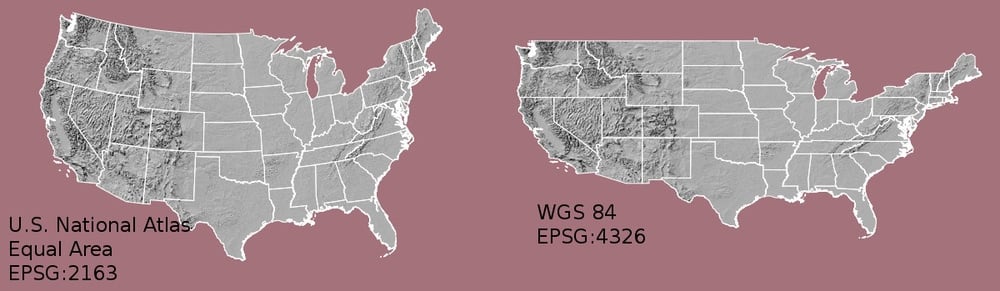
2) Mapping (distortion of shape and distances)
Lavorare con i dati geospaziali in Python

Why converting the CRS?

1) Sources with a different CRS

2) Mapping (distortion of shape and distances)

3) Distance / area based calculations

Lavorare con i dati geospaziali in Python

How to choose which CRS to use?

Tips:

  • Use projection specific to the area of your data
  • Most countries have a standard CRS

Useful sites:

Lavorare con i dati geospaziali in Python

Summary

  • To convert to another CRS: the to_crs() method
  • Make sure different datasets have the same CRS
  • When calculating distance, area, ... -> use a projected CRS

Useful sites:

Lavorare con i dati geospaziali in Python

Let's practice!

Lavorare con i dati geospaziali in Python

Preparing Video For Download...