Introduction to Advanced Editor

Trasformazione dei dati in Power BI

Maarten Van den Broeck

Content Developer at DataCamp

What is the advanced editor?

  • The advanced editor allows you to view and edit the underlying code of your query

  • Any transformation you make to your data is translated into M code (also referred to as M Language) - the language of Power Query

  • DAX code allows you to analyze your data, M code allows you to transform and load it
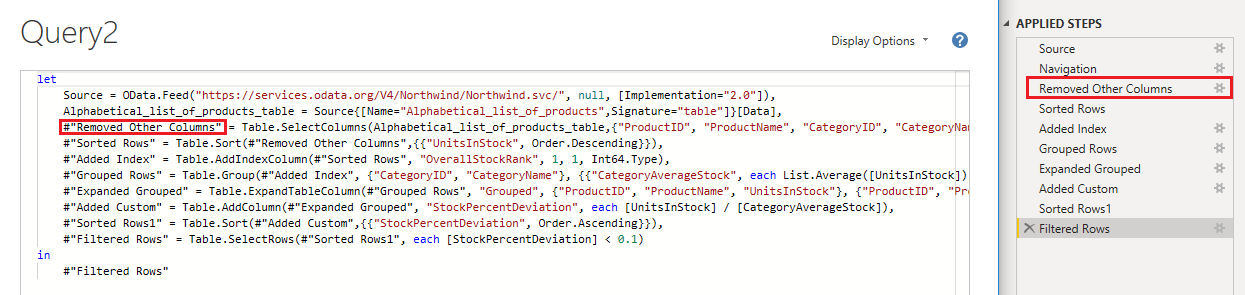
A screen shot of the advanced editor next to the power query applied steps pane. The steps in the advanced editor are directly linked to the applied steps

Trasformazione dei dati in Power BI

The difference between M code and DAX

DAX Code

Power BI

  • Data Analysis eXpressions
  • Used to create metrics and analyze data
  • Create calculations without changing data
  • Filters and summarizes columns
  • Not case-sensitive

M Language

Power Query

  • Data Mashup
  • Used to load, transform, and create data
  • Remove or rename columns
  • Pivot, unpivot, transpose, group your data
  • Case-sensitive
Trasformazione dei dati in Power BI

M Language and the applied steps

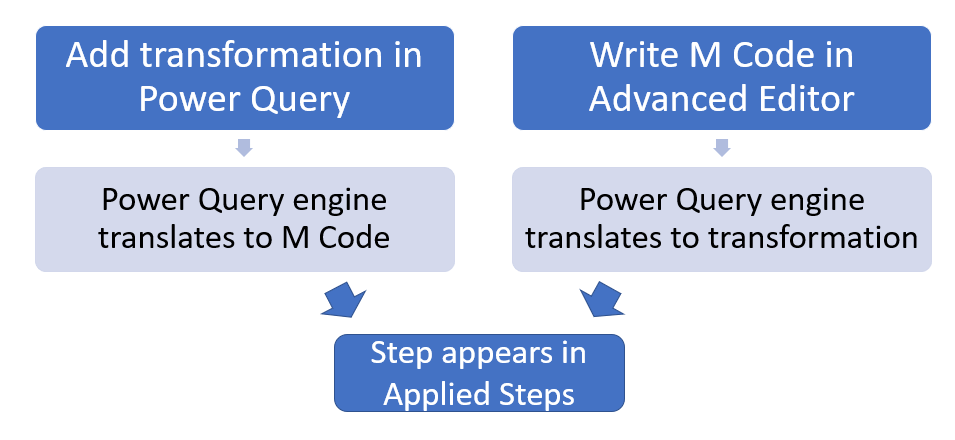
  • Any transformation you make is automatically converted to the appropriate M code, and vice versa
  • M code and Power Query transformations share a 1:1 relationship

A flowchart showing the alternative ways a transformation can appear in the applied steps pane

Trasformazione dei dati in Power BI

Writing M language

  • Write your own M language allows you to:
    • Store variables for use in the query
    • Implement custom functions
    • Make advanced transformations
    • Add comments with //
Trasformazione dei dati in Power BI

Intro to M language

Value types in M language:

  • Number = 123
  • Text = "DataCamp"
  • Logical = true
  • Date = 1/20/2022
  • List = {123, "DataCamp", true}
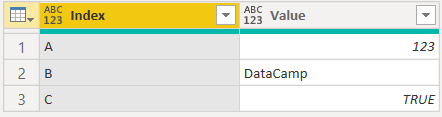
  • Table = #table( {"Index", "Value"}, {{"A", 123}, {"B", "DataCamp"}, {"C", true}})

Table created by example code:

Table containing two columns, Index and Value. Index has the values "A", "B" and "C". While value has "123", "DataCamp", and "true"

Trasformazione dei dati in Power BI

Let's practice!

Trasformazione dei dati in Power BI

Preparing Video For Download...