Creare database vettoriali con ChromaDB

Introduzione agli Embeddings con l'API di OpenAI

Emmanuel Pire

Senior Software Engineer, DataCamp

Installare ChromaDB

  • ChromaDB è un database vettoriale semplice ma potente
  • Due modalità:
    • Locale: ottima per sviluppo e prototipi
    • Client/Server: pensata per la produzione
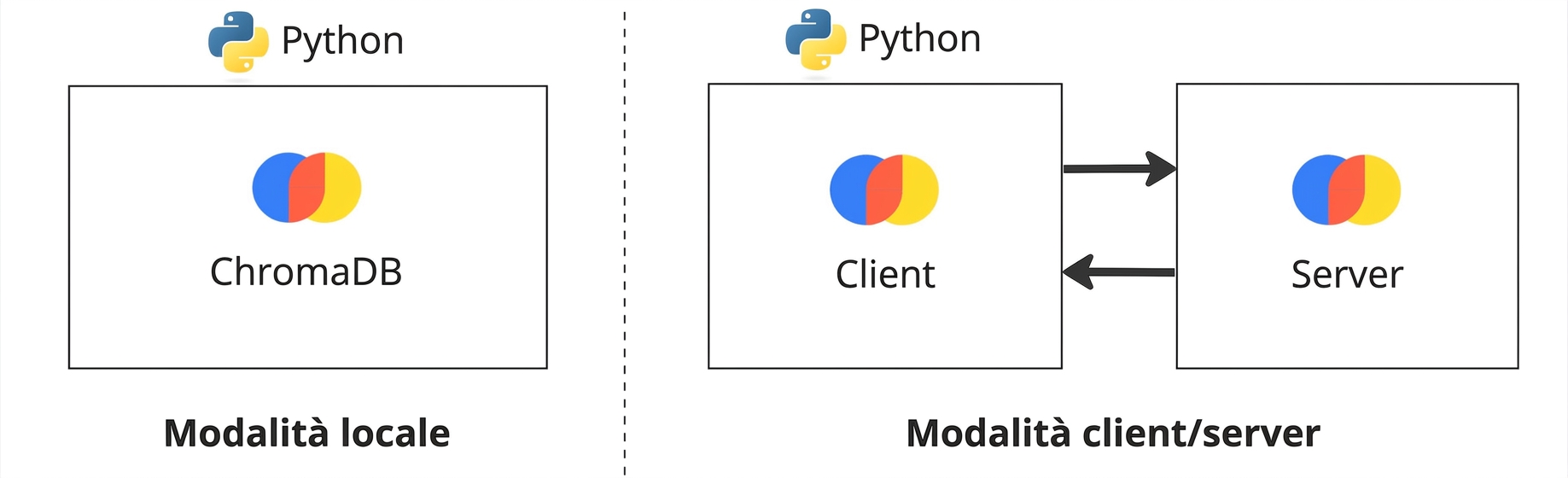
ChromaDB in local mode alongside ChromaDB in client/server mode. The client and server are shown in separate instances in client/server mode.

Introduzione agli Embeddings con l'API di OpenAI

Connessione al database

import chromadb

client = chromadb.PersistentClient(path="/path/to/save/to")
  • I dati verranno salvati su disco
Introduzione agli Embeddings con l'API di OpenAI

Creare una collection

  • Le collection sono analoghe alle tabelle
from chromadb.utils.embedding_functions import OpenAIEmbeddingFunction
collection = client.create_collection(
    name="my_collection",

embedding_function=OpenAIEmbeddingFunction( model_name="text-embedding-3-small", api_key="..." )
)
  • Le collection possono creare automaticamente gli embedding
Introduzione agli Embeddings con l'API di OpenAI

Ispezionare le collection

client.list_collections()
[Collection(name=my_collection)]
Introduzione agli Embeddings con l'API di OpenAI

Inserire embedding

Singolo documento

collection.add(ids=["my-doc"], documents=["This is the source text"])
  • Gli ID sono obbligatori
  • Gli embedding verranno creati dalla collection!

Più documenti

collection.add(
  ids=["my-doc-1", "my-doc-2"], 
  documents=["This is document 1", "This is document 2"]
)
Introduzione agli Embeddings con l'API di OpenAI

Ispezionare una collection

Contare i documenti in una collection

collection.count()
3
Introduzione agli Embeddings con l'API di OpenAI

Ispezionare una collection

Dare un'occhiata ai primi 10 elementi

collection.peek()
{'ids': ['my-doc', 'my-doc-1', 'my-doc-2'],
 'embeddings': [[...], [...], [...]],
 'documents': ['This is the source text',
  'This is document 1',
  'This is document 2'],
 'metadatas': [None, None, None]}
Introduzione agli Embeddings con l'API di OpenAI

Recuperare elementi

collection.get(ids=["s59"])
{'ids': ['s59'],
 'embeddings': None,
 'metadatas': [None],
 'documents': ['Title: Naruto Shippûden the Movie: The Will of Fire (Movie)\nDescription: When ...'],
 'uris': None,
 'data': None}
Introduzione agli Embeddings con l'API di OpenAI

Dataset di Netflix


Title: Kota Factory (TV Show)
Description: In a city of coaching centers known to train India's finest...
Categories: International TV Shows, Romantic TV Shows, TV Comedies
Title: The Last Letter From Your Lover (Movie)
Description: After finding a trove of love letters from 1965, a reporter sets...
Categories: Dramas, Romantic Movies
Introduzione agli Embeddings con l'API di OpenAI

Stimare il costo degli embedding

  • Il modello di embedding (text-embedding-3-small) costa $0.00002/1k token
cost = 0.00002 * len(tokens)/1000
  • Conta i token con la libreria tiktoken
    • pip install tiktoken
1 https://openai.com/pricing
Introduzione agli Embeddings con l'API di OpenAI

Stimare il costo degli embedding

import tiktoken

enc = tiktoken.encoding_for_model("text-embedding-3-small")

total_tokens = sum(len(enc.encode(text)) for text in documents)
cost_per_1k_tokens = 0.00002 print('Total tokens:', total_tokens) print('Cost:', cost_per_1k_tokens * total_tokens/1000)
Total tokens: 444463
Cost: 0.00888926
Introduzione agli Embeddings con l'API di OpenAI

Passiamo alla pratica!

Introduzione agli Embeddings con l'API di OpenAI

Preparing Video For Download...