CSS Konumlayıcılar

Python ile Web Scraping

Thomas Laetsch

Data Scientist, NYU

Rosetta CSStone

  • İlk karakter hariç, / yerine > kullanın
    • XPath: /html/body/div
    • CSS Konumlayıcı: html > body > div
  • İlk karakter hariç, // boşlukla değiştirilir
    • XPath: //div/span//p
    • CSS Konumlayıcı: div > span p
  • [N] yerine :nth-of-type(N) kullanın
    • XPath: //div/p[2]
    • CSS Konumlayıcı: div > p:nth-of-type(2)
Python ile Web Scraping

Rosetta CSStone

XPATH

xpath = '/html/body//div/p[2]'

CSS

css = 'html > body div > p:nth-of-type(2)'
Python ile Web Scraping

CSS’te Öznitelikler

  • Sınıfa göre bulmak için nokta . kullanın
    • Örnek: p.class-1 class-1 sınıfındaki tüm paragraf öğelerini seçer
  • ID’ye göre bulmak için kare # kullanın
    • Örnek: div#uid id’si uid olan div öğesini seçer
Python ile Web Scraping

CSS’te Öznitelikler

class1 sınıfındaki paragraf öğelerini seçin:

css_locator = 'div#uid > p.class1'

Sınıf özniteliği class1 olan tüm öğeleri seçin:

css_locator = '.class1'
Python ile Web Scraping

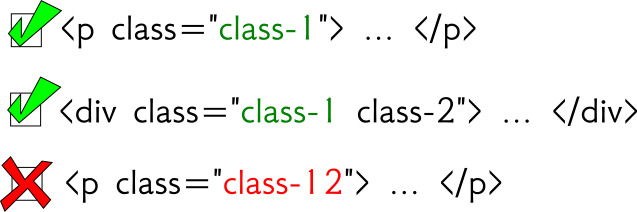
Sınıf Durumu

css = '.class1'

SınıfSeçimi-Xpath-classonly.png

Python ile Web Scraping

Sınıf Durumu

xpath = '//*[@class="class1"]'
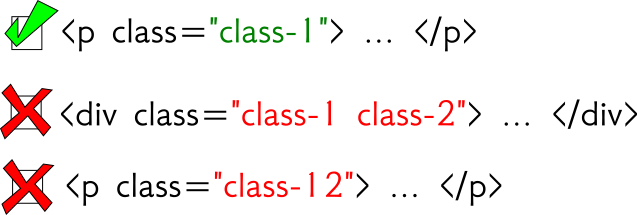
SınıfSeçimi-Xpath-eq.png

Python ile Web Scraping

Sınıf Durumu

xpath = '//*[contains(@class,"class1")]'
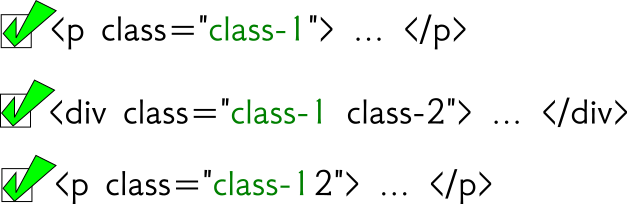
SınıfSeçimi-Xpath-contains.png

Python ile Web Scraping

CSS ile Seçiciler

from scrapy import Selector 

html = '''
<html>
  <body>
    <div class="hello datacamp">
      <p>Hello World!</p>
    </div>
    <p>Enjoy DataCamp!</p>
  </body>
</html>
''' 
sel = Selector( text = html )
>>> sel.css("div > p")
çıktı: [<Selector xpath='...' data='<p>Hello World!</p>'>] 

>>> sel.css("div > p").extract()
çıktı: [ '<p>Hello World!</p>' ]
Python ile Web Scraping

C(SS) Görüşürüz!

Python ile Web Scraping

Preparing Video For Download...