# Create an nlp object
from spacy.lang.en import English
nlp = English()

# Import the Doc class
from spacy.tokens import Doc

# The words and spaces to create the doc from
words = ['Hello', 'world', '!']
spaces = [True, False, False]

# Create a doc manually
doc = Doc(nlp.vocab, words=words, spaces=spaces)
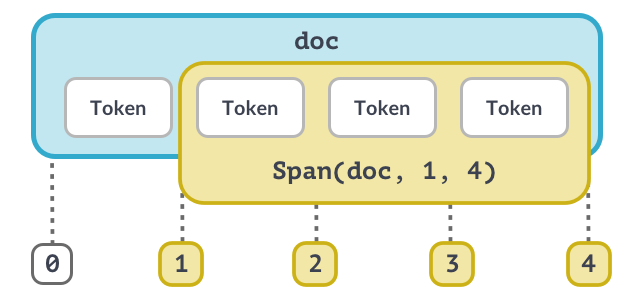
Span nesnesi (1)
Span nesnesi (2)
# Import the Doc and Span classes
from spacy.tokens import Doc, Span

# The words and spaces to create the doc from
words = ['Hello', 'world', '!']
spaces = [True, False, False]

# Create a doc manually
doc = Doc(nlp.vocab, words=words, spaces=spaces)

# Create a span manually
span = Span(doc, 0, 2)

# Create a span with a label
span_with_label = Span(doc, 0, 2, label="GREETING")

# Add span to the doc.ents
doc.ents = [span_with_label]
En iyi uygulamalar
Doc ve Span çok güçlüdür; sözcük ve cümlelerin başvurularını ve ilişkilerini tutar
Sonuçları metne olabildiğince geç dönüştürün
Varsa token özniteliklerini kullanın – örn. token indeksi için token.i