Small multiples

Introductie tot datavisualisatie met Matplotlib

Ariel Rokem

Data Scientist

Data toevoegen

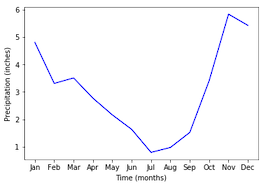
ax.plot(seattle_weather["MONTH"], 
        seattle_weather["MLY-PRCP-NORMAL"], 
        color='b')
ax.set_xlabel("Tijd (maanden)")
ax.set_ylabel("Neerslag (inch)")
plt.show()
Introductie tot datavisualisatie met Matplotlib

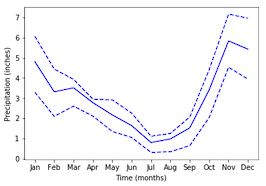
Meer data toevoegen

ax.plot(seattle_weather["MONTH"], seattle_weather["MLY-PRCP-25PCTL"], 
        linestyle='--', color='b')
ax.plot(seattle_weather["MONTH"], seattle_weather["MLY-PRCP-75PCTL"], 
        linestyle='--', color=color)
plt.show()
Introductie tot datavisualisatie met Matplotlib

En nog meer data

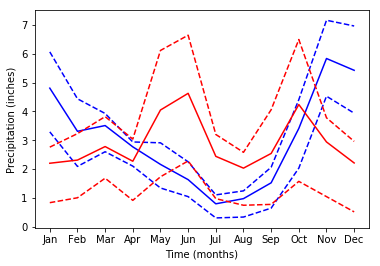
ax.plot(austin_weather["MONTH"], austin_weather["MLY-PRCP-NORMAL"],
        color='r')
ax.plot(austin_weather["MONTH"], austin_weather["MLY-PRCP-25PCTL"], 
        linestyle='--', color='r')
ax.plot(austin_weather["MONTH"], austin_weather["MLY-PRCP-75PCTL"], 
        linestyle='--', color='r')
plt.show()
Introductie tot datavisualisatie met Matplotlib

Te veel data!

Introductie tot datavisualisatie met Matplotlib

Small multiples met plt.subplots

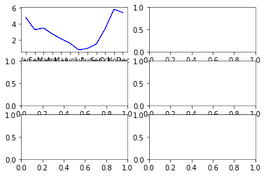
fig, ax = plt.subplots()
fig, ax = plt.subplots(3, 2)

plt.show()

Introductie tot datavisualisatie met Matplotlib

Data toevoegen aan subplotten

ax.shape
(3, 2)
ax[0, 0].plot(seattle_weather["MONTH"], 
              seattle_weather["MLY-PRCP-NORMAL"], 
              color='b')

plt.show()

Introductie tot datavisualisatie met Matplotlib

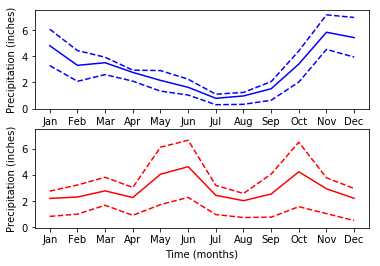
Subplotten met data

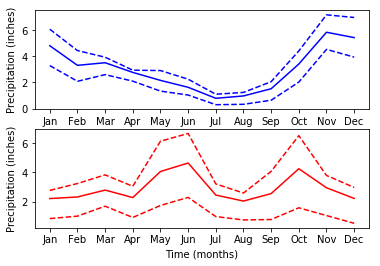
fig, ax = plt.subplots(2, 1)

ax[0].plot(seattle_weather["MONTH"], seattle_weather["MLY-PRCP-NORMAL"], color='b') ax[0].plot(seattle_weather["MONTH"], seattle_weather["MLY-PRCP-25PCTL"], linestyle='--', color='b') ax[0].plot(seattle_weather["MONTH"], seattle_weather["MLY-PRCP-75PCTL"], linestyle='--', color='b')
ax[1].plot(austin_weather["MONTH"], austin_weather["MLY-PRCP-NORMAL"], color='r') ax[1].plot(austin_weather["MONTH"], austin_weather["MLY-PRCP-25PCTL"], linestyle='--', color='r') ax[1].plot(austin_weather["MONTH"], austin_weather["MLY-PRCP-75PCTL"], linestyle='--', color='r')
ax[0].set_ylabel("Neerslag (inch)") ax[1].set_ylabel("Neerslag (inch)")
ax[1].set_xlabel("Tijd (maanden)")
plt.show()
Introductie tot datavisualisatie met Matplotlib

Subplotten met data

Introductie tot datavisualisatie met Matplotlib

y-as bereik delen

fig, ax = plt.subplots(2, 1, sharey=True)
Introductie tot datavisualisatie met Matplotlib

Oefen met subplotten maken!

Introductie tot datavisualisatie met Matplotlib

Preparing Video For Download...