Waarom je logistische regressie nodig hebt

Introductie tot regressie in R

Richie Cotton

Data Evangelist at DataCamp

Bank-churn-dataset

has_churned time_since_first_purchase time_since_last_purchase
0 0.3993247 -0.5158691
1 -0.4297957 0.6780654
0 3.7383122 0.4082544
0 0.6032289 -0.6990435
... ... ...
response duur van relatie recency van activiteit
1 https://www.rdocumentation.org/packages/bayesQR/topics/Churn
Introductie tot regressie in R

Churn vs. recency: een lineair model

mdl_churn_vs_recency_lm <- lm(has_churned ~ time_since_last_purchase, data = churn)
Call:
lm(formula = has_churned ~ time_since_last_purchase, data = churn)

Coefficients:
             (Intercept)  time_since_last_purchase  
                 0.49078                   0.06378 
coeffs <- coefficients(mdl_churn_vs_recency_lm)
intercept <- coeffs[1]
slope <- coeffs[2]
Introductie tot regressie in R

Het lineaire model visualiseren

ggplot(
  churn, 
  aes(time_since_last_purchase, has_churned)
) +
  geom_point() +
  geom_abline(intercept = intercept, slope = slope)

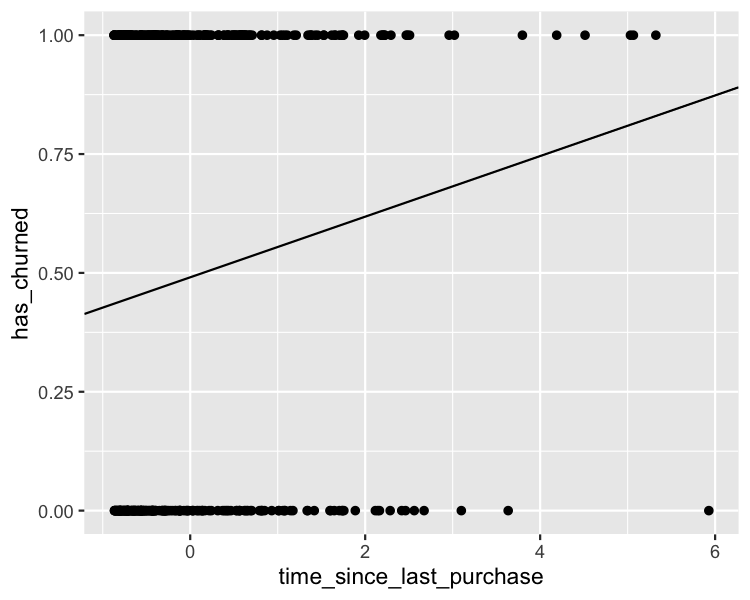
Voorspellingen zijn kansen op churn, geen hoeveelheden churn.

Een spreidingsdiagram van wel/niet klantvertrek versus tijd sinds laatste aankoop. Alle punten liggen op y = 0 of y = 1. Een lineaire trendlijn toont een stijgende churn-kans bij meer tijd sinds laatste aankoop.

Introductie tot regressie in R

Uitzoomen

ggplot(
  churn, 
  aes(days_since_last_purchase, has_churned)
) +
  geom_point() +
  geom_abline(intercept = intercept, slope = slope) +
  xlim(-10, 10) +
  ylim(-0.2, 1.2)

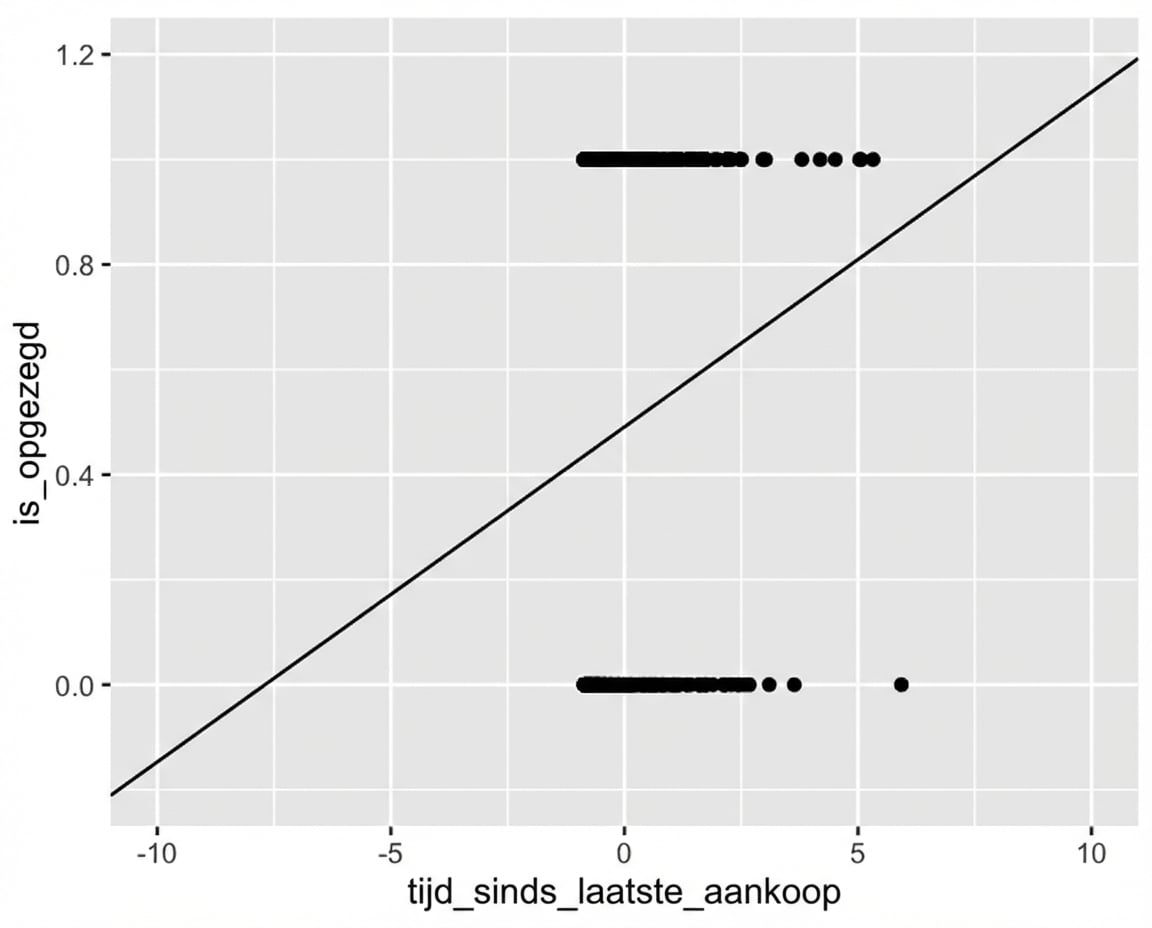
Hetzelfde spreidingsdiagram, uitgezoomd. De lineaire trendlijn gaat onder y = 0 en boven y = 1, wat onmogelijk zou moeten zijn.

Introductie tot regressie in R

Wat is logistische regressie?

  • Een ander type gegeneraliseerd lineair model.
  • Gebruik je als de responsvariabele logisch is.
  • Respons volgt een logistische (S-vormige) curve.
Introductie tot regressie in R

Lineaire regressie met glm()

glm(has_churned ~ time_since_last_purchase, data = churn, family = gaussian)
Call:  glm(formula = has_churned ~ time_since_last_purchase, family = gaussian, 
    data = churn)

Coefficients:
             (Intercept)  time_since_last_purchase  
                 0.49078                   0.06378  

Degrees of Freedom: 399 Total (i.e. Null);  398 Residual
Null Deviance:        100 
Residual Deviance: 98.02     AIC: 578.7
Introductie tot regressie in R

Logistische regressie: glm() met binomiale family

mdl_recency_glm <- glm(has_churned ~ time_since_last_purchase, data = churn, family = binomial)
Call:  glm(formula = has_churned ~ time_since_last_purchase, family = binomial, 
    data = churn)

Coefficients:
             (Intercept)  time_since_last_purchase  
                -0.03502                   0.26921  

Degrees of Freedom: 399 Total (i.e. Null);  398 Residual
Null Deviance:        554.5 
Residual Deviance: 546.4     AIC: 550.4
Introductie tot regressie in R

De logistieke modelcurve visualiseren
ggplot(
  churn, 
  aes(time_since_last_purchase, has_churned)
) +
  geom_point() +
  geom_abline(
    intercept = intercept, slope = slope
  ) +
  geom_smooth(
    method = "glm", 
    se = FALSE, 
    method.args = list(family = binomial)
  )

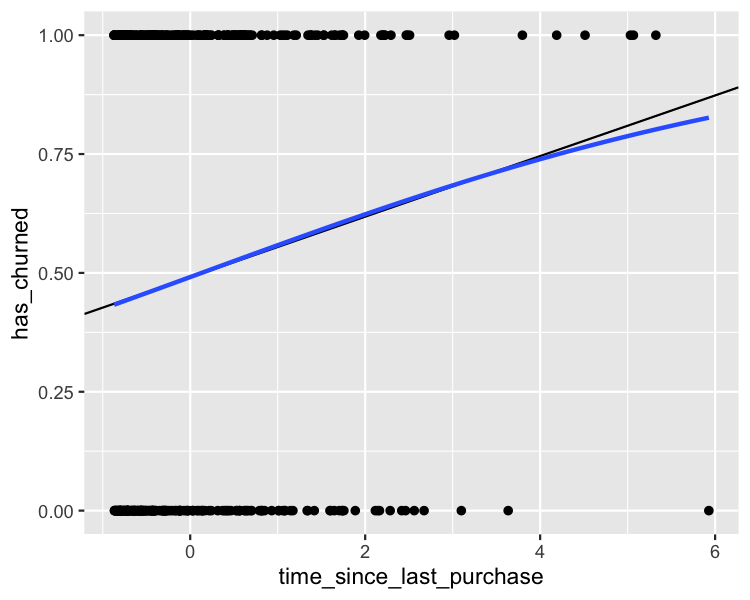
Een spreidingsdiagram van wel/niet klantvertrek versus tijd sinds laatste aankoop. Lineaire en logistische trendlijnen tonen beide stijgende vertrek-kans bij meer tijd sinds laatste aankoop. Ze liggen dicht bij elkaar, behalve bij hoge waarden van tijd sinds laatste aankoop.

Introductie tot regressie in R

Uitzoomen

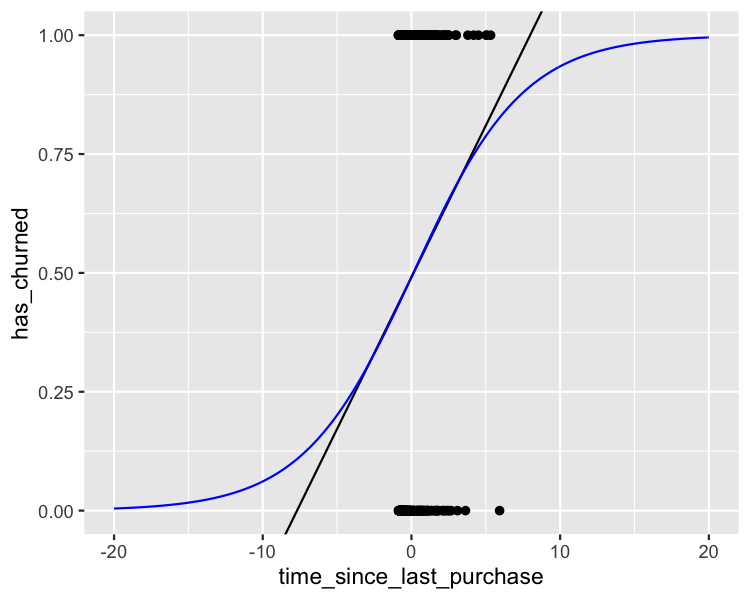
Het spreidingsdiagram van wel/niet klantvertrek versus tijd sinds laatste aankoop, met beide trendlijnen. De assen zijn verder uitgezoomd en tonen dat de logistische lijn altijd binnen het bereik 0–1 blijft.

Introductie tot regressie in R

Laten we oefenen!

Introductie tot regressie in R

Preparing Video For Download...