Uitbreidende vensterfuncties met pandas

Tijdreeksgegevens manipuleren in Python

Stefan Jansen

Founder & Lead Data Scientist at Applied Artificial Intelligence

Expanding windows in pandas

  • Van rolling naar expanding windows
  • Ken getallen tot en met de huidige datum
  • Nieuwe tijdreeks omvat alle historische waarden
  • Handig voor running rendement, min/max
  • Twee opties met pandas:
    • .expanding() - net als .rolling()
    • .cumsum(), .cumprod(), cummin()/max()
Tijdreeksgegevens manipuleren in Python

Het basisidee

df = pd.DataFrame({'data': range(5)})

df['expanding sum'] = df.data.expanding().sum()
df['cumulative sum'] = df.data.cumsum()
df
   data  expanding sum  cumulative sum
0     0            0.0               0
1     1            1.0               1
2     2            3.0               3
3     3            6.0               6
4     4           10.0              10
Tijdreeksgegevens manipuleren in Python

Data voor de S&P 500 ophalen

data = pd.read_csv('sp500.csv', parse_dates=['date'], index_col='date')
DatetimeIndex: 2519 entries, 2007-05-24 to 2017-05-24
Data columns (total 1 columns):
SP500    2519 non-null float64
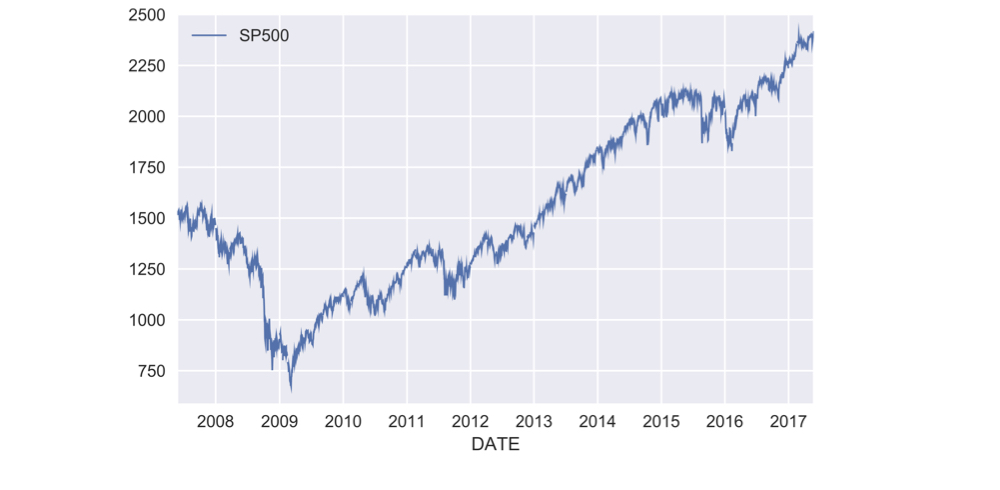
ch3_2_v2 - Gegevens ophalen voor de S&P 500.013.png

Tijdreeksgegevens manipuleren in Python

Hoe bereken je een running rendement

  • Enkelperiodereturn r_t: huidige prijs / vorige prijs − 1:

    $$r_t = \frac{P_t}{P_{t-1}} - 1$$

    • Meerdere periodes: product van (1 + r_t) voor alle periodes, min 1:

    $$R_T = (1 + r_1)(1 + r_2)...(1 + r_T) - 1$$

    • Periodereturn: .pct_change()
    • Basisbewerkingen: .add(), .sub(), .mul(), .div()
    • Cumulatief product: .cumprod()
Tijdreeksgegevens manipuleren in Python

Running rendement in de praktijk

pr = data.SP500.pct_change() # periodereturn

pr_plus_one = pr.add(1)
cumulative_return = pr_plus_one.cumprod().sub(1)
cumulative_return.mul(100).plot()

ch3_2_v2 - Running rendement in de praktijk.021.png

Tijdreeksgegevens manipuleren in Python

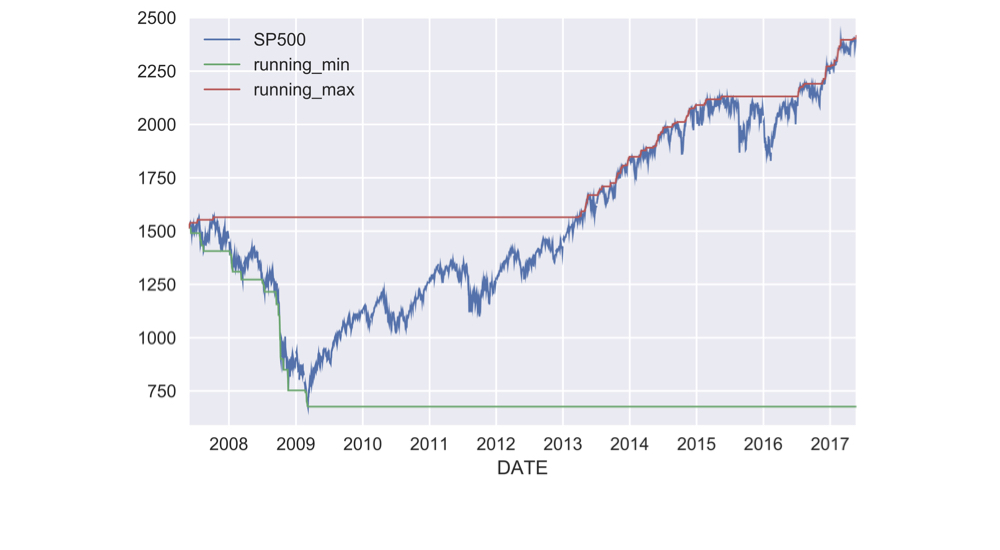
Running min en max bepalen

data['running_min'] = data.SP500.expanding().min()

data['running_max'] = data.SP500.expanding().max()
data.plot()

ch3_2_v2 - Uitbreidende vensterfuncties met Pandas.023.png

Tijdreeksgegevens manipuleren in Python

Rollend jaarrendement

def multi_period_return(period_returns):
    return np.prod(period_returns + 1) - 1

pr = data.SP500.pct_change() # periodereturn
r = pr.rolling('360D').apply(multi_period_return)
data['Rolling 1yr Return'] = r.mul(100)
data.plot(subplots=True)
Tijdreeksgegevens manipuleren in Python

Rollend jaarrendement

data['Rolling 1yr Return'] = r.mul(100)

data.plot(subplots=True)

ch3_2_v2 - Uitbreidende vensterfuncties met Pandas.027.png

Tijdreeksgegevens manipuleren in Python

Laten we oefenen!

Tijdreeksgegevens manipuleren in Python

Preparing Video For Download...