Indexeren en resamplen van tijdreeksen
Tijdreeksgegevens manipuleren in Python

Stefan Jansen
Founder & Lead Data Scientist at Applied Artificial Intelligence
Transformatie van tijdreeksen
Basistransformaties voor tijdreeksen:
Datumstrings parsen en omzetten naar
datetime64Selecteren & slicen voor subperiodes
Frequentie van
DateTimeIndexinstellen/wijzigen- Upsamplen vs downsamplen
GOOG-koersen ophalen
google = pd.read_csv('google.csv') # import pandas as pdgoogle.info()
<class 'pandas.core.frame.DataFrame'>
RangeIndex: 504 entries, 0 to 503
Data columns (total 2 columns):
date     504 non-null object
price    504 non-null float64
dtypes: float64(1), object(1)
google.head()
         date   price
0  2015-01-02  524.81
1  2015-01-05  513.87
2  2015-01-06  501.96
3  2015-01-07  501.10
4  2015-01-08  502.68
Datumstrings omzetten naar datetime64
pd.to_datetime():- Datumstring parsen
- Converteren naar
datetime64
google.date = pd.to_datetime(google.date)google.info()
<class 'pandas.core.frame.DataFrame'>
RangeIndex: 504 entries, 0 to 503
Data columns (total 2 columns):
date     504 non-null datetime64[ns]
price    504 non-null float64
dtypes: datetime64[ns](1), float64(1)
Datumstrings omzetten naar datetime64
.set_index():- Datum naar index
inplace:- geen kopie maken
google.set_index('date', inplace=True)google.info()
<class 'pandas.core.frame.DataFrame'>
DatetimeIndex: 504 entries, 2015-01-02 to 2016-12-30
Data columns (total 1 columns):
price    504 non-null float64
dtypes: float64(1)
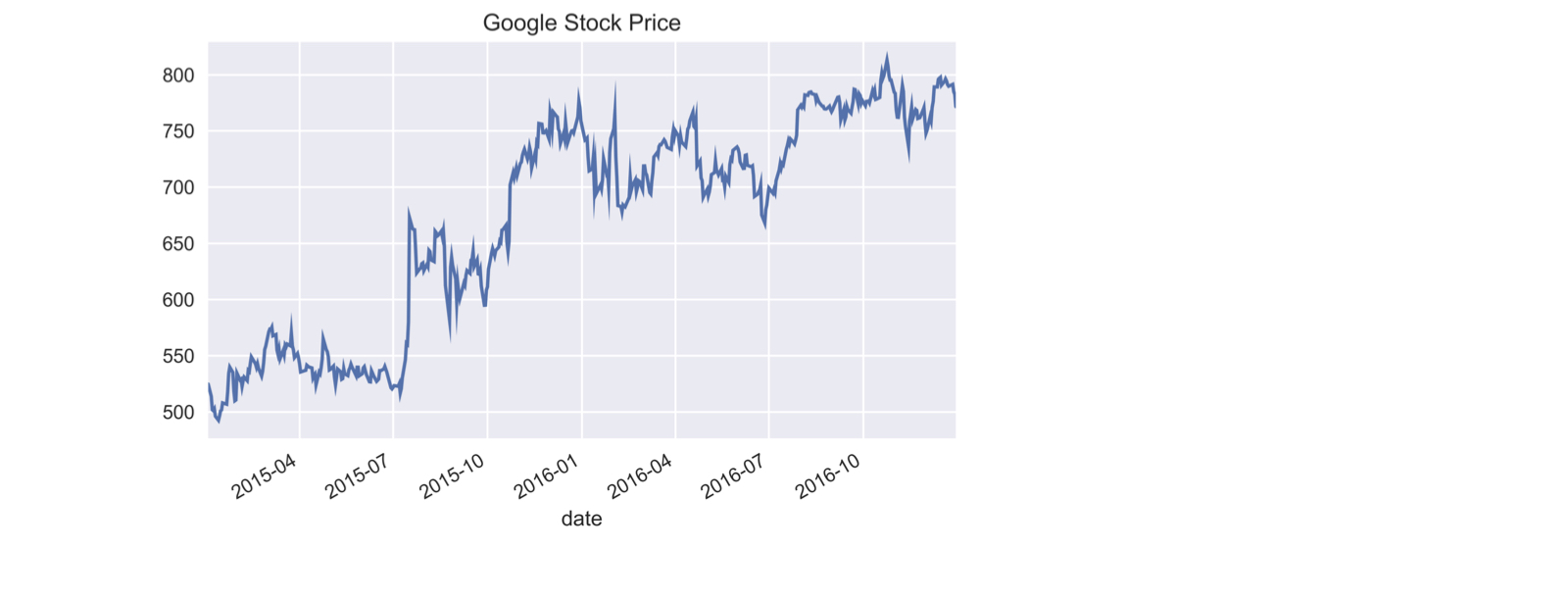
De tijdreeks van Google-koers plotten
google.price.plot(title='Google Stock Price')plt.tight_layout(); plt.show()
Gedeeltelijke stringindexering
- Selecteren/indexeren met strings die als datum worden geparsed
google['2015'].info() # Geef string voor deel van datum
DatetimeIndex: 252 entries, 2015-01-02 to 2015-12-31
Data columns (total 1 columns):
price    252 non-null float64
dtypes: float64(1)
google['2015-3': '2016-2'].info() # Slice bevat laatste maand
DatetimeIndex: 252 entries, 2015-03-02 to 2016-02-29
Data columns (total 1 columns):
price    252 non-null float64
dtypes: float64(1)
memory usage: 3.9 KB
Gedeeltelijke stringindexering
google.loc['2016-6-1', 'price'] # Gebruik volledige datum met .loc[]
734.15
.asfreq(): frequentie instellen
.asfreq('D'):- Zet
DateTimeIndexom naar kalenderdagfrequentie
- Zet
google.asfreq('D').info() # stel kalenderdagfrequentie in
DatetimeIndex: 729 entries, 2015-01-02 to 2016-12-30
Freq: D
Data columns (total 1 columns):
price    504 non-null float64
dtypes: float64(1)
.asfreq(): frequentie instellen
- Upsamplen:
- Hogere frequentie geeft nieuwe datums => missende waarden
google.asfreq('D').head()
             price
date
2015-01-02  524.81
2015-01-03     NaN
2015-01-04     NaN
2015-01-05  513.87
2015-01-06  501.96
.asfreq(): frequentie resetten
.asfreq('B'):- Zet
DateTimeIndexom naar werkdagfrequentie
- Zet
google = google.asfreq('B') # Wijzig naar kalenderdagfrequentiegoogle.info()
DatetimeIndex: 521 entries, 2015-01-02 to 2016-12-30
Freq: B
Data columns (total 1 columns):
price    504 non-null float64
dtypes: float64(1)
.asfreq(): frequentie resetten
google[google.price.isnull()] # Selecteer missende 'price'-waarden
            price
date
2015-01-19    NaN
2015-02-16    NaN
...
2016-11-24    NaN
2016-12-26    NaN
- Werkdagen die geen handelsdagen waren
Laten we oefenen!
Tijdreeksgegevens manipuleren in Python

