Introductie tot MLflow
Weston Bassler
Senior MLOps Engineer
Opslaan
Loggen
Laden
# Een model opslaan in het lokale bestandssysteem
mlflow.sklearn.save_model(model, path)
# Een model als artifact loggen naar MLflow Tracking.
mlflow.sklearn.log_model(model, artifact_path)
# Een model laden vanaf lokaal of MLflow Tracking.
mlflow.sklearn.load_model(model_uri)
Lokale bestandsstructuur - relative/path/to/local/model of /Users/me/path/to/local/model
relative/path/to/local/model
/Users/me/path/to/local/model
MLflow Tracking - runs:/<mlflow_run_id>/run-relative/path/to/model
runs:/<mlflow_run_id>/run-relative/path/to/model
S3-ondersteuning - s3://my_bucket/path/to/model
s3://my_bucket/path/to/model
# Model
lr = LogisticRegression()
lr.fit(X, y)


# Model lokaal opslaan
mlflow.sklearn.save_model(lr, "local_path")
# Model lr = LogisticRegression() lr.fit(X, y)
# Model lokaal opslaan mlflow.sklearn.save_model(lr, "local_path")
ls local_path/
MLmodel model.pkl requirements.txt python_env.yaml
# Model laden vanaf lokaal pad
model = mlflow.sklearn.load_model("local_path")


# Model tonen
model
# Model laden vanaf lokaal pad model = mlflow.sklearn.load_model("local_path")
# Model tonen model
LogisticRegression()
# Model
lr = LogisticRegression(n_jobs=n_jobs)
lr.fit(X, y)


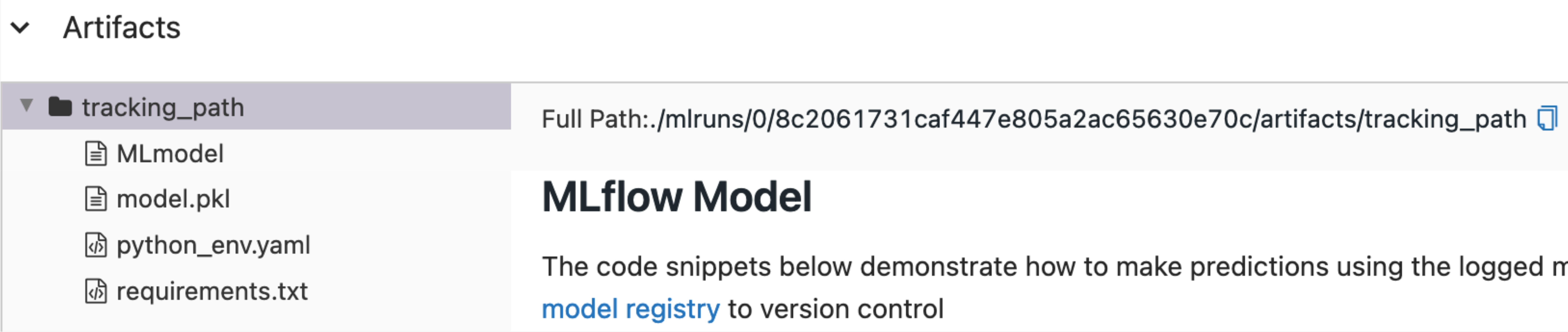
# Model loggen
mlflow.sklearn.log_model(lr, "tracking_path")
# Model lr = LogisticRegression(n_jobs=n_jobs) lr.fit(X, y)
# Model loggen mlflow.sklearn.log_model(lr, "tracking_path")
# Formaat voor runs
runs:/<mlflow_run_id>/run-relative/path/to/model
# Laatste actieve run ophalen
run = mlflow.last_active_run()

run
# Laatste actieve run ophalen run = mlflow.last_active_run()
run
<Run: data=<RunData: metrics={}, params={},
tags={'mlflow.runName': 'run_name'}>,
 info=<RunInfo: artifact_uri='uri', end_time='end_time',
 experiment_id='0', lifecycle_stage='active', run_id='run_id',
 run_name='name', run_uuid='run_uuid', start_time=start_time,
 status='FINISHED', user_id='user_id'>>
# run_id van laatste run tonen run.info.run_id
'8c2061731caf447e805a2ac65630e70c'
# Laatste actieve run ophalen
run = mlflow.last_active_run()
# run_id-variabele zetten run_id = run.info.run_id run_id
# run_id-variabele zetten run_id = run.info.run_id
run_id
# run_id als f-string literal doorgeven
model = mlflow.sklearn.load_model(f"runs:/{run_id}/tracking_path")

# Model tonen
model
# run_id als f-string literal doorgeven model = mlflow.sklearn.load_model(f"runs:/{run_id}/tracking_path")