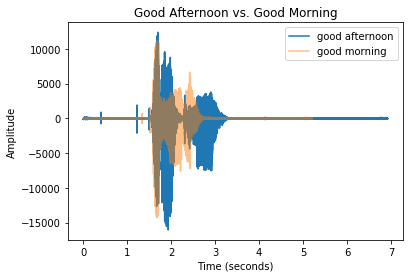
Geluidsgolven visualiseren

Spoken Language Processing in Python

Daniel Bourke

Machine Learning Engineer/YouTube Creator

Nog een geluidsgolf toevoegen

  • Nieuw audiobestand: good_afternoon.wav
  • Beide zijn 48 kHz
  • Dezelfde transformaties voor alle audiobestanden
Spoken Language Processing in Python

Een plot opzetten

import matplotlib.pyplot as plt

# Initialize figure and setup title plt.title("Good Afternoon vs. Good Morning")
# x and y axis labels plt.xlabel("Time (seconds)") plt.ylabel("Amplitude")
# Add good morning and good afternoon values plt.plot(time_ga, soundwave_ga, label ="Good Afternoon") plt.plot(time_gm, soundwave_gm, label="Good Morning", alpha=0.5)
# Create a legend and show our plot plt.legend() plt.show()
Spoken Language Processing in Python

Geluidsgolf good morning versus good afternoon

Spoken Language Processing in Python

Tijd om te visualiseren!

Spoken Language Processing in Python

Preparing Video For Download...