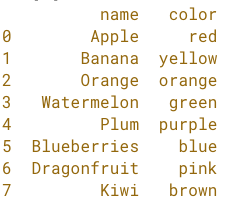
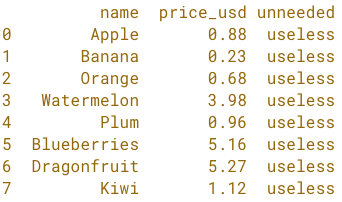
Voorbereiden op tabellen samenvoegen

Python voor spreadsheetgebruikers

Chris Cardillo

Data Scientist

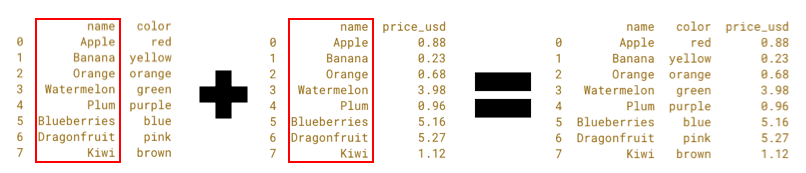
Tabellen samenvoegen
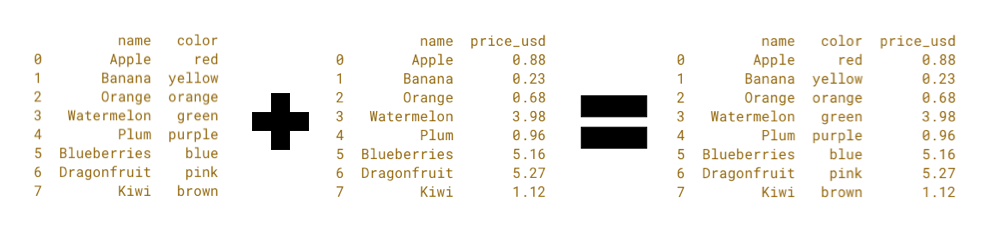
Table Merges.png

Python voor spreadsheetgebruikers

Tabellen samenvoegen

Table Merges Name Highlighted.png

Python voor spreadsheetgebruikers

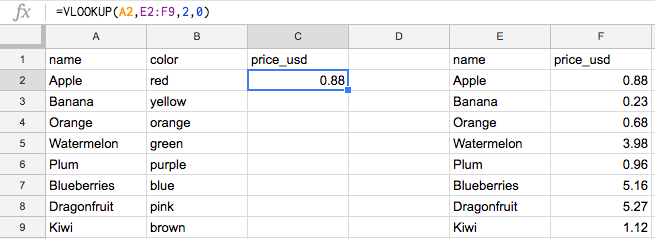
Mergen: de VLOOKUP van data science

Fruit VLookup.png

Python voor spreadsheetgebruikers

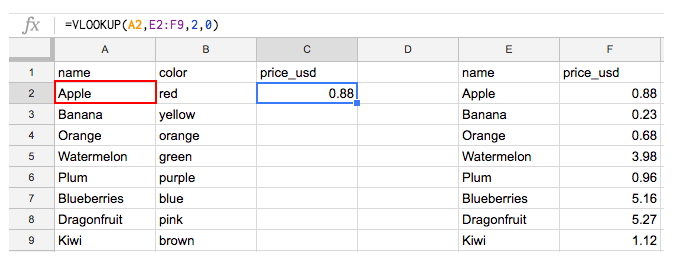
Mergen: de VLOOKUP van data science

Fruit Vlookup Key on the Left.png

Python voor spreadsheetgebruikers

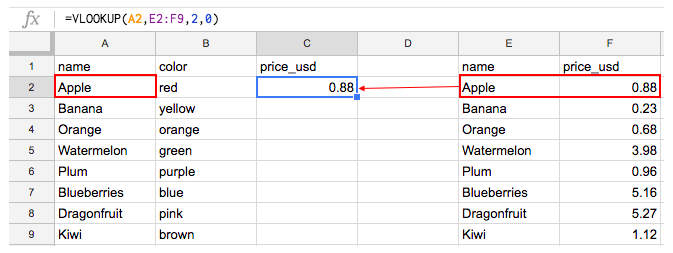
Mergen: de VLOOKUP van data science

Fruit Vlookup Match on the Right.png

Python voor spreadsheetgebruikers

Mergen in Python

  • Python is hoofdlettergevoelig!
    • 'Apple' != 'apple'
Python voor spreadsheetgebruikers

Mergen in Python

  • Python is hoofdlettergevoelig!
    • 'Apple' != 'apple'
  • Python let precies op witruimte!
    • 'Apple' != ' Apple '
Python voor spreadsheetgebruikers

Mergen in Python

  • Python is hoofdlettergevoelig!
    • 'Apple' != 'apple'
  • Python is precies!
    • 'Apple' != ' Apple '
  • Python voegt hele tabellen samen!
    • AB + ACD = ABCD, ook als we alleen ABC willen
    • Dus kolom D moeten we droppen.
Python voor spreadsheetgebruikers

Hoofdlettergevoeligheid aanpakken

fruit_Price - naam in hoofdletters
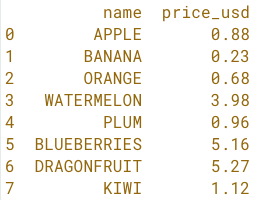
fruit price upper.png

fruit_Color - naam in titelcase

fruit color console.png

Python voor spreadsheetgebruikers

Methode .str.title()

fruit_price['name'].str.title()
Python voor spreadsheetgebruikers

Methode .str.title()

fruit_price['name'] = fruit_price['name'].str.title()

print(fruit_price)
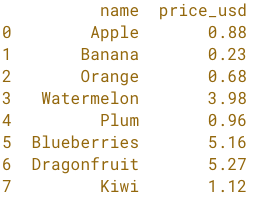
fruit prices console.png

Python voor spreadsheetgebruikers

Methode .str.upper()

fruit_price['name'] = fruit_price['name'].str.upper()

print(fruit_price)

fruit price upper.png

Python voor spreadsheetgebruikers

Methode .str.lower()

fruit_price['name'] = fruit_price['name'].str.lower()

print(fruit_price)
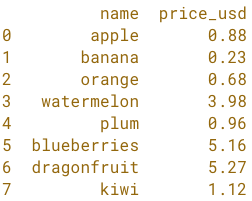
fruit price lower.png

Python voor spreadsheetgebruikers

Methode .str.title()

fruit_price['name'] = fruit_price['name'].str.title()

print(fruit_price)

fruit prices console.png

Python voor spreadsheetgebruikers

Witruimte aanpakken met .str.strip()

fruit_price['name'] = fruit_price['name'].str.strip()

print(fruit_price)

fruit prices console.png

Python voor spreadsheetgebruikers

Kolommen selecteren en droppen

fruit with unneeded column.png

Python voor spreadsheetgebruikers

Kolommen selecteren

Kolommen selecteren
fruit_price[['name', 'price_usd']]

fruit prices console.png

Python voor spreadsheetgebruikers

Kolommen selecteren

Kolommen selecteren
fruit_price = fruit_price[['name', 'price_usd']]

fruit prices console.png

Python voor spreadsheetgebruikers

Kolommen droppen met .drop()

Kolommen droppen
fruit_price.drop('unneeded', axis=1)

fruit prices console.png

Python voor spreadsheetgebruikers

Kolommen droppen

Kolommen droppen
fruit_price = fruit_price.drop('unneeded', axis=1)

fruit prices console.png

Python voor spreadsheetgebruikers

Jij bent aan de beurt!

Python voor spreadsheetgebruikers

Preparing Video For Download...