LDA in de praktijk
Introductie tot Natural Language Processing in R

Kasey Jones
Research Data Scientist
LDA-resultaten afronden
- kies het aantal topics
- perplexity/andere metrics
- een oplossing die werkt voor jouw situatie
Perplexity
- maat voor hoe goed een probabilistisch model nieuwe data past
- lager is beter
- gebruikt om modellen te vergelijken
- Bij LDA-parameterafstemming
- Aantal topics kiezen
sample_size <- floor(0.90 * nrow(doc_term_matrix))
set.seed(1111)
train_ind <- sample(nrow(doc_term_matrix), size = sample_size)
train <- matrix[train_ind, ]
test <- matrix[-train_ind, ]
1 https://en.wikipedia.org/wiki/Perplexity
Perplexity in R
library(topicmodels)
values = c()
for(i in c(2:35)){
  lda_model <- LDA(train, k = i, method = "Gibbs",
                   control = list(iter = 25, seed = 1111))
  values <- c(values, perplexity(lda_model, newdata = test))
}
plot(c(2:35), values, main="Perplexity for Topics",
     xlab="Number of Topics", ylab="Perplexity")
Nogmaals perplexity!
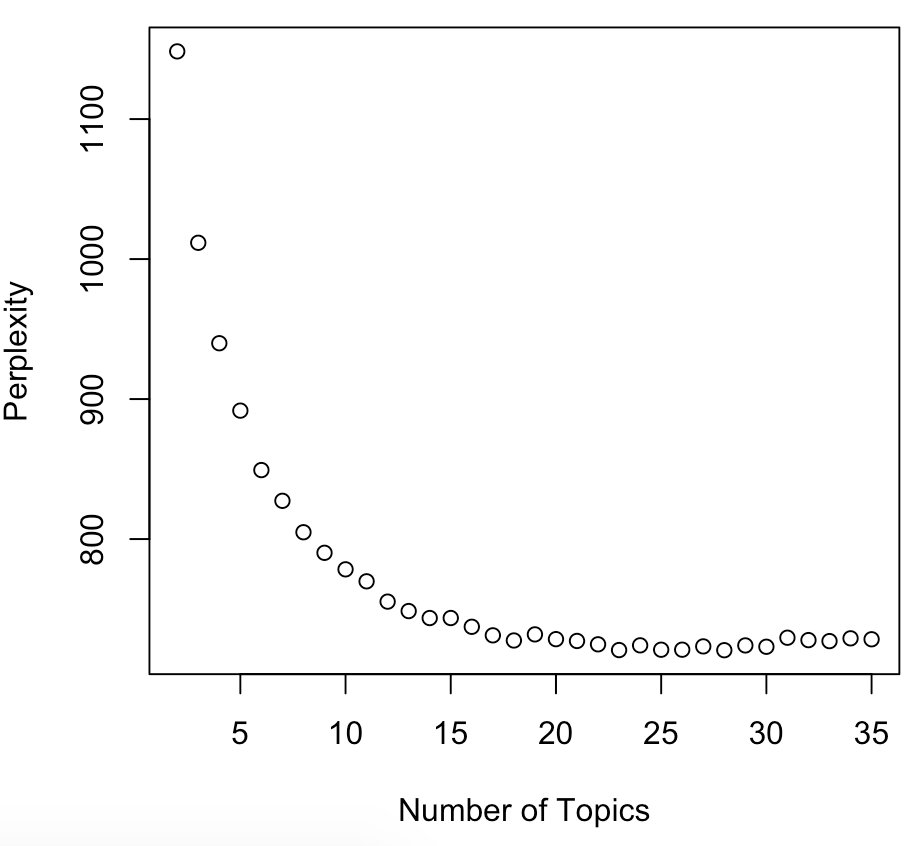
Praktische selectie
- Hoeveel topics kan de situatie aan?
- 20 is lastig te behandelen
- Hoe laat je de resultaten zien?
- Grafieken met 5 topics zijn makkelijker dan met 100
- Vuistregels:
- Gebruik een klein aantal topics, elk gedekt door meerdere documenten
- Veel topics kan alleen als je tijd hebt om elk topic te verkennen en te ontleden
Resultaten gebruiken
- Review of laat reviewers per topic "thema's" vinden
- geef de reviewer een lijst met topwoorden in het topic
- geef de reviewer een lijst met topdocumenten voor dat topic
Output beoordelen
betas <- tidy(lda_model, matrix = "beta")
betas %>%
  filter(topic == 1) %>%
  arrange(desc(beta)) %>%
  select(term)
# A tibble: 2,000 x 1
   term
   <chr>
 1 athletic
 2 quick
 3 strong
 4 tough
...
gammas <- tidy(lda_model, matrix = "gamma")
gammas %>%
  filter(topic == 1) %>%
  arrange(desc(gamma)) %>%
  select(document)
# A tibble: 1,000 x 1
   document
   <chr>
 1 232
 2 292
 3 921
 4 643
 5 468
Output samenvatten
gammas <- tidy(lda_model, matrix = "gamma")
gammas %>%
  group_by(document) %>%
  arrange(desc(gamma)) %>%
  slice(1) %>%
  group_by(topic) %>%
  tally(topic, sort=TRUE)
  topic     n
1     1  1326
2     5  1215
3     4   804
...
Nogmaals samenvatten
gammas %>%
  group_by(document) %>%
  arrange(desc(gamma)) %>%
  slice(1) %>%
  group_by(topic) %>%
  summarize(avg=mean(gamma)) %>%
  arrange(desc(avg))
  topic   avg
1     1 0.696
2     5 0.530
3     4 0.482
...
LDA-oefening.
Introductie tot Natural Language Processing in R

