Een foundation model kiezen

Introductie tot Amazon Bedrock

Nikhil Rangarajan

Data Scientist

Modeltoegang inschakelen in Amazon Bedrock

  • Toegang tot modelinstellingen — je hoeft geen modellen in te schakelen voor deze course
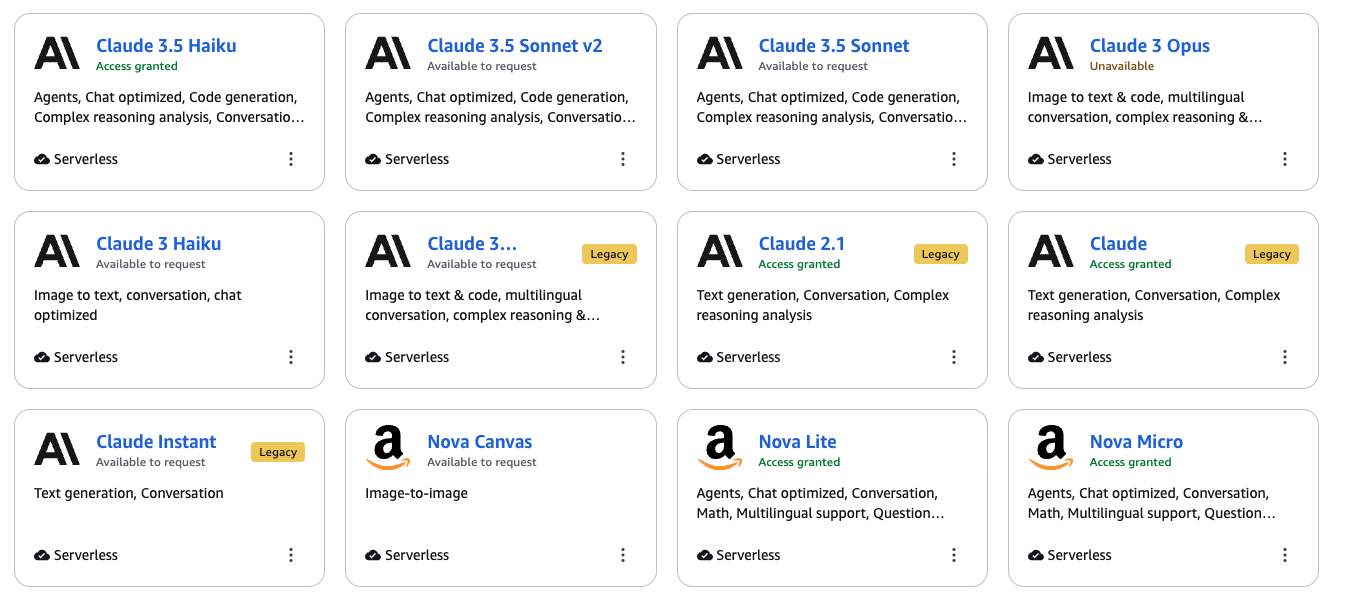
Een screenshot waarop de Claude- en Nova-modellen zijn ingeschakeld in de AWS-console.

Introductie tot Amazon Bedrock

Lichtgewicht vs. geavanceerde foundation models

  • Lichtgewicht modellen
    • Beste voor: Q&A, samenvatten
    • Snel en kostenefficiënt
    • Voorbeeld: Nova Micro, Claude Haiku

Logo van Amazon.

  • Geavanceerde modellen
    • Beste voor: Complex redeneren, analyse
    • Uitgebreide analysemogelijkheden
    • Voorbeeld: Nova Plus, Claude Sonnet

Logo van Anthropic.

Introductie tot Amazon Bedrock

Andere foundation models in Amazon Bedrock

Andere modellen in Amazon Bedrock:

  • Meta’s Llama

    • 📝 Open-source LLM voor algemene teksttaken
  • Stability AI’s Stable Diffusion

    • 🖼️ Gespecialiseerd in beeldgeneratie
  • AI21’s Jurassic

    • 📈 Tekstgeneratie en -analyse

Logo van Meta’s Llama.

Introductie tot Amazon Bedrock

Bedrock-modellen aanroepen

  • Basisstructuur:
import json
bedrock = boto3.client('bedrock-runtime', region_name='us-east-1')
response = bedrock.invoke_model(modelId='amazon.nova-lite-v1:0',

body=json.dumps(input_dictionary)
)
  • Geeft het modelantwoord terug in JSON-formaat
Introductie tot Amazon Bedrock

Claude aanroepen

  • Anthropic Claude
response = bedrock.invoke_model(
    modelId='anthropic.claude-3-5-sonnet-v2:0',
    body=json.dumps(

{"anthropic_version": "bedrock-2023-05-31",
"max_tokens": 100,
"messages": [{ "role": "user", "content": [{"type": "text", "text": "your prompt here"}], }],
}
))
Introductie tot Amazon Bedrock

Nova aanroepen

  • Amazon Nova
response = bedrock.invoke_model(
    modelId='amazon.nova-lite-v1:0', 
    body=json.dumps(

{"messages":
[{"role": "user", "content": [{"text": "your prompt here"}] }]
}
))
Introductie tot Amazon Bedrock

Modelantwoord ophalen

  • Lees de body van de API-respons
  • Zet JSON om naar een Python-dict
  • Haal de output op via keys
print("Claude:",

json.loads( claude_response['body'].read() )
["content"][0]["text"]
)
Hallo! Leuk je te ontmoeten. Hoe kan ik je vandaag helpen?
Introductie tot Amazon Bedrock

Modelantwoord ophalen

  • Lees de body van de API-respons
  • Zet JSON om naar een Python-dict
  • Haal de output op via keys
print("Nova:",

json.loads( nova_response.get("body").read().decode() )
["output"]["message"]["content"][0]["text"]
)
Hallo! Hoe kan ik je vandaag helpen?
Introductie tot Amazon Bedrock

Laten we oefenen!

Introductie tot Amazon Bedrock

Preparing Video For Download...