Human-in-the-loop workflows

Building Data Pipelines with Airflow

Volker Janz

Senior Developer Advocate at Astronomer

HITL use cases

$$

$$

  • Approving an AI-generated response
  • Routing a support ticket to the right team
  • Reviewing a data quality report before publishing

Human in the loop visual

Building Data Pipelines with Airflow

The HITL operator family

$$

Operator Use case
ApprovalOperator Binary approve/reject
HITLBranchOperator Choose which tasks run next
HITLOperator Custom options + form
HITLEntryOperator Pure form input, no options

$$

  • All HITL operators are implemented as deferrable operators
Building Data Pipelines with Airflow

HITLEntryOperator

from airflow.providers.standard.operators.hitl import HITLEntryOperator
from airflow.sdk import Param

review = HITLEntryOperator( task_id="human_review", subject="Review AI draft response", body="{{ ti.xcom_pull(task_ids='generate_draft') }}", params={ "feedback": Param("", type="string"), "urgency": Param("p3", type="string"), }, )
  • The pipeline pauses until the fields are filled in
Building Data Pipelines with Airflow

Accessing the response

@task
def send_response(hitl_output):
    feedback = hitl_output["params_input"]["feedback"]
    urgency = hitl_output["params_input"]["urgency"]
    print(f"Sending response (urgency: {urgency}): {feedback}")

draft = generate_draft() chain(draft, review) send_response(review.output)


  • Form input is in params_input
  • Options (if any) are in chosen_options
Building Data Pipelines with Airflow

HITLBranchOperator

from airflow.providers.standard.operators.hitl import HITLBranchOperator

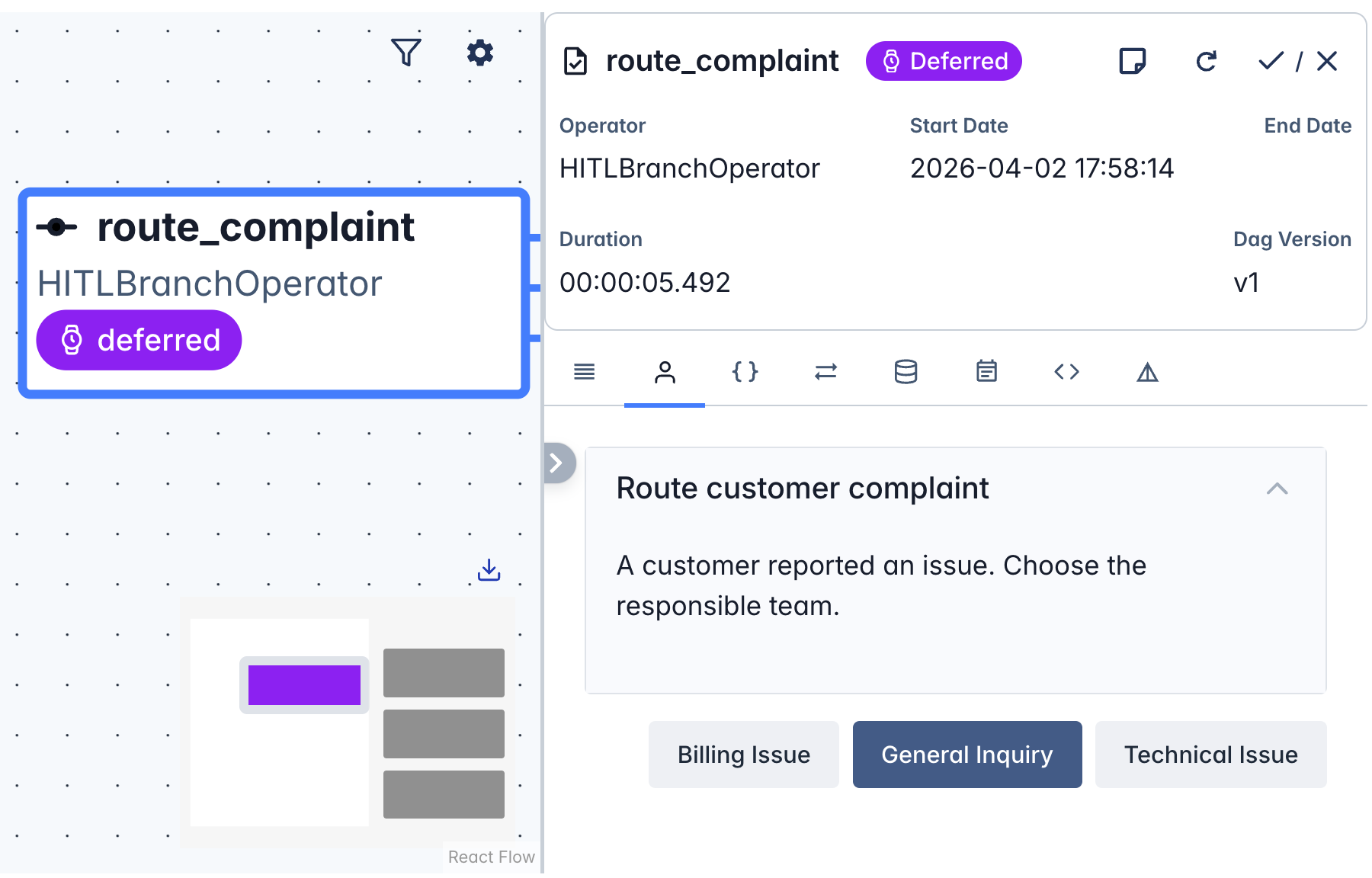
route = HITLBranchOperator( task_id="route_complaint", subject="Route customer complaint", body="A customer reported an issue. Choose the responsible team.", options=["Billing Issue", "General Inquiry", "Technical Issue"], options_mapping={ "Billing Issue": "handle_billing", "Technical Issue": "handle_technical", "General Inquiry": "handle_general", }, defaults=["General Inquiry"], )


  • Human selects an option, mapped to a downstream task ID
  • Unselected paths are skipped
Building Data Pipelines with Airflow

Required Actions in the UI


  • HITL tasks create a Required Action
  • Reviewers respond in the task instance view


  • All HITL operators are deferrable
  • They release the worker slot while waiting
  • The Triggerer handles the async wait

HITL in the Airflow UI

Building Data Pipelines with Airflow

Let's practice!

Building Data Pipelines with Airflow

Preparing Video For Download...