Variabel Lingkungan dan Secret

CI/CD untuk Machine Learning

Ravi Bhadauria

Machine Learning Engineer

Context

  • Akses info tentang variabel dan data bawaan
    • workflow run
    • variabel
    • lingkungan runner
    • job dan step
  • Akses context dengan sintaks ekspresi ${{ context.XXX }}
  • Context yang dipakai di kursus ini
    • github: info tentang workflow run
    • env: variabel yang disetel di workflow
    • secrets: nama dan nilai yang tersedia untuk workflow
    • job: info tentang job saat ini
    • runner: info tentang mesin
1 https://docs.github.com/en/actions/learn-github-actions/contexts
CI/CD untuk Machine Learning

Variabel

  • Simpan info tidak sensitif sebagai teks biasa
    • flag compiler, username, path file
  • Dideklarasikan sebagai nilai untuk kunci env
  • Cakupan global/lokal dikendalikan oleh level pendefinisian
  • Diakses dari context env sebagai ${{ env.ENV_VAR }}
name: Greeting on variable day
# Global env
env:
  Greeting: Hello

jobs: greeting_job: runs-on: ubuntu-latest # Local env: scoped to greeting_job env: First_Name: Ravi
steps: - run: | echo "${{ env.Greeting }} \ ${{ env.First_Name }}."
CI/CD untuk Machine Learning

Secret

  • Simpan info sensitif secara terenkripsi
    • kata sandi, API key
  • Akses nilai via context secrets
    • ${{ secrets.SuperSecret }}
  • Dapat disimpan sebagai input atau variabel lingkungan
steps:
  - name: Hello world action
    env: # Set the secret as an env var
      super_secret: ${{ secrets.SuperSecret }}

with: # Or as an input super_secret: ${{ secrets.SuperSecret }}
  • Mencetak secret

    steps:
    - name: Print secret
      run: |
        echo "my secret is \
        ${{ secrets.SuperSecret }}"
    
  • Keluaran

Gambar log workflow yang menunjukkan *** dicetak alih-alih nilai secret sebenarnya

CI/CD untuk Machine Learning

Mengatur secret

Gambar yang menampilkan tab Settings di halaman repositori

  • Buka Security > Secrets and variables > Actions
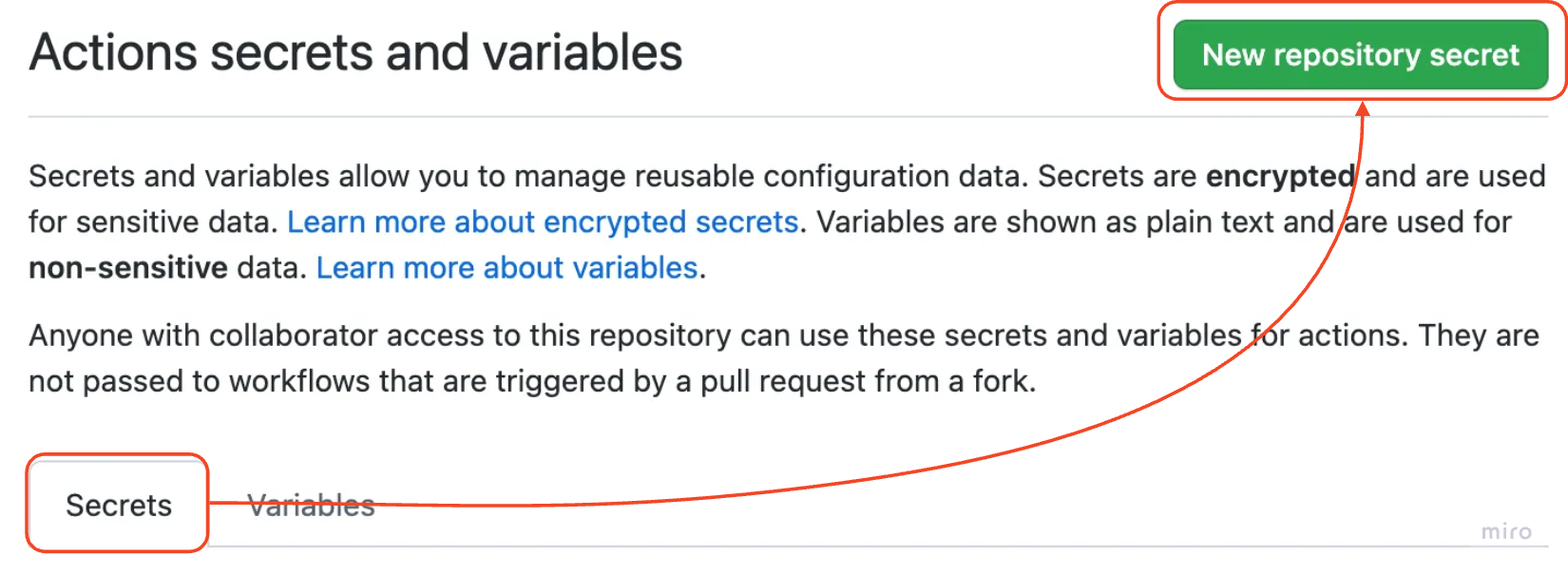
Gambar cara memilih tab secret

CI/CD untuk Machine Learning

Mengatur secret

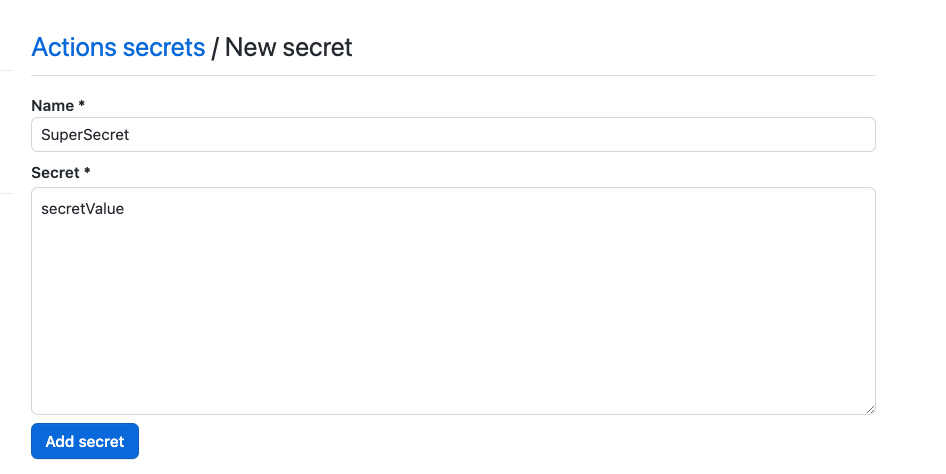
Gambar cara menetapkan nama dan nilai secret

CI/CD untuk Machine Learning

Secret GITHUB_TOKEN

  • Secret bawaan dari GitHub Actions
  • Dipakai untuk menjalankan aksi workflow
    • Clone repo dan fetch kode
    • Membuka/menutup issue dan pull request
    • Berkomentar pada issue dan pull request
  • Tersedia otomatis di setiap workflow GitHub Actions
    • Diakses via ${{ secrets.GITHUB_TOKEN }}
  • Izin dapat disetel sesuai kebutuhan
CI/CD untuk Machine Learning

Contoh: berkomentar di pull request

  • Beri izin untuk menulis komentar di PR
permissions: 
  pull-requests: write
  • Gunakan GITHUB_TOKEN untuk otorisasi
permissions: 
  pull-requests: write 
steps:
  - name: Comment PR
    uses: thollander/actions-comment-pull-request@v2
    with:
      GITHUB_TOKEN: ${{ secrets.GITHUB_TOKEN }}
      message: |
        Hello world ! :wave:

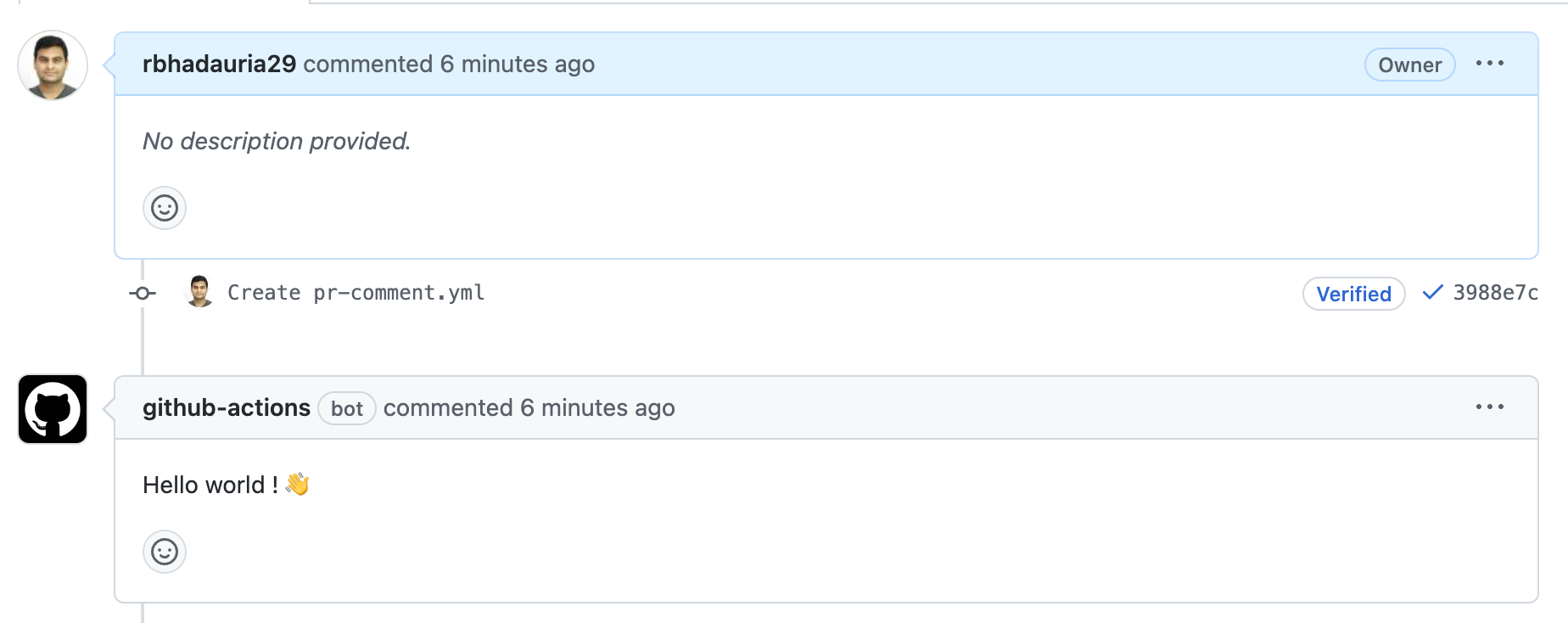
Cuplikan halaman pull request yang menunjukkan komentar otomatis oleh bot github-actions

1 https://gist.github.com/rbhadauria29/6d7fc51944b4fb48425c3c307fec77c6
CI/CD untuk Machine Learning

Ayo berlatih!

CI/CD untuk Machine Learning

Preparing Video For Download...