Geometri Shapely dan relasi spasial

Bekerja dengan Data Geospasial di Python

Dani Arribas-Bel

Geographic Data Science Lab (University of Liverpool)

Nilai geometri skalar

cities = geopandas.read_file("ne_110m_populated_places.shp")
cities.head()
           name                                      geometry
0  Vatican City   POINT (12.45338654497177 41.90328217996012)
1    San Marino     POINT (12.44177015780014 43.936095834768)
2         Vaduz   POINT (9.516669472907267 47.13372377429357)
3       Lobamba  POINT (31.19999710971274 -26.46666746135247)
4    Luxembourg   POINT (6.130002806227083 49.61166037912108)
brussels = cities.loc[170, 'geometry']
print(brussels)
POINT (4.33137074969045 50.83526293533032)
Bekerja dengan Data Geospasial di Python

Nilai geometri skalar

brussels = cities.loc[170, 'geometry']
print(brussels)
POINT (4.33137074969045 50.83526293533032)
type(brussels)
shapely.geometry.point.Point
Bekerja dengan Data Geospasial di Python

Paket Python Shapely

type(brussels)
shapely.geometry.point.Point

Shapely

  • Paket Python untuk manipulasi dan analisis objek geometri
  • Menyediakan objek Point, LineString, dan Polygon
  • GeoSeries (kolom 'geometry' pada GeoDataFrame) berisi objek Shapely
Bekerja dengan Data Geospasial di Python

Objek geometri

Mengambil dari GeoDataFrame:

brussels = cities.loc[170, 'geometry']
paris = cities.loc[235, 'geometry']
belgium = countries.loc[countries['name'] == 'Belgium', 'geometry'].squeeze()
france = countries.loc[countries['name'] == 'France', 'geometry'].squeeze()
uk = countries.loc[countries['name'] == 'United Kingdom', 'geometry'].squeeze()

Membuat manual:

from shapely.geometry import Point
p = Point(1, 2)
print(p)
POINT (1 2)
Bekerja dengan Data Geospasial di Python

Metode spasial

Luas suatu geometri:

belgium.area
3.8299974609075753

Jarak antara 2 geometri:

brussels.distance(paris)
2.8049127723186214

Dan banyak lagi! (mis. centroid, simplify, ...)

Bekerja dengan Data Geospasial di Python

Relasi spasial

geopandas.GeoSeries([belgium, france, uk, paris,  brussels, line]).plot()
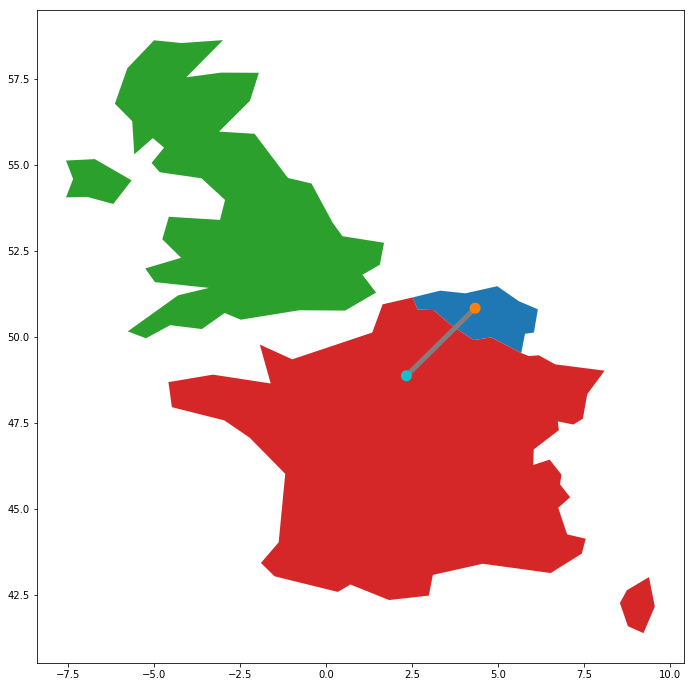
Bekerja dengan Data Geospasial di Python

Relasi spasial

belgium.contains(brussels)
True
france.contains(brussels)
False
brussels.within(belgium)
True
belgium.touches(france)
True
line.intersects(france)
True
line.intersects(uk)
False
Bekerja dengan Data Geospasial di Python

Ayo berlatih!

Bekerja dengan Data Geospasial di Python

Preparing Video For Download...