Pengemasan model ML

Mengembangkan Model Machine Learning untuk Produksi

Sinan Ozdemir

Data Scientist, Entrepreneur, and Author

Mengapa pengemasan penting

  • Optimalkan kinerja
  • Pastikan kompatibilitas
  • Memudahkan deploy model

Metode Pengemasan

  • Serialisasi: sederhana, ringan, dan lintas bahasa
  • Pengemasan lingkungan: menangkap seluruh lingkungan perangkat lunak
  • Kontainerisasi: lingkungan portabel, reprodusibel, dan terisolasi
Mengembangkan Model Machine Learning untuk Produksi

Cara mengemas model ML

  • Serialisasi - menyimpan dan memuat model ML

  • Pengemasan lingkungan - lingkungan yang konsisten dan reprodusibel untuk model ML

  • Kontainerisasi - mengemas model, dependensi, dan lingkungan dalam satu "container"

Mengembangkan Model Machine Learning untuk Produksi

Men-serialisasi model scikit-learn

Men-serialisasi model sklearn dengan pickle:

import pickle

model = ...  # Train the scikit-learn model

# Serialize the model to a file
with open('model.pkl', 'wb') as f:
    pickle.dump(model, f)

# Load the serialized model from the file
with open('model.pkl', 'rb') as f:
    model = pickle.load(f)

Men-serialisasi model sklearn dalam format HDF5:

import h5py
import numpy as np
from sklearn.externals import joblib

model = ...  # Train the scikit-learn model

# Serialize the model to an HDF5 file
with h5py.File('model.h5', 'w') as f:
    f.create_dataset('model_weights',
    data=joblib.dump(model))

# Load the serialized model from the HDF5 file
with h5py.File('model.h5', 'r') as f:
    model = joblib.load(f['model_weights'][:])
Mengembangkan Model Machine Learning untuk Produksi

Men-serialisasi model PyTorch dan Tensorflow

Men-serialisasi model PyTorch:

import torch

# Train a PyTorch model and store it in a variable
trained_model = ...

# Serialize the trained model to a file
serialized_model_path = 'model.pt'
torch.save(trained_model.state_dict(), serialized_model_path)

# Load the serialized model from a file
loaded_model = ... # Initialize the model
loaded_model.load_state_dict(
    torch.load(serialized_model_path))

Men-serialisasi model Tensorflow:

import tensorflow as tf

# Train a Tensorflow model
trained_model = ...

# Save the trained model to a directory 
saved_model_directory = 'model/'
tf.saved_model.save
    (trained_model, saved_model_directory)

# Load the saved model from the directory 
loaded_model = tf.saved_model.load(
    saved_model_directory)
Mengembangkan Model Machine Learning untuk Produksi

Pengemasan lingkungan ML dengan Docker

  • Pastikan lingkungan model dapat menjalankannya
  • virtualenv dll. membuat lingkungan konsisten dan reprodusibel
  • Kontainer Docker bersifat mandiri dan mudah dideploy

docker

Mengembangkan Model Machine Learning untuk Produksi

Contoh Dockerfile

# Use an existing image as the base image
FROM python:3.8-slim

# Set the working directory
WORKDIR /app

# Copy the requirements file to the image
COPY requirements.txt .

# Install the required dependencies
RUN pip install -r requirements.txt

# Copy the ML model and its dependencies to the image
COPY model/ .

# Set the entrypoint to run the model
ENTRYPOINT ["python", "run_model.py"]

<---- Gunakan image dasar Python 3.8


<---- Tetapkan working directory


<---- Salin file requirements.txt


<---- Instal paket dependensi model


<---- Salin model ke dalam container


<---- Beri tahu container cara memulai
Mengembangkan Model Machine Learning untuk Produksi

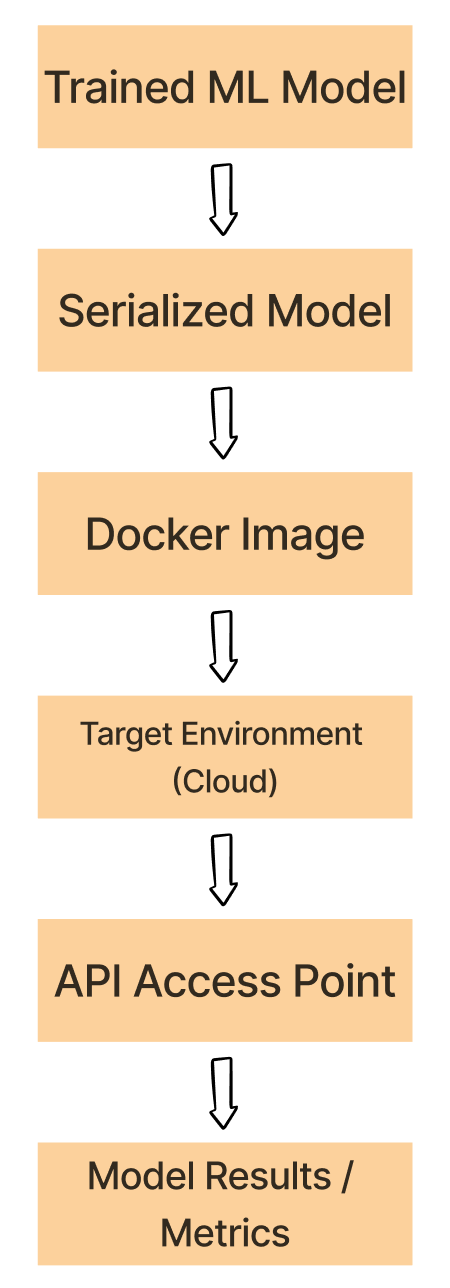
Eksperimen -> alur Docker

  1. Serialisasi model ML terlatih menggunakan format seperti pickle, HDF5, atau PyTorch.

  2. Kontainerisasi model terserialisasi, dependensi, dan lingkungannya

  3. Deploy image Docker ke lingkungan target seperti platform cloud

  4. Jalankan kontainer dari image yang dideploy dan jalankan model ML

  5. Gunakan model di dalam kontainer lewat API atau titik akses lain

Alur kerja Docker

Mengembangkan Model Machine Learning untuk Produksi

Ayo berlatih!

Mengembangkan Model Machine Learning untuk Produksi

Preparing Video For Download...