Visually Inspecting Data

Rekayasa Fitur dengan PySpark

John Hogue

Lead Data Scientist, General Mills

Getting Descriptive with DataFrame.describe()

df.describe(['LISTPRICE']).show()
+-------+------------------+
|summary|         LISTPRICE|
+-------+------------------+
|  count|              5000|
|   mean|        263419.365|
| stddev|143944.10818036905|
|    min|            100000|
|    max|             99999|
+-------+------------------+
Rekayasa Fitur dengan PySpark

Many descriptive functions are already available

  • Mean
    • pyspark.sql.functions.mean(col)
  • Skewness
    • pyspark.sql.functions.skewness(col)
  • Minimum
    • pyspark.sql.functions.min(col)
  • Covariance
    • cov(col1, col2)
  • Correlation
    • corr(col1, col2)
Rekayasa Fitur dengan PySpark

Example with mean()

  • mean(col)
  • Aggregate function: returns the average (mean) of the values in a group.
df.agg({'SALESCLOSEPRICE': 'mean'}).collect()
[Row(avg(SALESCLOSEPRICE)=262804.4668)]
Rekayasa Fitur dengan PySpark

Example with cov()

  • cov(col1, col2)
  • Parameters:
    • col1 – first column
    • col2 – second column
df.cov('SALESCLOSEPRICE', 'YEARBUILT')
1281910.3840634783
Rekayasa Fitur dengan PySpark

seaborn: statistical data visualization
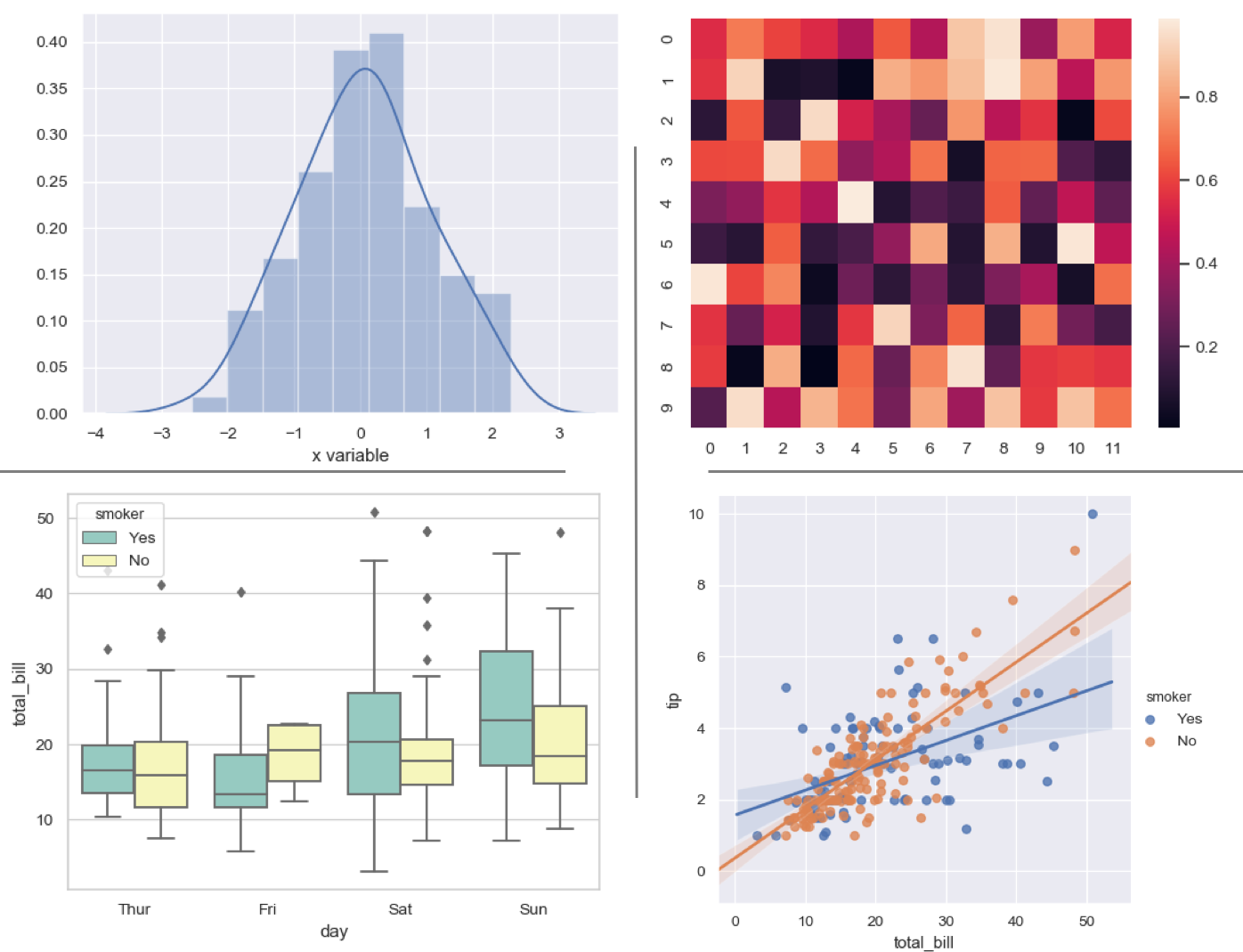
Seaborn

Rekayasa Fitur dengan PySpark

Notes on plotting

Plotting PySpark DataFrames using standard libraries like Seaborn require conversion to Pandas

WARNING: Sample PySpark DataFrames before converting to Pandas!

  • sample(withReplacement, fraction, seed=None)
    • withReplacement allow repeats in sample
    • fraction % of records to keep
    • seed random seed for reproducibility
# Sample 50% of the PySpark DataFrame and count rows
df.sample(False, 0.5, 42).count()
2504
Rekayasa Fitur dengan PySpark

Prepping for plotting a distribution

Seaborn distplot()

  • seaborn.distplot(a)
  • a : Series, 1d-array, or list. Observed data.
# Import your favorite visualization library
import seaborn as sns

# Sample the dataframe sample_df = df.select(['SALESCLOSEPRICE']).sample(False, 0.5, 42)
# Convert the sample to a Pandas DataFrame pandas_df = sample_df.toPandas()
# Plot it sns.distplot(pandas_df)
Rekayasa Fitur dengan PySpark

Distribution plot of sales closing price
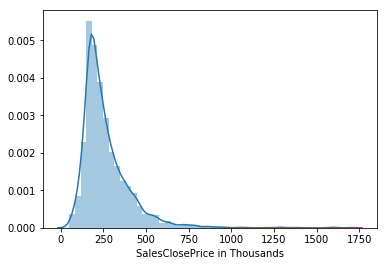
Displot

Rekayasa Fitur dengan PySpark

Relationship plotting

Seaborn lmplot()

  • seaborn.lmplot(x, y, data)
  • x, y : strings, Input variables; these should be column names in data.
  • data : Pandas DataFrame
# Import your favorite visualization library
import seaborn as sns

# Select columns s_df = df.select(['SALESCLOSEPRICE', 'SQFTABOVEGROUND']) # Sample dataframe s_df = s_df.sample(False, 0.5, 42)
# Convert to Pandas DataFrame pandas_df = s_df.toPandas()
# Plot it sns.lmplot(x='SQFTABOVEGROUND', y='SALESCLOSEPRICE', data=pandas_df)
Rekayasa Fitur dengan PySpark

Linear model plot between SQFT above ground and sales price
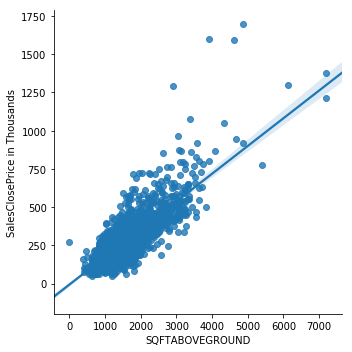
Linear Model Plot

Rekayasa Fitur dengan PySpark

Let's practice!

Rekayasa Fitur dengan PySpark

Preparing Video For Download...