Python untuk Pengguna MATLAB
Justin Kiggins
Product Manager
print(arr)
[[2, 4, 8, 16, 32]]
print(arr[2])
8
print(arr[0])
2
print(arr[-1])
32
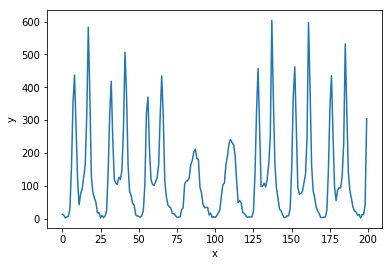
import matplotlib.pyplot as plt
# Buat figure baru
plt.figure()

# Plot y terhadap x
plt.plot(x, y)

# Atur label sumbu x dan y
plt.xlabel('x')
plt.ylabel('y')

# Tampilkan plot
plt.show()
# Buat figure baru plt.figure()
# Plot y terhadap x plt.plot(x, y)
# Atur label sumbu x dan y plt.xlabel('x') plt.ylabel('y')
# Tampilkan plot plt.show()