Pengantar DataFrame
Python untuk Pengguna MATLAB

Justin Kiggins
Product Manager
DataFrame
- Paket
pandas - Data tabular
- pandas DataFrame = tabel MATLAB
- Simpan data dengan tipe campuran per observasi:
- float
- integer
- Boolean
- string
DataFrame
                     rank num_households frac_dog_owners frac_cat_owners
state
Alabama              17   1828000        0.441           0.274
Arizona              18   2515000        0.401           0.296
Arkansas             6    1148000        0.479           0.306
California           40   12974000       0.328           0.283
Colorado             13   1986000        0.425           0.323
Connecticut          33   1337000        0.283           0.319
Delaware             25   334000         0.337           0.337
District of Columbia 48   287000         0.131           0.116
Florida              32   7609000        0.357           0.273
Georgia              31   3798000        0.401           0.273
Metode .head()
pets.head()
            rank  num_households  frac_dog_owners  frac_cat_owners
state
Alabama       17         1828000            0.441            0.274
Arizona       18         2515000            0.401            0.296
Arkansas       6         1148000            0.479            0.306
California    40        12974000            0.328            0.283
Colorado      13         1986000            0.425            0.323
Atribut .columns
pets.columns
Index(['rank', 'num_households', 'frac_dog_owners', 'frac_cat_owners'],
      dtype='object')
Atribut .index
pets.index
Index(['Alabama', 'Arizona', 'Arkansas', 'California', 'Colorado',
       'Connecticut', 'Delaware', 'District of Columbia', 'Florida',
       'Georgia', 'Idaho', 'Illinois', 'Indiana', 'Iowa', 'Kansas',
       'Kentucky', 'Louisiana', 'Maine', 'Maryland', 'Massachusetts',
       'Michigan', 'Minnesota', 'Mississippi', 'Missouri', 'Montana',
       'Nebraska', 'Nevada', 'New Hampshire', 'New Jersey', 'New Mexico',
       'New York', 'North Carolina', 'North Dakota', 'Ohio', 'Oklahoma',
       'Oregon', 'Pennsylvania', 'Rhode Island', 'South Carolina',
       'South Dakota', 'Tennessee', 'Texas', 'Utah', 'Vermont', 'Virginia',
       'Washington', 'West Virginia', 'Wisconsin', 'Wyoming'],
      dtype='object', name='state')
Mengambil satu kolom
pets['rank']
state
Alabama                 17
Arizona                 18
Arkansas                 6
California              40
...
Virginia                37
Washington               5
West Virginia            7
Wisconsin               21
Wyoming                  9
Name: rank, dtype: int64
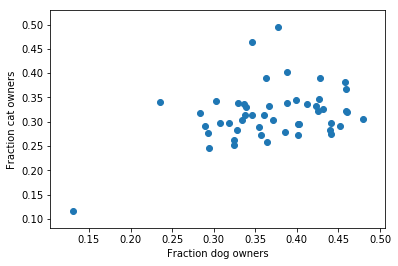
Kompatibel dengan NumPy & Matplotlib
plt.scatter(pets['frac_dog_owners'], pets['frac_cat_owners'])
Ayo berlatih!
Python untuk Pengguna MATLAB

