Mengeksplorasi Data dengan Visualisasi

Manipulasi Data di Julia

Katerina Zahradova

Instructor

Mengapa kita memvisualisasikan?
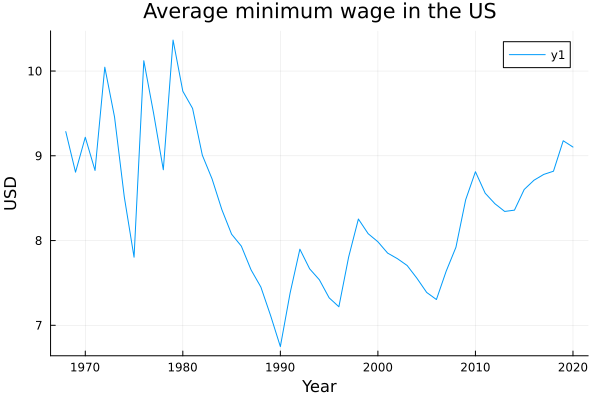
Row year   mean_min_wage_2020_dollars
    Int64  Float64
________________________________
1   1968   9.28529
2   1969   8.80667
3   1970   9.21882
4   1971   8.82686
5   1972   10.0457
...

Upah efektif rata-rata (dolar 2020)

Manipulasi Data di Julia

Histogram

# Make a histogram with default bins
wages_2015 = filter(wages.year == 2015, wages)
histogram(wages_2015.eff_min_wage_2020_dollars)
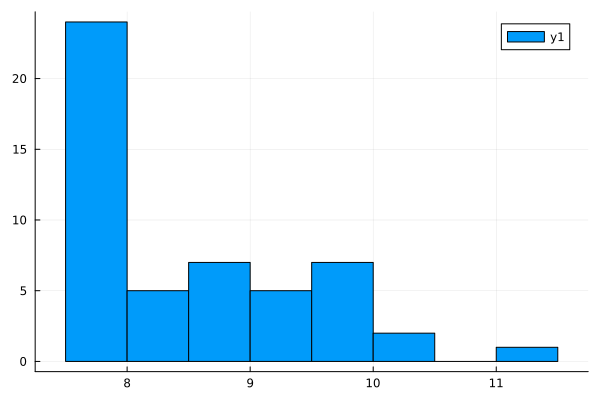
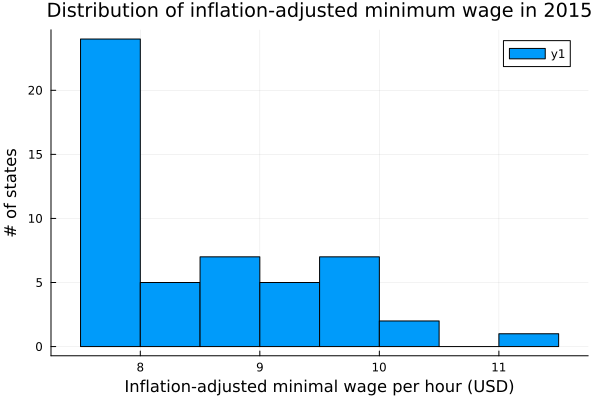
Histogram upah minimum disesuaikan inflasi tahun 2015

# Specifying the number of bins
wages_2015 = filter(wages.year == 2015, wages)
histogram(wages_2015.eff_min_wage_2020_dollars,
          bins = 25)
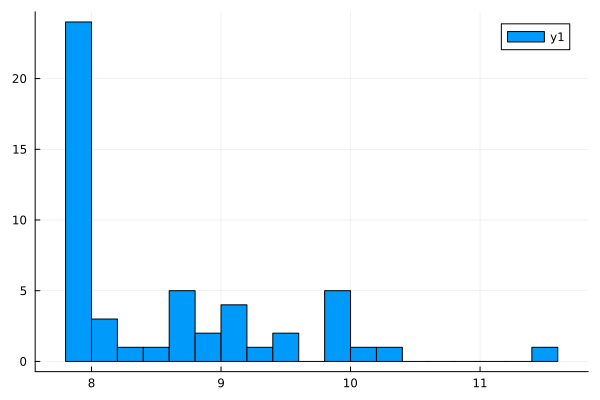
Histogram upah minimum disesuaikan inflasi 2015 dengan label

Manipulasi Data di Julia

Memberi label plot

# Make histogram
wages_2015 = filter(wages.year == 2015, wages)
histogram(wages_2015.eff_min_wage_2020_dollars)

# Include x label xlabel!("Inflation-adjusted minimal wage per hour (USD)")
# Include y label ylabel!("# of states")
# Make title title!("Distribution of inflation-adjusted minimum wage in 2015")

Histogram persentase kakao dengan label

Manipulasi Data di Julia

Scatter plot

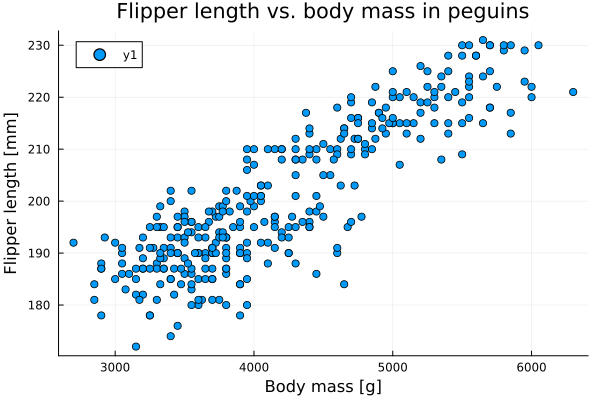
# Scatter plot
scatter(penguins.body_mass_g, 
        penguins.flipper_length_mm)

# Labels
xlabel!("Body mass [g]")
ylabel!("Flipper length [mm]")
title!("Flipper length vs. 
        body mass in peguins")

Plot sebar panjang sirip vs. massa tubuh penguin

Manipulasi Data di Julia

Plot garis

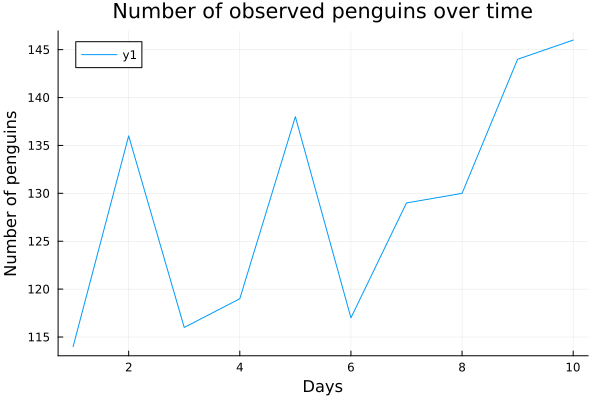
# Number of Adelie penguins over time
plot(observations.days, 
    observations.adelie)

# Labels
xlabel!("Days")
ylabel!("Number of penguins")
title!("Number of observed 
        penguins over time")

Plot garis tren jumlah penguin

Manipulasi Data di Julia

Beberapa garis

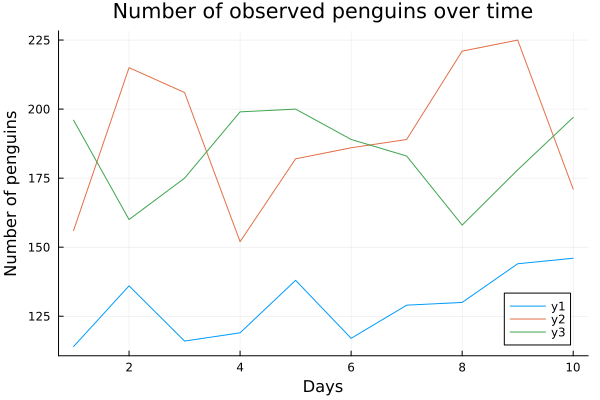
# Plot the first line
plot(observations.day, observations.adelie)


# Adding and modifying with new lines plot!(observations.day, observations.chinstrap) plot!(observations.day, observations.gentoo)
# Labels xlabel!("Days") ylabel!("Number of penguins") title!("Number of observed penguins over time")

Plot garis tren jumlah penguin per spesies

Manipulasi Data di Julia

Beberapa garis dengan legenda

# Make a plot
plot(observations.day, observatations.adelie, 
    label = "Adelie" )
plot!(observations.day, observations.chinstrap, 
    label = "Chinstrap")
plot!(observations.day, observations.gentoo, 
    label = "Gentoo")

# Labels
xlabel!("Days")
ylabel!("Number of penguins")
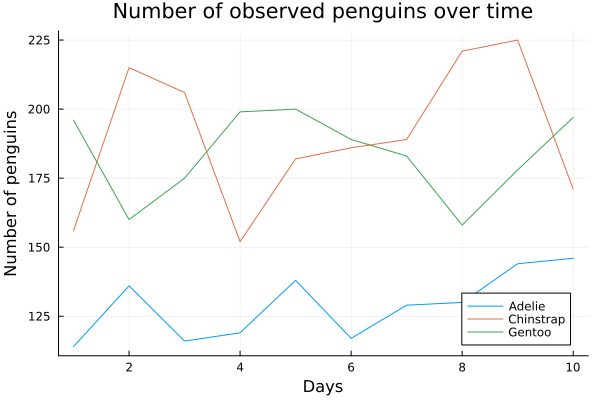
title!("Number of observed penguins over time")

Plot garis tren jumlah penguin per spesies dengan legenda

Manipulasi Data di Julia

Cheat sheet

Jenis plot:

  • Histogram - distribusi variabel numerik histogram(df.n1, label = "n1")

  • Scatter plot - hubungan dua variabel numerik scatter(df.x, df.y, label = "y")

  • Line plot - evolusi waktu variabel numerik plot(df.x, df.y, label = "y")

Menambah garis ke plot yang ada:

  • histogram!(df.n2, label = "n2")
  • scatter!(df.x2, df.y2, label = "y2")
  • plot!(df.x2, df.y2, label = "y2")

Label:

  • xlabel!("Teks label x")
  • ylabel!("Teks label y")
  • title!("Teks judul")
Manipulasi Data di Julia

Ayo berlatih!

Manipulasi Data di Julia

Preparing Video For Download...