Working with more than one time series

Visualizzare dati di serie temporali in Python

Thomas Vincent

Head of Data Science, Getty Images

Working with multiple time series

An isolated time series

date ts1
1949-01 112
1949-02 118
1949-03 132

A file with multiple time series

date ts1 ts2 ts3 ts4 ts5 ts6 ts7
2012-01-01 2113.8 10.4 1987.0 12.1 3091.8 43.2 476.7
2012-02-01 2009.0 9.8 1882.9 12.3 2954.0 38.8 466.8
2012-03-01 2159.8 10.0 1987.9 14.3 3043.7 40.1 502.1
Visualizzare dati di serie temporali in Python

The Meat production dataset

import pandas as pd
meat = pd.read_csv("meat.csv")
print(meat.head(5))
         date   beef   veal    pork  lamb_and_mutton  broilers   
0  1944-01-01  751.0   85.0  1280.0             89.0       NaN 
1  1944-02-01  713.0   77.0  1169.0             72.0       NaN 
2  1944-03-01  741.0   90.0  1128.0             75.0       NaN 
3  1944-04-01  650.0   89.0   978.0             66.0       NaN 
4  1944-05-01  681.0  106.0  1029.0             78.0       NaN 

   other_chicken  turkey  
0            NaN     NaN  
1            NaN     NaN  
2            NaN     NaN  
3            NaN     NaN  
4            NaN     NaN
Visualizzare dati di serie temporali in Python

Summarizing and plotting multiple time series

import matplotlib.pyplot as plt
plt.style.use('fivethirtyeight')
ax = df.plot(figsize=(12, 4), fontsize=14)

plt.show()
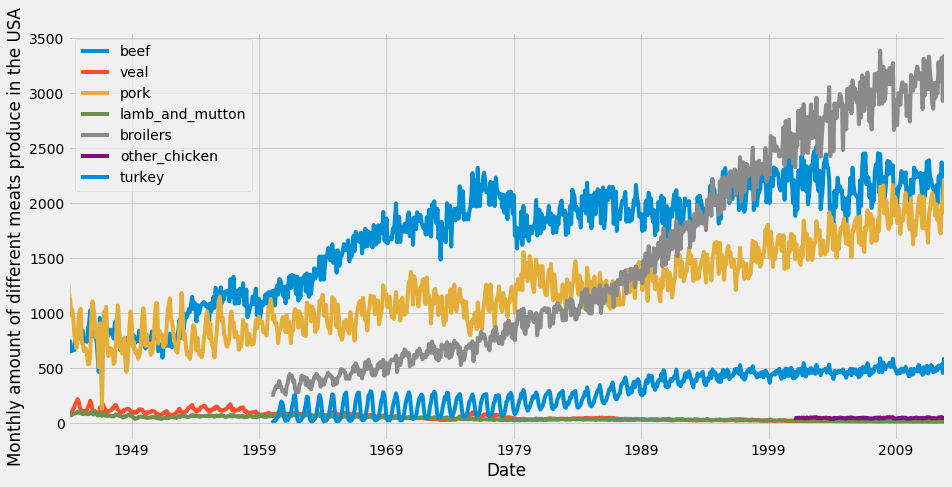
The Meat production dataset

Visualizzare dati di serie temporali in Python

Area charts

import matplotlib.pyplot as plt
plt.style.use('fivethirtyeight')
ax = df.plot.area(figsize=(12, 4), fontsize=14)

plt.show()
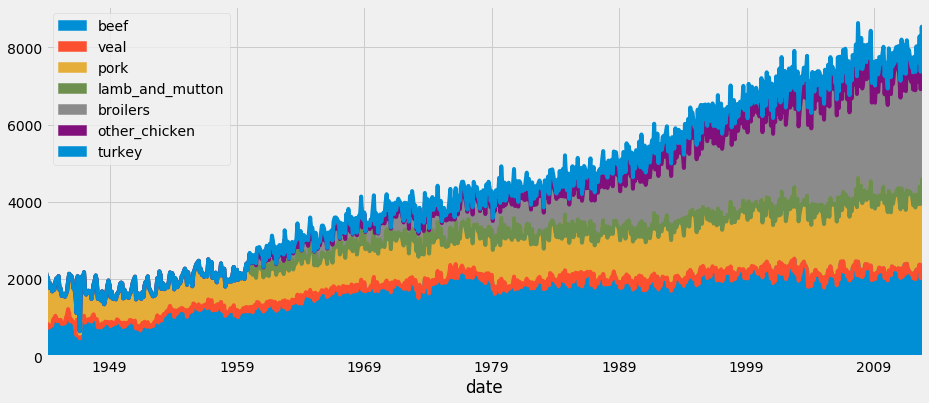
The Meat production dataset as an Area Chart

Visualizzare dati di serie temporali in Python

Let's practice!

Visualizzare dati di serie temporali in Python

Preparing Video For Download...