La natura delle richieste HTTP

Web scraping in R

Timo Grossenbacher

Instructor

Hypertext Transfer Protocol (HTTP)
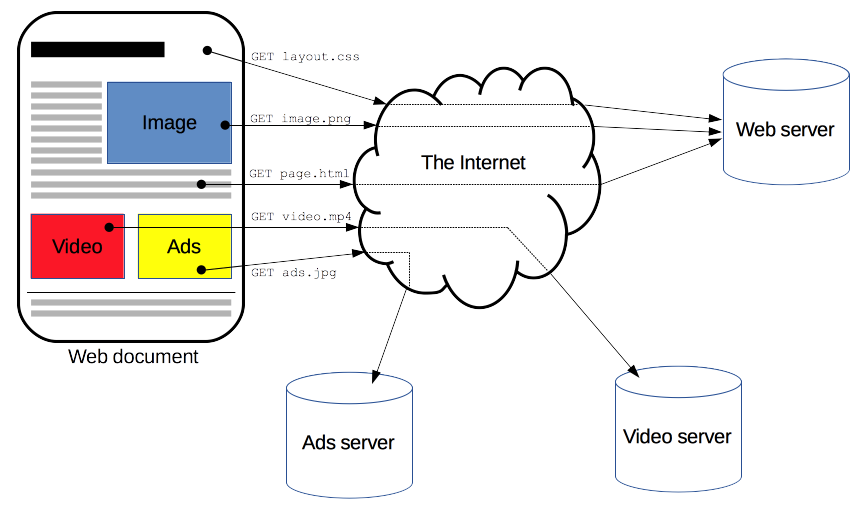
Uno schema che mostra come i browser comunicano con i server

1 https://developer.mozilla.org/en-US/docs/Web/HTTP/Overview
Web scraping in R

Anatomia delle richieste

Una richiesta viene inviata al server web
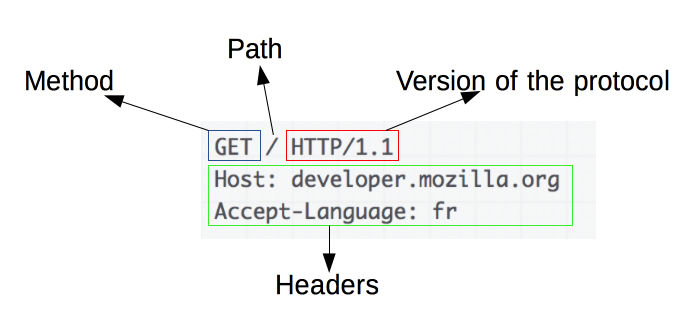
Esempio di richiesta

Codici di stato tipici: 200 (OK), 404 (NOT FOUND), 3xx (reindirizzamenti), 5xx (errori server)

Si riceve una risposta dal server web
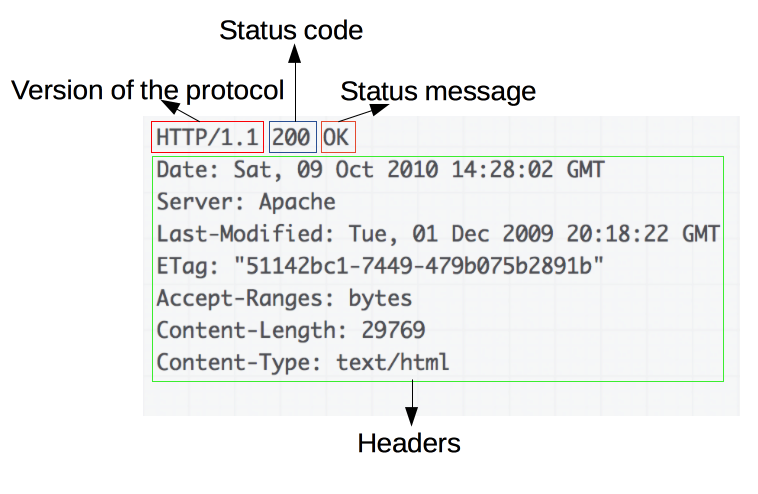
La risposta corrispondente

1 https://developer.mozilla.org/en-US/docs/Web/HTTP/Overview
Web scraping in R

Metodi di richiesta: GET e POST

  • GET: usato per recuperare una risorsa senza inviare dati (GET /index.html)
  • POST: usato per inviare dati a un server, ad es. dopo aver compilato un form
POST /test HTTP/1.1
Host: foo.example
Content-Type: application/x-www-form-urlencoded
Content-Length: 27

field1=value1&field2=value2

Anche le richieste POST ricevono una risposta!

1 https://developer.mozilla.org/en-US/docs/Web/HTTP/Methods/POST
Web scraping in R

Richieste HTTP con httr

library(httr)
GET('https://httpbin.org')
Response [https://httpbin.org/]
  Date: 2020-09-19 13:02
  Status: 200
  Content-Type: text/html; charset=utf-8
  Size: 9.59 kB
<!DOCTYPE html>
<html lang="en">

<head>
    <meta charset="UTF-8">
    ...
Web scraping in R

Richieste HTTP con httr

library(httr)
response <- GET('https://httpbin.org')
content(response)
{html_document}
<html lang="en">
[1] <head>\n<meta http-equiv="Content-Type" content="text/html; charset=UTF ...
[2] <body>\n    <a href="https://github.com/requests/httpbin" class="github ...
Web scraping in R

Ayo berlatih!

Web scraping in R

Preparing Video For Download...