Aggregazione

Analisi del carrello in Python

Isaiah Hull

Visiting Associate Professor of Finance, BI Norwegian Business School

Esplorare i dati

import pandas as pd

# Load novelty gift data.
gifts = pd.read_csv('datasets/novelty_gifts.csv')

# Preview data with head() method.
print(gifts.head())
  InvoiceNo                          Description
0    562583      IVORY STRING CURTAIN WITH POLE 
1    562583        PINK AND BLACK STRING CURTAIN
2    562583                PSYCHEDELIC TILE HOOK
3    562583                ENAMEL COLANDER CREAM
4    562583  SMALL FOLDING SCISSOR(POINTED EDGE)
Analisi del carrello in Python

Esplorare i dati

# Print number of transactions.
print(len(gifts['InvoiceNo'].unique()))
9709
# Print number of items.
print(len(gifts['Description'].unique()))
3461
Analisi del carrello in Python

Potatura e aggregazione

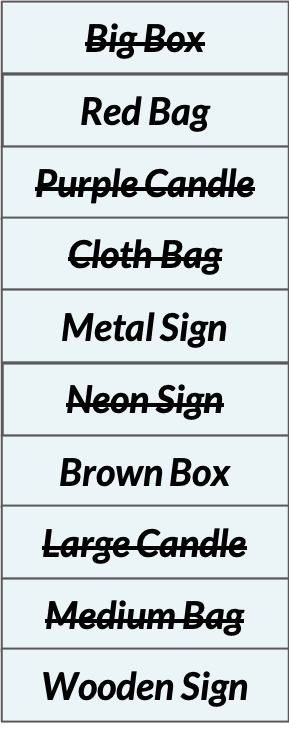
Potatura Il diagramma mostra un elenco di articoli, alcuni barrati per indicare che sono stati potati.

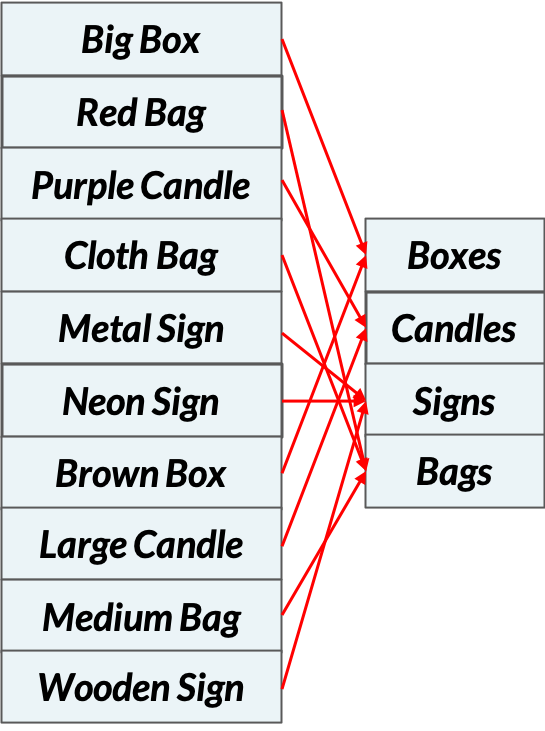
Aggregazione Il diagramma mostra un elenco di articoli mappati a un elenco più piccolo per indicare che

Analisi del carrello in Python

Aggregare i dati

# Load one-hot encoded data
onehot = pd.read_csv('datasets/online_retail_onehot.csv')

# Print preview of DataFrame
print(onehot.head(2))
    50'S CHRISTMAS GIFT BAG LARGE   DOLLY GIRL BEAKER ...  ZINC WILLIE WINKIE  CANDLE STICK
0                           False               False                               False
1                           False               False                               True
Analisi del carrello in Python

Aggregare i dati

# Select the column names for bags and boxes
bag_headers = [i for i in onehot.columns if i.lower().find('bag')>=0]
box_headers = [i for i in onehot.columns if i.lower().find('box')>=0]
# Identify column headers
bags = onehot[bag_headers]
boxes = onehot[box_headers]
print(bags)
       50'S CHRISTMAS GIFT BAG LARGE   RED SPOT GIFT BAG LARGE  
0                              False                     False   
1                              False                     False
...                             ...                      ...
Analisi del carrello in Python

Aggregare i dati

# Sum over columns
bags = (bags.sum(axis=1) > 0.0).values
boxes = (boxes.sum(axis=1) > 0.0).values
print(bags)
[False  True False ... False  True False]
Analisi del carrello in Python

Aggregare i dati

# Add results to DataFrame
aggregated = pd.DataFrame(np.vstack([bags, boxes]).T, columns = ['bags', 'boxes'])
print(aggregated.head())
    bags  boxes
0  False  False
1   True  False
2  False  False
3  False  False
4   True  False
Analisi del carrello in Python

Analisi del carrello con aggregati

  • Processo di aggregazione:
    • Articoli -> Categorie
    • Calcola metriche
    • Identifica regole
# Compute support
print(aggregated.mean())
bags     0.130075
boxes    0.071429
Analisi del carrello in Python

Passiamo alla pratica !

Analisi del carrello in Python

Preparing Video For Download...