Mettere tutto insieme

Feature Engineering in R

Jorge Zazueta

Research Professor. Head of the Modeling Group at the School of Economics, UASLP

Un flusso di modellazione stilizzato

Tipici passaggi di modellazione ad alto livello.
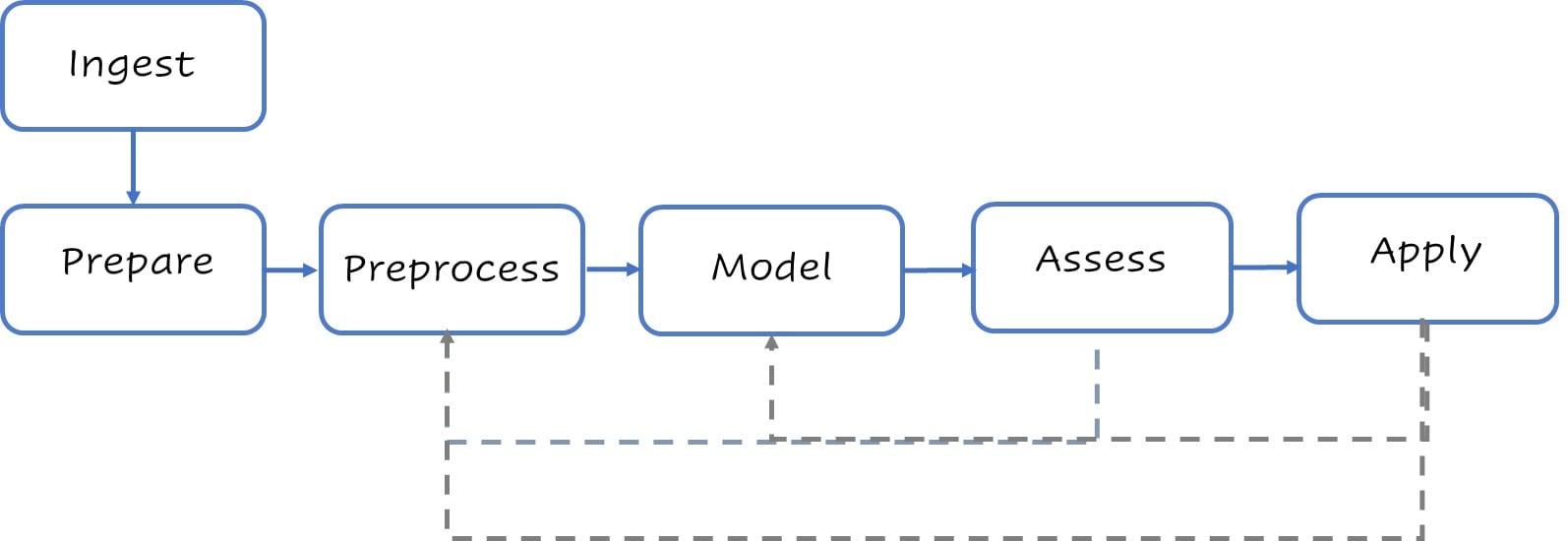
Diagramma di flusso del processo di modellazione.

Feature Engineering in R

Un flusso di modellazione stilizzato

Tipici passaggi di modellazione ad alto livello.
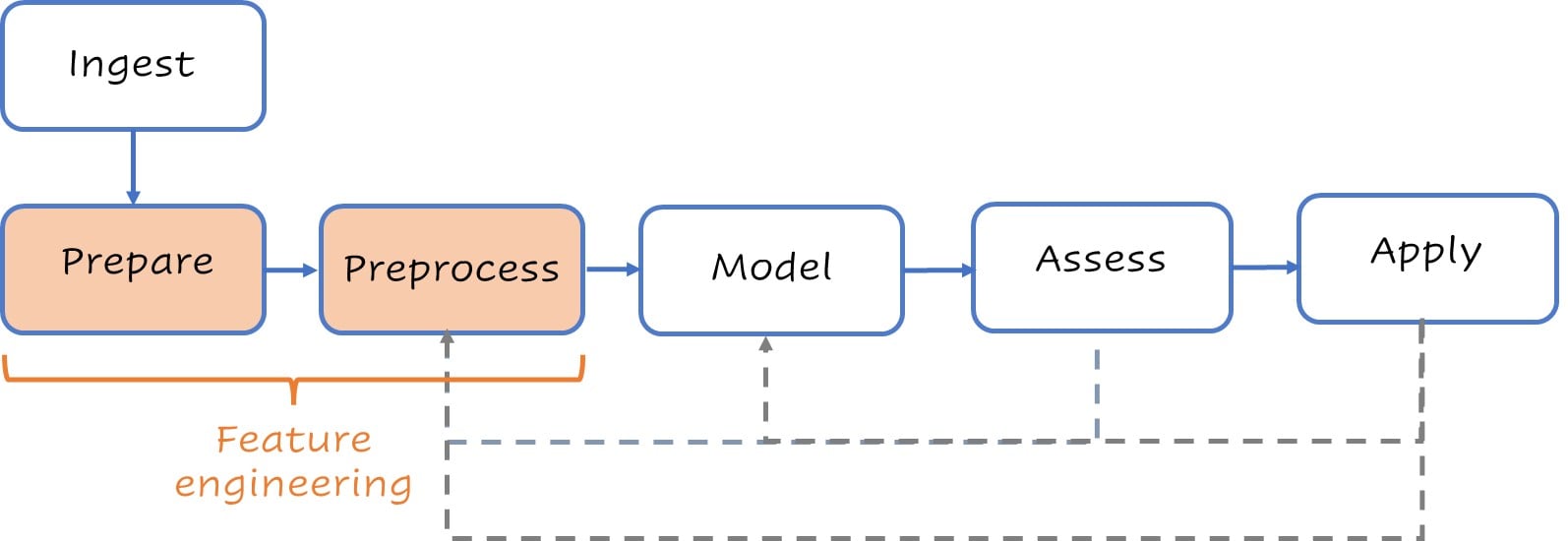
Workflow del processo di modellazione, con focus su feature engineering.

Feature Engineering in R

Prepara

Inizia con un po' di pulizia di base e imposta gli split.

loans <- # Pulizia di base
  loans %>%
  mutate(across(where(is_character),
                  as_factor)) %>%
  mutate(across(Credit_History,
                  as_factor))

set.seed(123) # Imposta gli split
split <- initial_split(loans, 
        strata = Loan_Status)
test <- testing(split)
train <- training(split)
glimpse(train)
Rows: 460
Columns: 13
$ Loan_ID           <fct> LP001003...
$ Gender            <fct> Male, Ma...
$ Married           <fct> Yes, No,...
$ Dependents        <fct> 1, 0, 0,...
$ Education         <fct> Graduate...
$ Self_Employed     <fct> No, No, ...
$ ApplicantIncome   <dbl> 4583, 18...
$ CoapplicantIncome <dbl> 1508, 28...
$ LoanAmount        <dbl> 128, 114...
$ Loan_Amount_Term  <dbl> 360, 360...
$ Credit_History    <fct> 1, 1, 0,...
$ Property_Area     <fct> Rural, R...
$ Loan_Status       <fct> N, N, N,...
Feature Engineering in R

Preprocessa

La nostra recipe può essere molto breve o molto complessa.

recipe <- recipe(Loan_Status ~ .,
data = train) %>%
  update_role(Loan_ID, 
  new_role = "ID") %>%
  step_normalize(all_numeric_predictors()) %>% 
  step_impute_knn(all_predictors()) %>%
  step_dummy(all_nominal_predictors())
recipe
Recipe

Input:

      role #variables
        ID          1
   outcome          1
 predictor         11

Operazioni:

Centratura e scaling per all_numeric_predictors()
Imputazione k-nearest neighbor per all_predictors()
Variabili dummy da all_nominal_predictors()
Feature Engineering in R

Modello

Imposta il workflow

lr_model <- logistic_reg() %>%
  set_engine("glmnet") %>%
  set_args(mixture = 1, penalty = tune())

lr_penalty_grid <- grid_regular(
  penalty(range = c(-3, 1)),
  levels = 30)

lr_workflow <-
  workflow() %>%
  add_model(lr_model) %>%
  add_recipe(recipe)
lr_workflow
--Workflow -------------------------------
Preprocessor: Recipe
Model: logistic_reg()

-- Preprocessor --------------------------
3 passaggi della recipe
- step_normalize()
- step_impute_knn()
- step_dummy()

-- Model ---------------------------------
Specifiche modello di regressione logistica (classificazione)

Argomenti principali:
  penalty = tune()
  mixture = 1
Motore computazionale: glmnet
Feature Engineering in R

Valuta

Tuning della penalty per Lasso

lr_tune_output <- tune_grid( 
  lr_workflow,
  resamples = vfold_cv(train, v = 5),
  metrics = metric_set(roc_auc),
  grid = penalty_grid)

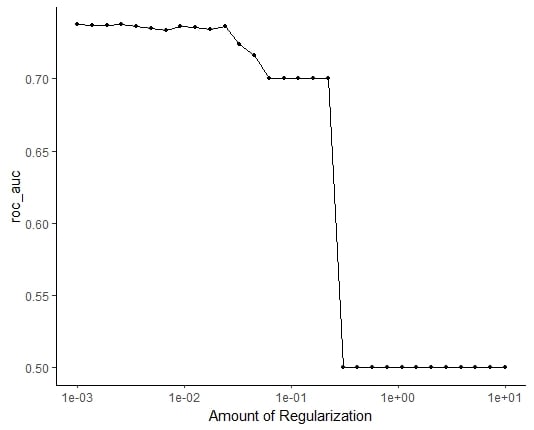
autoplot(tune_output)

ROC_AUC vs. regolarizzazione

Grafico di ROC_AUC rispetto alla regolarizzazione.

Feature Engineering in R

Valuta

Adattare il modello finale

best_penalty <-
select_by_one_std_err(lr_tune_output,
metric = 'roc_auc', desc(penalty)) 

lr_final_fit<-
finalize_workflow(lr_workflow, best_penalty) %>%
  fit(data = train)

lr_final_fit %>%
  augment(test) %>% 
  class_evaluate(truth = Loan_Status,
              estimate = .pred_class,
                         .pred_Y)

Le nostre metriche

# A tibble: 2 × 3
  .metric  .estimator .estimate
  <chr>    <chr>          <dbl>
1 accuracy binary         0.818
2 roc_auc  binary         0.813
Feature Engineering in R

Passons à la pratique !

Feature Engineering in R

Preparing Video For Download...