Dai workflow alle pipeline

Progettare workflow di Machine Learning in Python

Dr. Chris Anagnostopoulos

Honorary Associate Professor

Riprendiamo il workflow

from sklearn.ensemble import RandomForestClassifier as rf
X_train, X_test, y_train, y_test = train_test_split(X, y)
grid_search = GridSearchCV(rf(), param_grid={'max_depth': [2, 5, 10]})
grid_search.fit(X_train, y_train)
depth = grid_search.best_params_['max_depth']
vt = SelectKBest(f_classif, k=3).fit(X_train, y_train)
clf = rf(max_depth=best_value).fit(vt.transform(X_train), y_train)
accuracy_score(clf.predict(vt.transform(X_test), y_test))
Progettare workflow di Machine Learning in Python

La potenza della grid search

Ottimizza max_depth:

pg = {'max_depth': [2,5,10]}
gs = GridSearchCV(rf(),  
   param_grid=pg)
gs.fit(X_train, y_train)
depth = gs.best_params_['max_depth']

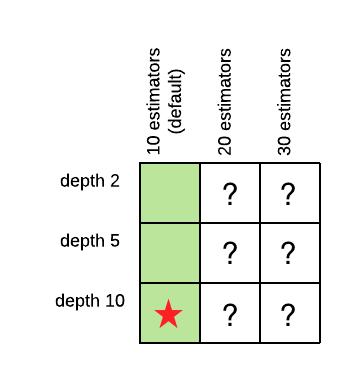
Una tabella di tutte le combinazioni possibili dei valori di profondità e numero di stimatori, che mostra che sono stati esplorati tre valori e uno è risultato il migliore.

Progettare workflow di Machine Learning in Python

La potenza della grid search

Poi ottimizza n_estimators:

pg = {'n_estimators': [10,20,30]}
gs = GridSearchCV(
   rf(max_depth=depth),  
   param_grid=pg)
gs.fit(X_train, y_train)
n_est = gs.best_params_[
    'n_estimators']

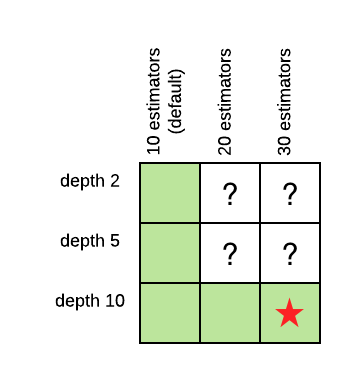
Una tabella di tutte le combinazioni possibili dei valori di profondità e numero di stimatori, che mostra che sono stati esplorati cinque valori e un altro è risultato il migliore.

Progettare workflow di Machine Learning in Python

La potenza della grid search

Insieme max_depth e n_estimators:

pg = {
   'max_depth': [2,5,10],
   'n_estimators': [10,20,30]
}
gs = GridSearchCV(rf(),  
   param_grid=pg)
gs.fit(X_train, y_train)
print(gs.best_params_) 

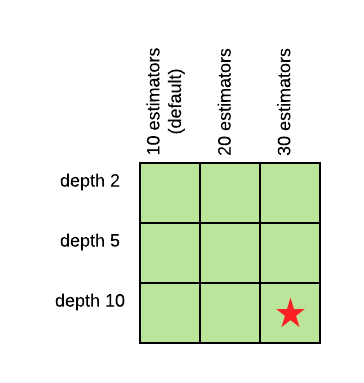
{'max_depth': 10, 'n_estimators': 20}

Una tabella di tutte le combinazioni possibili dei valori di profondità e numero di stimatori, che mostra che sono stati esplorati tutti i valori e lo stesso è risultato il migliore.

Progettare workflow di Machine Learning in Python

Pipeline

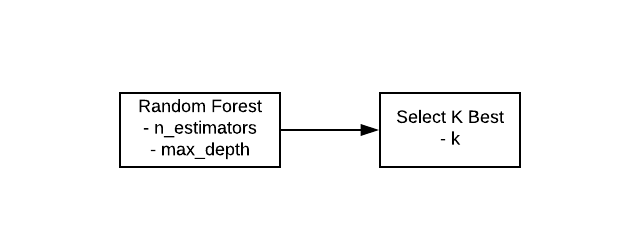
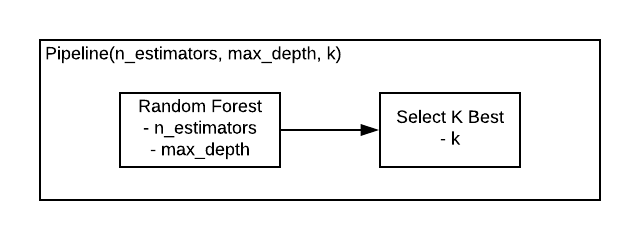
In questo schema, la random forest, con due iperparametri, è collegata al selettore di feature, che ha un iperparametro, tramite una freccia.

Progettare workflow di Machine Learning in Python

Pipeline

Entrambi gli oggetti sono racchiusi in un'unica scatola.

Progettare workflow di Machine Learning in Python

Pipeline

from sklearn.pipeline import Pipeline
pipe = Pipeline([
    ('feature_selection', SelectKBest(f_classif)), 
    ('classifier', RandomForestClassifier())
])

params = dict( feature_selection__k=[2, 3, 4], classifier__max_depth=[5, 10, 20] )
grid_search = GridSearchCV(pipe, param_grid=params) gs = grid_search.fit(X_train, y_train).best_params_
{'classifier__max_depth': 20, 'feature_selection__k': 4}
Progettare workflow di Machine Learning in Python

Personalizza la pipeline

from sklearn.metrics import roc_auc_score, make_scorer
auc_scorer = make_scorer(roc_auc_score)

grid_search = GridSearchCV(pipe, param_grid=params, scoring=auc_scorer)
Progettare workflow di Machine Learning in Python

Non esagerare

params = dict(
    feature_selection__k=[2, 3, 4], 
    clf__max_depth=[5, 10, 20], 
    clf__n_estimators=[10, 20, 30] 
)
grid_search = GridSearchCV(pipe, params, cv=10)

3 x 3 x 3 x 10 = 270 fit del classificatore!

Progettare workflow di Machine Learning in Python

Workflow potenziati

Progettare workflow di Machine Learning in Python

Preparing Video For Download...