Riepilogo e modifica del testo

Lavorare con DeepSeek in Python

James Chapman

AI Curriculum Lead, DataCamp

Ricapitoliamo...

  • Q&A
response = client.chat.completions.create(
  model="deepseek-ai/DeepSeek-V4-Pro",
  messages=[{"role": "user", "content": "How many days are in October?"}]
)

print(response.choices[0].message.content)
October has **31 days**.  

It's one of the seven months in the Gregorian calendar with 31 days...
Lavorare con DeepSeek in Python

Modifica del testo

  • Esempio: aggiornare nome, pronomi e qualifica

$$

prompt = """
Update name to Maarten, pronouns to he/him, and job title to Senior Content Developer
in the following text:

Joanne is a Content Developer at DataCamp. Her favorite programming language is R,
which she uses for her statistical analyses.
"""
Lavorare con DeepSeek in Python

Modifica del testo

response = client.chat.completions.create(
    model="deepseek-ai/DeepSeek-V4-Pro",

messages=[{"role": "user", "content": prompt}]
) print(response.choices[0].message.content)
Here's the updated text with the requested changes:

Maarten is a Senior Content Developer at DataCamp. His favorite programming language
is R, which he uses for his statistical analyses.

Let me know if you'd like any further adjustments!
Lavorare con DeepSeek in Python

Riepilogo del testo

  • Esempio: riepilogo di chat con clienti

Team di assistenza clienti

text = """
Customer: Hi, I'm trying to log into 
my account, but it keeps saying 
my password is incorrect. I'm sure 
I'm entering the right one.  

Support: I'm sorry to hear that! 
Have you tried resetting your password?  
...
"""
Lavorare con DeepSeek in Python

Riepilogo del testo

prompt = f"""Summarize the customer support chat 
             in three concise key points: {text}"""


response = client.chat.completions.create( model="deepseek-ai/DeepSeek-V4-Pro", messages=[{"role": "user", "content": prompt}] ) print(response.choices[0].message.content)
1. **Login Issue**: Customer couldn't log in due to a password issue and missing reset link.  
2. **Password Reset Suggestion**: Support resent the reset email after confirming it was sent.  
3. **Prompt Assistance**: Customer resolved the issue by using Google sign-in.
Lavorare con DeepSeek in Python

Controllare la lunghezza della risposta

  • max_tokens = 5
response = client.chat.completions.create(
  model="deepseek-ai/DeepSeek-V4-Pro",
  messages=[{"role":"user",
      "content":"Write a haiku about AI."}],
  max_tokens=5
)

**Silent circuits hum
  • max_tokens = 30
response = client.chat.completions.create(
    model="deepseek-ai/DeepSeek-V4-Pro",
    messages=[{"role":"user",
      "content":"Write a haiku about AI."}],
    max_tokens=30
)

**Silent circuits hum,**  
**thoughts of light and logic bloom—**  
**minds beyond our own.**
Lavorare con DeepSeek in Python

Capire i token

$$

  • Token: unità di testo che aiutano l'AI a comprendere e interpretare il testo

$$
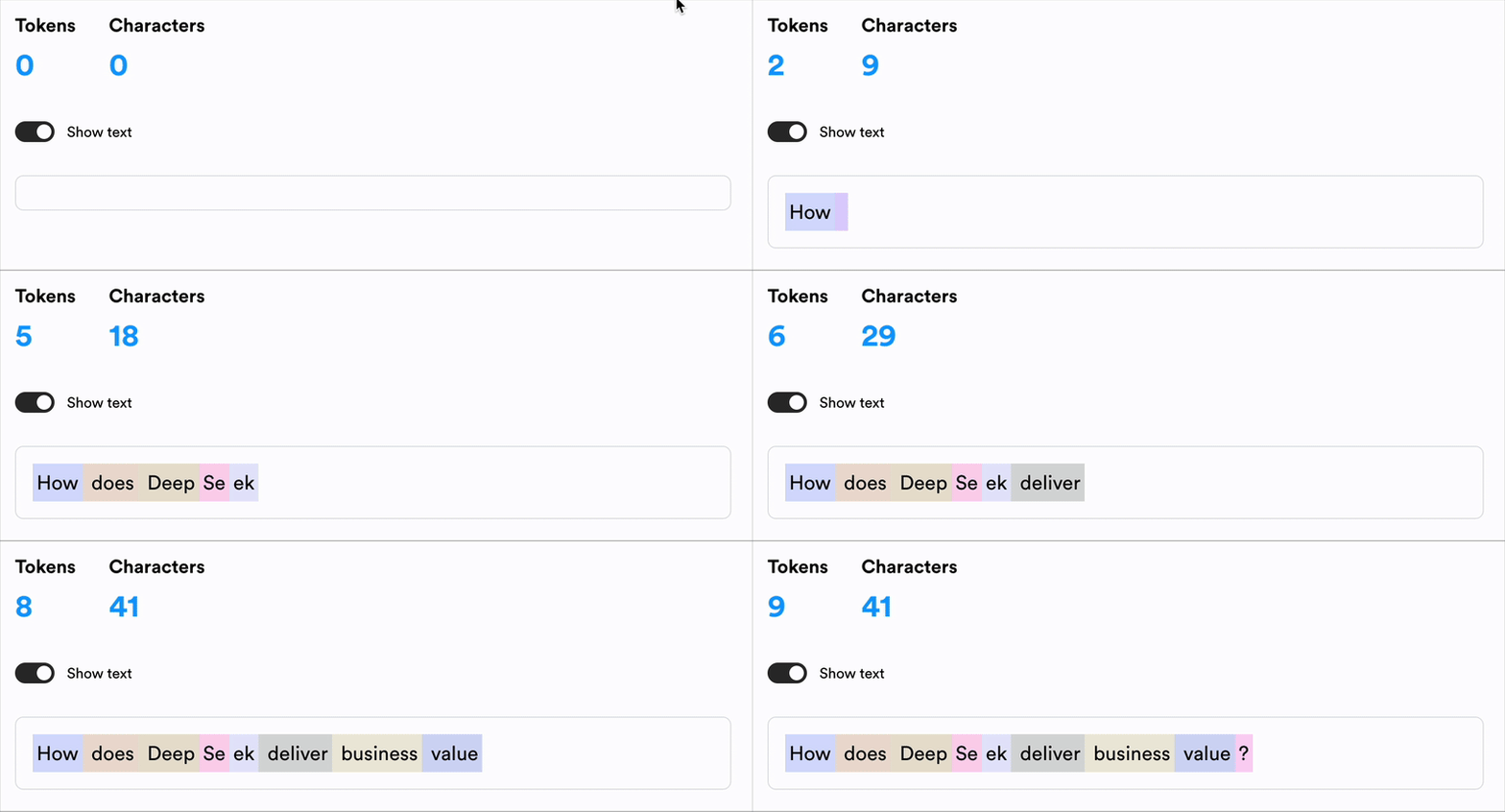
La frase, "How can the OpenAI API deliver business value?" con ogni token evidenziato in un colore diverso.

1 https://lunary.ai/deepseek-tokenizer
Lavorare con DeepSeek in Python

Calcolare il costo


  • I costi API dipendono da piattaforma, modello e numero di token 💰

    • I modelli hanno prezzi per costo/token
    • I token di input e output possono avere costi diversi
  • Aumentare max_tokens aumenta il costo 📈

Screenshot 2025-03-05 at 11.46.54.png

Lavorare con DeepSeek in Python

Calcolare il costo

prompt = f"""Summarize the customer support chat 
             in three concise key points: {text}"""

max_tokens = 500

response = client.chat.completions.create(
    model="deepseek-ai/DeepSeek-V4-Pro",
    messages=[{"role": "user", "content": prompt}], 
    max_tokens=max_tokens
)
Lavorare con DeepSeek in Python

Calcolare il costo

# Define price per token
input_token_price = 2.1 / 1_000_000
output_token_price = 4.4 / 1_000_000

# Extract token usage input_tokens = response.usage.prompt_tokens
output_tokens = max_tokens
# Calculate cost cost = (input_tokens * input_token_price + output_tokens * output_token_price) print(f"Estimated cost: ${cost}")
Estimated cost: $0.0153964
Lavorare con DeepSeek in Python

Esercitiamoci!

Lavorare con DeepSeek in Python

Preparing Video For Download...