Kiểu dữ liệu và Exceptions trong Java
Jim White
Java Developer
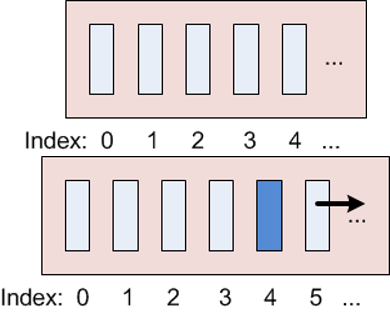
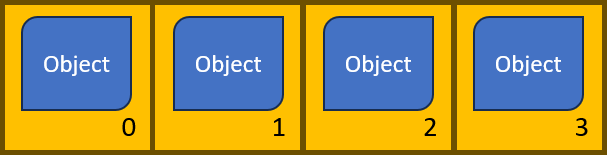
List, là giao diện con của CollectionListArrayList - danh sách đối tượng có thể thay đổi kích thước, có chỉ mục (như mảng), có thứ tự
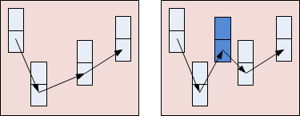
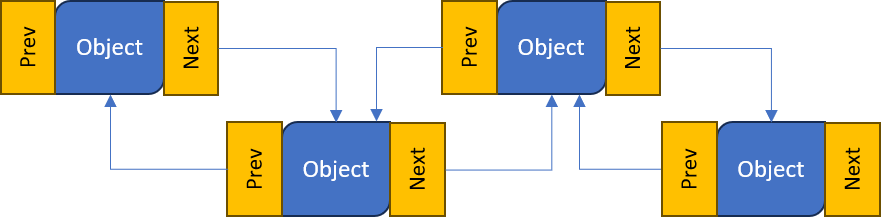
LinkedList - các đối tượng nối với nhau bằng liên kết tới đối tượng trước/sau.
new và dùng generics để chỉ định kiểu phần tử.add(object).get(index)ArrayList dùng chỉ mục bắt đầu từ 0.set(index, object).remove(index).clear().size()import java.util.ArrayList; ... ArrayList<String> animals = new ArrayList<String>();animals.add("horse"); animals.add("cow"); animals.add("horse"); // Cho phép trùng lặpString c = animals.get(1); // c="cow" animals.set(1, "chicken");// Xóa con ngựa đầu tiên animals.remove(0); // Xóa tất cả đối tượng animals.clear();animals.size();
ArrayList<Integer> list = new ArrayList<Integer>();
list.add(new Integer(5));
list.add(6); // 6 được Integer tự động bọc rồi thêm vào
Object làm kiểu tham số hóaArrayList<Object> list = new ArrayList<Object>(); // Cho phép mọi đối tượng
list.add(new Integer(5)); // Thêm một Integer
list.add(6); // Thêm Integer qua autoboxing
list.add("Hello"); // Thêm một String
ListArrayList<String> animals = new ArrayList<String>();
animals.add("horse");
animals.add("cow");
animals.add("chicken");
for (String animal : animals) { // for-each để lặp qua toàn bộ phần tử trong ArrayList
System.out.println(animal);
}
horse
cow
chicken
List (như ArrayList) có thể hiển thị bằng printlnArrayList<String> animals = new ArrayList<String>();
animals.add("horse");
animals.add("cow");
animals.add("chicken");
System.out.println(animals); // Hiển thị toàn bộ phần tử trong ArrayList
ArrayList<Object> list = new ArrayList<Object>();
list.add(5);
list.add("Hello");
System.out.println(list); // Hiển thị toàn bộ phần tử trong ArrayList
[horse, cow, chicken]
[5, Hello]
LinkedList được tạo giống ArrayListLinkedList có cùng phương thức với ArrayListimport java.util.LinkedList;
...
LinkedList<String> cars // Tạo một ...
= new LinkedList<String>(); // ... LinkedList
cars.add("Ford"); // Thêm đối tượng vào danh sách
cars.add("Mercedes");
String c = cars.get(1);
cars.set(1, "Toyota"); // Thay thế một đối tượng
System.out.println(cars); // Hiển thị danh sách
cars.remove(0); // Xóa một đối tượng
cars.clear(); // Xóa tất cả đối tượng
cars.size(); // Lấy độ dài danh sách
[Ford, Toyota]
addFirst() thêm vào đầu danh sáchaddLast() thêm vào cuối danh sáchremoveFirst() xóa ở đầuremoveLast() xóa ở cuốicars.addFirst("Fiat"); // Thêm vào đầu
cars.addLast("BMW"); // Thêm vào cuối
cars.removeFirst(); // Xóa phần tử đầu
cars.removeLast(); // Xóa phần tử cuối
ArrayList và LinkedList trông giống nhauListArrayList và LinkedList (hoặc bất kỳ List nào) là như nhauList tùy trường hợp sử dụngArrayList:list.get(11))
LinkedList:list.get(11))
Kiểu dữ liệu và Exceptions trong Java