Thiết lập dự án dbt và nạp dữ liệu

Nghiên cứu tình huống: Xây dựng mô hình dữ liệu E-Commerce với dbt

Susan Sun

Freelance Data Scientist

Ôn tập: thiết lập và khởi tạo dbt

Cài đặt dbt

pip install dbt

Khởi tạo dự án dbt looker_ecommerce

dbt init looker_ecommerce

Xác minh thiết lập thành công

cd looker_ecommerce
dbt debug

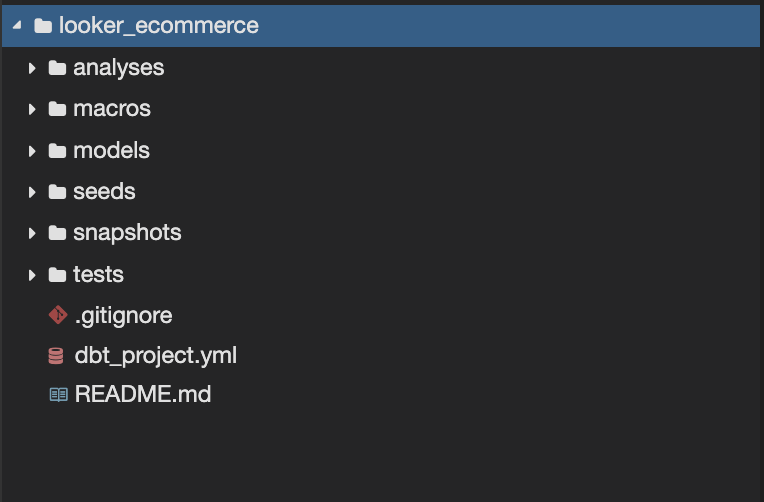
Thư mục tệp do dbt tự tạo:

Ảnh lặp lại từ bài trước. Gồm các thư mục do dbt init tạo: thư mục gốc looker e-commerce; thư mục con analyses, macros, models, seeds, snapshots, tests; cùng ba tệp gitignore, dbt project yaml, và readme markdown.

Nghiên cứu tình huống: Xây dựng mô hình dữ liệu E-Commerce với dbt

Làm quen dữ liệu: distribution centers

  • distribution_centers.csv nhỏ và tĩnh, chỉ có 10 dòng

  • Mẫu tệp thô distribution_centers.csv

Bản xem trước dữ liệu trung tâm phân phối gồm 3 hàng dữ liệu và 4 cột. Tên cột: id, name, latitude, longitude.

  • id: Định danh duy nhất của mỗi trung tâm phân phối
  • name: Tên trung tâm phân phối
  • latitude: Vĩ độ của trung tâm phân phối
  • longitude: Kinh độ của trung tâm phân phối
Nghiên cứu tình huống: Xây dựng mô hình dữ liệu E-Commerce với dbt

Làm quen dữ liệu: orders

orders.csv lớn và cập nhật liên tục, có 125.000 dòng và 9 cột

  • order_id: ID duy nhất cho từng mục đơn hàng
  • user_id: ID người đặt hàng
  • status: Trạng thái đơn hàng
  • gender: Giới tính người dùng
  • created_at: Dấu thời gian tạo đơn
  • returned_at: Dấu thời gian trả hàng
  • shipped_at: Dấu thời gian gửi hàng
  • delivered_at: Dấu thời gian giao hàng
  • num_of_items: Số mặt hàng trong mỗi đơn
Nghiên cứu tình huống: Xây dựng mô hình dữ liệu E-Commerce với dbt

Làm quen dữ liệu: orders

Mẫu tệp thô orders.csv:
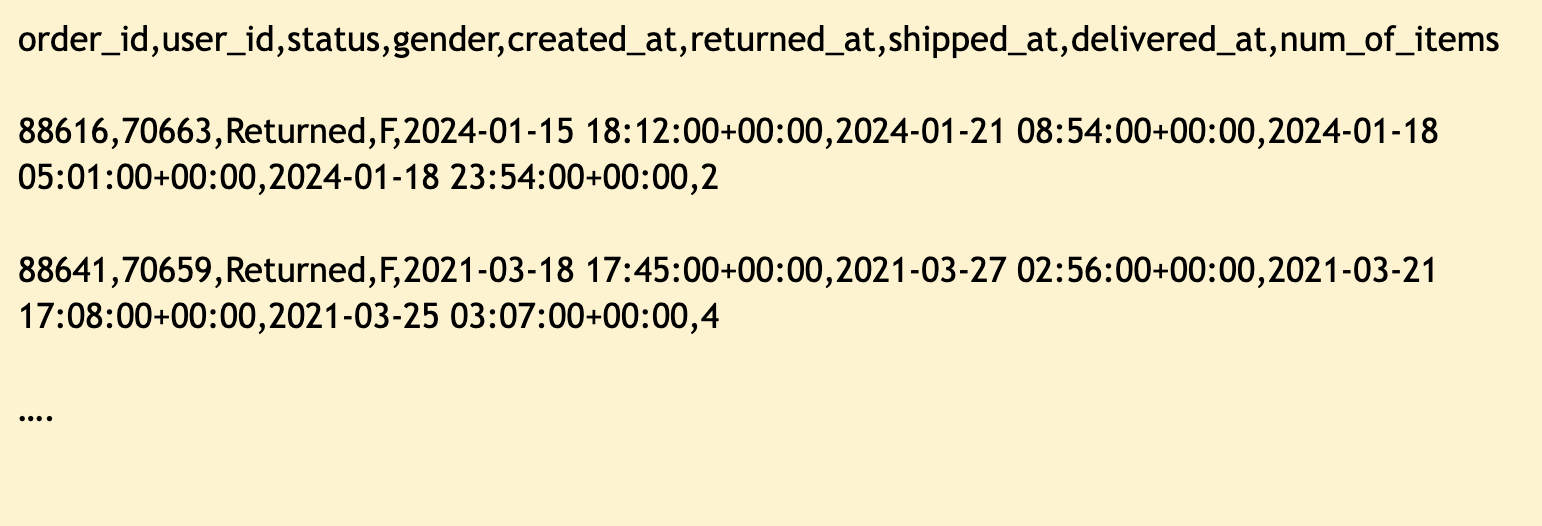
Bản xem trước dữ liệu orders gồm 2 hàng dữ liệu và 9 cột. Tên cột: order id, user id, status, gender, created at, returned at, shipped at, delivered at, num of items.

Nghiên cứu tình huống: Xây dựng mô hình dữ liệu E-Commerce với dbt

Thiết lập nguồn thô và seed

Tệp dữ liệu thô Distribution center:

  • Đặc điểm dữ liệu:
    • Tệp nhỏ, phẳng (csv)
    • Dữ liệu thay đổi chậm

Tệp dữ liệu thô Orders:

  • Đặc điểm dữ liệu:
    • Tập dữ liệu lớn
    • Dữ liệu thay đổi nhanh
  • Cách nạp dbt:
    • dbt seed
    • Nạp một lần từ tệp
  • Cách nạp dbt:
    • dbt source
    • Kết nối tới DuckDB
Nghiên cứu tình huống: Xây dựng mô hình dữ liệu E-Commerce với dbt

Thiết lập nguồn thô và seed

dbt init tự tạo cấu trúc tệp cơ bản:

looker_ecommerce/
  macros/
  models/
  seeds/
  snapshots/
  tests/
  dbt_project.yml
Nghiên cứu tình huống: Xây dựng mô hình dữ liệu E-Commerce với dbt

Thiết lập nguồn thô và seed

Nạp distribution_center dưới dạng seed:

looker_ecommerce/
  macros/
  models/
    stg_looker__distribution_centers.sql
  seeds/
    looker__distribution_centers.csv
  snapshots/
  tests/
  dbt_project.yml

Trong stg_looker__distribution_centers.sql:

SELECT 
  id,
  name,
  latitude,
  longitude
FROM 
 {{ref('looker__distribution_centers')}}
Nghiên cứu tình huống: Xây dựng mô hình dữ liệu E-Commerce với dbt

Thiết lập nguồn thô và seed

Nạp orders dưới dạng source:

looker_ecommerce/
  macros/
  models/
    stg_looker__orders.sql
  seeds/
  snapshots/
  tests/
  dbt_project.yml

Trong stg_looker__orders.sql:

SELECT *
FROM 
{{source('looker_ecommerce', 'orders')}}
Nghiên cứu tình huống: Xây dựng mô hình dữ liệu E-Commerce với dbt

Tài liệu hóa sources và mô hình staging

Tài liệu hóa sources:

looker_ecommerce/
  macros/
  models/
    _looker__sources.yml
  seeds/
  snapshots/
  tests/
  dbt_project.yml

Trong _looker__sources.yml:

version: 2

sources:
  - name: looker_ecommerce
    tables:
      - name: orders
Nghiên cứu tình huống: Xây dựng mô hình dữ liệu E-Commerce với dbt

Tài liệu hóa sources và mô hình staging

  • Tệp mẫu _looker__models.yml trong cùng thư mục models:
version: 2

models:
  - name: stg_looker__distribution_centers
    description: Tên và vị trí trung tâm phân phối    

  - name: stg_looker__orders
    description: Thông tin đơn hàng như trạng thái
Nghiên cứu tình huống: Xây dựng mô hình dữ liệu E-Commerce với dbt

Sources, seed, models và yaml

looker_ecommerce/
  macros/
  models/
    _looker__models.yml
    _looker__sources.yml
    stg_looker__distribution_centers.sql
    stg_looker__orders.sql
  seeds/
    looker__distribution_centers.csv
  snapshots/
  tests/
  dbt_project.yml
Nghiên cứu tình huống: Xây dựng mô hình dữ liệu E-Commerce với dbt

Ôn tập: các lệnh phụ của dbt

Nạp các tệp csv làm seed

dbt seed

Tạo hoặc cập nhật toàn bộ models trong dự án

dbt run

Tạo hoặc cập nhật model chỉ định

dbt run --select model

Chạy toàn bộ tests trong dự án

dbt test 

Chạy tests cho model chỉ định

dbt test --select model

Kết hợp dbt rundbt test trong một lệnh

dbt build
dbt build --select model
Nghiên cứu tình huống: Xây dựng mô hình dữ liệu E-Commerce với dbt

Ôn tập: hướng dẫn thực hành tốt

Quy ước đặt tên models:

  • Dùng hai dấu gạch dưới để tách nguồn dữ liệu và tên model
  • <data_source>__<model_name>.sql

ví dụ

  • stg_looker__distribution_centers.sql
  • stg_looker__orders.sql

Quy ước đặt tên tệp yaml:

  • Bắt đầu bằng một dấu gạch dưới
  • Dùng hai dấu gạch dưới để tách nguồn dữ liệu và loại artifact
  • _<data_source>__<artifact_type>.yml

ví dụ

  • _looker__models.yml
  • _looker__sources.yml
1 https://docs.getdbt.com/best-practices
Nghiên cứu tình huống: Xây dựng mô hình dữ liệu E-Commerce với dbt

Ayo berlatih!

Nghiên cứu tình huống: Xây dựng mô hình dữ liệu E-Commerce với dbt

Preparing Video For Download...