Phát triển mô hình Machine Learning cho môi trường sản xuất
Sinan Ozdemir
Data Scientist, Entrepreneur, and Author
Phương pháp đóng gói
Tuần tự hóa - lưu và tải mô hình ML
Đóng gói môi trường - môi trường nhất quán, tái lập cho mô hình ML
Container hóa - đóng gói mô hình, phụ thuộc và môi trường trong một “container”
Tuần tự hóa mô hình sklearn bằng pickle:
import pickle
model = ... # Train the scikit-learn model
# Serialize the model to a file
with open('model.pkl', 'wb') as f:
pickle.dump(model, f)
# Load the serialized model from the file
with open('model.pkl', 'rb') as f:
model = pickle.load(f)
Tuần tự hóa mô hình sklearn ở định dạng HDF5:
import h5py
import numpy as np
from sklearn.externals import joblib
model = ... # Train the scikit-learn model
# Serialize the model to an HDF5 file
with h5py.File('model.h5', 'w') as f:
f.create_dataset('model_weights',
data=joblib.dump(model))
# Load the serialized model from the HDF5 file
with h5py.File('model.h5', 'r') as f:
model = joblib.load(f['model_weights'][:])
Tuần tự hóa mô hình PyTorch:
import torch
# Train a PyTorch model and store it in a variable
trained_model = ...
# Serialize the trained model to a file
serialized_model_path = 'model.pt'
torch.save(trained_model.state_dict(), serialized_model_path)
# Load the serialized model from a file
loaded_model = ... # Initialize the model
loaded_model.load_state_dict(
torch.load(serialized_model_path))
Tuần tự hóa mô hình Tensorflow:
import tensorflow as tf
# Train a Tensorflow model
trained_model = ...
# Save the trained model to a directory
saved_model_directory = 'model/'
tf.saved_model.save
(trained_model, saved_model_directory)
# Load the saved model from the directory
loaded_model = tf.saved_model.load(
saved_model_directory)

# Use an existing image as the base image
FROM python:3.8-slim
# Set the working directory
WORKDIR /app
# Copy the requirements file to the image
COPY requirements.txt .
# Install the required dependencies
RUN pip install -r requirements.txt
# Copy the ML model and its dependencies to the image
COPY model/ .
# Set the entrypoint to run the model
ENTRYPOINT ["python", "run_model.py"]
<---- Dùng image Python 3.8 làm base
<---- Đặt thư mục làm việc
<---- Sao chép tệp requirements.txt
<---- Cài các gói phụ thuộc của mô hình
<---- Sao chép mô hình vào container
<---- Chỉ định cách khởi động container
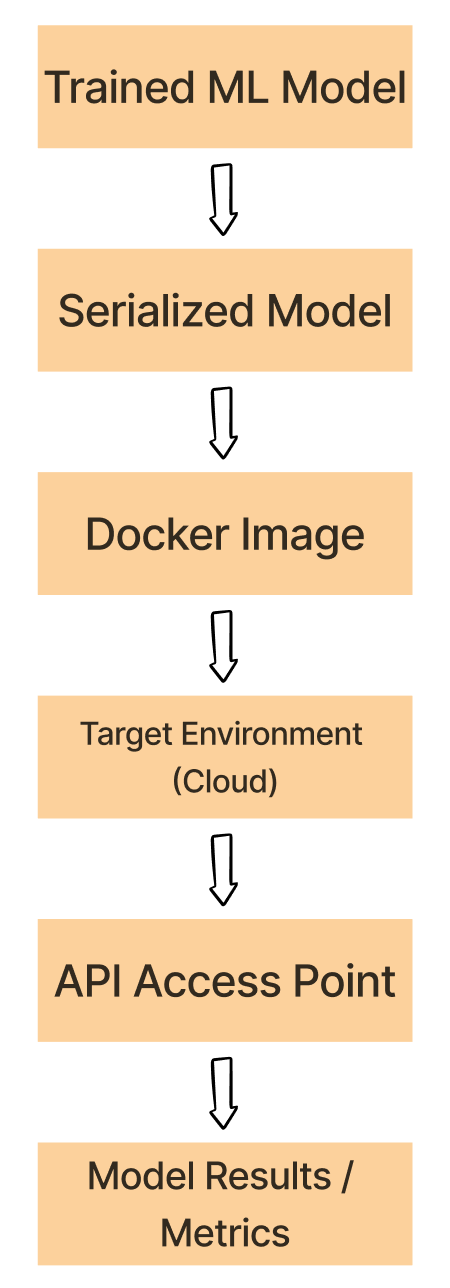
Tuần tự hóa mô hình đã huấn luyện bằng pickle, HDF5, hoặc PyTorch.
Đóng gói trong container mô hình đã tuần tự hóa, phụ thuộc và môi trường
Triển khai image Docker lên môi trường đích như đám mây
Chạy container từ image đã triển khai và chạy mô hình ML.
Sử dụng mô hình trong container qua API hoặc điểm truy cập khác.

Phát triển mô hình Machine Learning cho môi trường sản xuất