Các lớp và ID trong CSS

Web Scraping bằng R

Timo Grossenbacher

Instructor

Lớp (class)
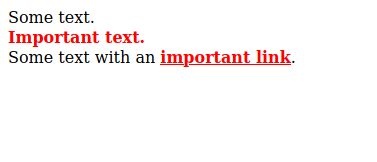
.alert {
  color: red;
  font-weight: 800;
}
...
<div>Một số văn bản.</div>
<div class = 'alert'>Văn bản quan trọng.</div>  
<div>
  Một số văn bản với
  <a href = '#' class = 'alert'>liên kết quan trọng</a>.
</div>
...

HTML với các lớp

html %>% html_elements('.alert')
{xml_nodeset (2)}
[1] <div class="alert">Important text...
[2] <a href="#" class="alert">important ...
Web Scraping bằng R

Chọn đồng thời nhiều lớp

.alert {
  color: red;
  font-weight: 800;
}
.emph {
  font-style: italic;
}
...
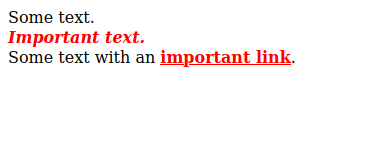
<div>Một số văn bản.</div>
<div class = 'alert emph'>Văn bản quan trọng.</div>  
<div>
  Một số văn bản với
  <a href = '#' class = 'alert'>liên kết quan trọng</a>.
</div>
...

Nhiều lớp

html %>% 
    html_elements('.alert.emph') # không: .alert, .emph
{xml_nodeset (1)}
[1] <div class="alert emph">Important text...
Web Scraping bằng R

ID

#special {
  color: green;
}
.alert {
  color: red;
  font-weight: 800;
}
...
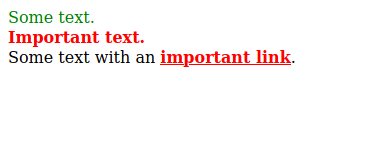
<div id = 'special'>Một số văn bản.</div>
<div class = 'alert'>Văn bản quan trọng.</div>  
<div>
  Một số văn bản với
  <a href = '#' class = 'alert'>liên kết quan trọng</a>.
</div>
...

HTML với ID

html %>% 
  html_elements('#special')
{xml_nodeset (1)}
[1] <div id="special">Some text.</div>
Web Scraping bằng R

Thu hẹp lựa chọn bằng kiểu thẻ

#special {
  color: green;
}
.alert {
  color: red;
  font-weight: 800;
}
...
<div id = 'special'>Một số văn bản.</div>
<div class = 'alert'>Văn bản quan trọng.</div>  
<div>
  Một số văn bản với
  <a href = '#' class = 'alert'>liên kết quan trọng</a>.
</div>
...
html %>% 
  html_elements('a.alert')
{xml_nodeset (1)}
[1] <a href="#" class="alert">important ...
html %>% 
  html_elements('#special')

is equivalent to...

html %>% 
  html_elements('div#special')
Web Scraping bằng R

Giả lớp để chọn các phần tử con cụ thể
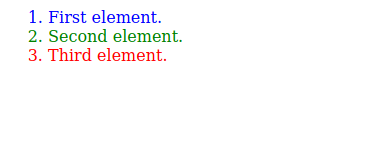
li:first-child { color: blue; }

li:nth-child(2) { color: green; }

li:last-child { color: red; }
...
<ol>
  <li>Phần tử thứ nhất.</li>
  <li>Phần tử thứ hai.</li>
  <li>Phần tử thứ ba.</li>
</ol>
...

Giả lớp CSS

html %>% html_elements('li:last-child') 
    # or html_elements('li:nth-child(3)')
{xml_nodeset (1)}
[1] <li>Phần tử thứ ba.</li>
1 https://developer.mozilla.org/en-US/docs/Web/CSS/Pseudo-classes
Web Scraping bằng R

Tóm lại...

Loại bộ chọn HTML Bộ chọn CSS
Theo loại thẻ <p>...</p> p
Nhiều loại thẻ <p>...</p><div>...</div> p, div
Theo lớp <p class = 'x'>...</p> .x
Nhiều lớp <p class = 'x y'>...</p> .x.y
Loại + Lớp <p class = 'x'>...</p> p.x
Theo ID <p id = 'x'>...</p> #x
Loại + Giả lớp <p>...</p><p>...</p> p:first-child
Web Scraping bằng R

Ayo berlatih!

Web Scraping bằng R

Preparing Video For Download...