Bản chất của yêu cầu HTTP

Web Scraping bằng R

Timo Grossenbacher

Instructor

Giao thức Truyền tải Siêu văn bản (HTTP)
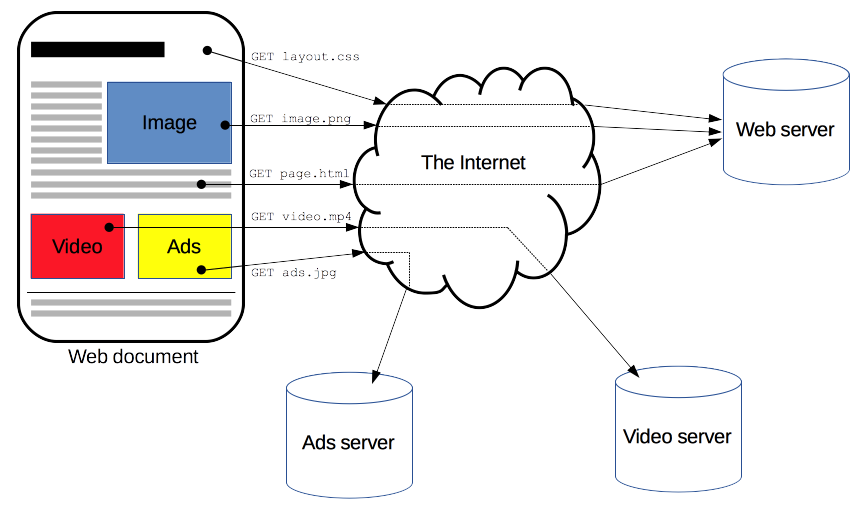
Sơ đồ cho thấy cách trình duyệt giao tiếp với máy chủ

1 https://developer.mozilla.org/en-US/docs/Web/HTTP/Overview
Web Scraping bằng R

Cấu trúc của request

Một request được gửi tới máy chủ web
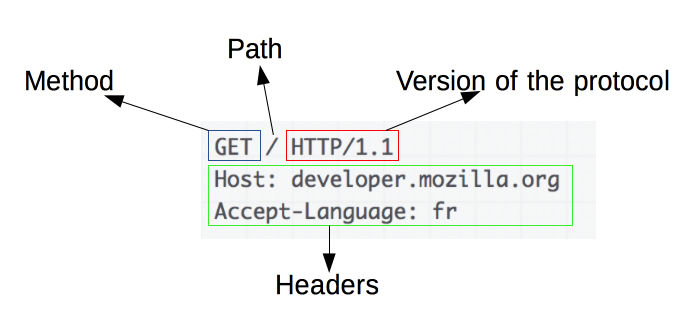
Một ví dụ về request

Mã trạng thái phổ biến: 200 (OK), 404 (KHÔNG TÌM THẤY), 3xx (chuyển hướng), 5xx (lỗi máy chủ)

Một response được nhận từ máy chủ web
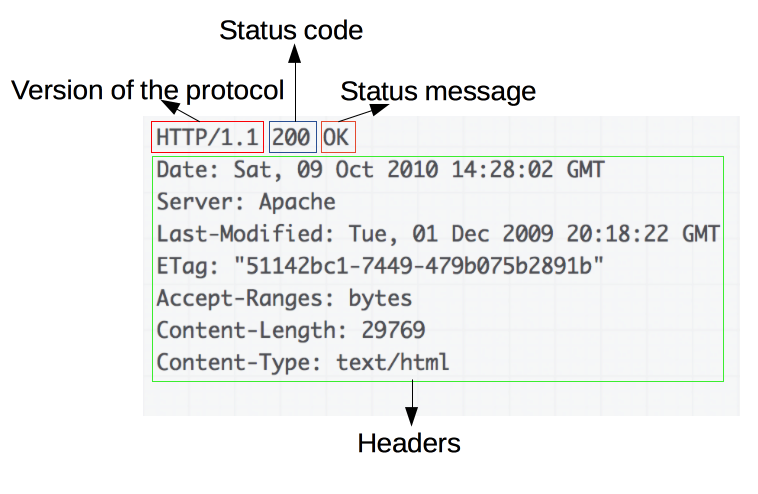
Response tương ứng

1 https://developer.mozilla.org/en-US/docs/Web/HTTP/Overview
Web Scraping bằng R

Phương thức: GET và POST

  • GET: Dùng để lấy tài nguyên, không gửi dữ liệu (GET /index.html)
  • POST: Dùng để gửi dữ liệu tới máy chủ, ví dụ sau khi điền biểu mẫu
POST /test HTTP/1.1
Host: foo.example
Content-Type: application/x-www-form-urlencoded
Content-Length: 27

field1=value1&field2=value2

POST cũng nhận được response!

1 https://developer.mozilla.org/en-US/docs/Web/HTTP/Methods/POST
Web Scraping bằng R

Yêu cầu HTTP với httr

library(httr)
GET('https://httpbin.org')
Response [https://httpbin.org/]
  Date: 2020-09-19 13:02
  Status: 200
  Content-Type: text/html; charset=utf-8
  Size: 9.59 kB
<!DOCTYPE html>
<html lang="en">

<head>
    <meta charset="UTF-8">
    ...
Web Scraping bằng R

Yêu cầu HTTP với httr

library(httr)
response <- GET('https://httpbin.org')
content(response)
{html_document}
<html lang="en">
[1] <head>\n<meta http-equiv="Content-Type" content="text/html; charset=UTF ...
[2] <body>\n    <a href="https://github.com/requests/httpbin" class="github ...
Web Scraping bằng R

Ayo berlatih!

Web Scraping bằng R

Preparing Video For Download...