Đọc, kiểm tra và làm sạch dữ liệu từ CSV
Nhập và quản lý dữ liệu tài chính bằng Python

Stefan Jansen
Instructor
Nhập và làm sạch dữ liệu
- Đảm bảo
pd.DataFrame()khớp với tệp CSV gốc - Danh sách niêm yết sàn:
amex-listings.csv
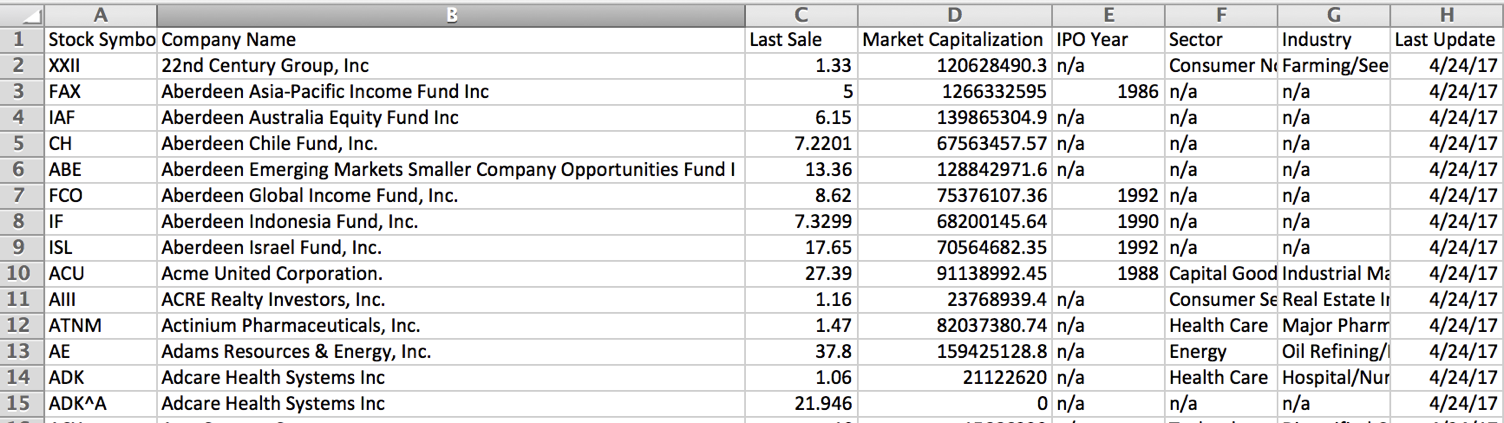
Cách pandas lưu dữ liệu
- Mỗi cột có định dạng dữ liệu riêng (
dtype) dtypeảnh hưởng đến tính toán và trực quan hóa
pandas dtype |
Đặc điểm cột |
|---|---|
object |
Văn bản, hoặc trộn văn bản và số |
int64 |
Số nguyên - 64 bit ($\le 2^{64}$) |
float64 |
Số thực; hoặc số nguyên có giá trị thiếu |
datetime64 |
Thông tin ngày giờ |
Nhập & kiểm tra
import pandas as pdamex = pd.read_csv('amex-listings.csv')amex.info() # Xem cấu trúc bảng & kiểu dữ liệu
RangeIndex: 360 entries, 0 to 359
Data columns (total 8 columns):
 #   Column                 Non-Null Count  Dtype
 --  ------                 --------------  -----
 0   Stock Symbol           360 non-null    object
 1   Company Name           360 non-null    object
 2   Last Sale              346 non-null    float64
 3   Market Capitalization  360 non-null    float64
 4   IPO Year               105 non-null    float64
 5   Sector                 238 non-null    object
 6   Industry               238 non-null    object
 7   Last Update            360 non-null    object
dtypes: float64(3), object(5)
Xử lý giá trị thiếu
# Thay 'n/a' bằng np.nan amex = pd.read_csv('amex-listings.csv', na_values='n/a')amex.info()
RangeIndex: 360 entries, 0 to 359
Data columns (total 8 columns):
 #   Column                 Non-Null Count  Dtype
 --  ------                 --------------  -----
 0   Stock Symbol           360 non-null    object
 1   Company Name           360 non-null    object
 2   Last Sale              346 non-null    float64
 3   Market Capitalization  360 non-null    float64
 4   IPO Year               105 non-null    float64
 5   Sector                 238 non-null    object
 6   Industry               238 non-null    object
 7   Last Update            360 non-null    object
dtypes: float64(3), object(5)
Phân tích ngày tháng đúng cách
amex = pd.read_csv('amex-listings.csv', na_values='n/a', parse_dates=['Last Update'])amex.info()
RangeIndex: 360 entries, 0 to 359
Data columns (total 8 columns):
 #   Column                 Non-Null Count  Dtype
 --  ------                 --------------  -----
 0   Stock Symbol           360 non-null    object
 1   Company Name           360 non-null    object
 2   Last Sale              346 non-null    float64
 3   Market Capitalization  360 non-null    float64
 4   IPO Year               105 non-null    float64
 5   Sector                 238 non-null    object
 6   Industry               238 non-null    object
 7   Last Update            360 non-null    datetime64[ns]
dtypes: datetime64[ns](1), float64(3), object(4)
Hiển thị kết quả
amex.head(2) # Hiển thị n dòng đầu (mặc định: 5)
  Stock Symbol   Company Name
0         XXII   22nd Century Group, Inc
1          FAX   Aberdeen Asia-Pacific Income Fund Inc

   Last Sale  Market Capitalization  IPO Year
0     1.3300           1.206285e+08       NaN
1     5.0000           1.266333e+09    1986.0

   Sector        Industry              Last Update
0  Non-Durables  Farming/Seeds/Milling  2017-04-26
1  NaN           NaN                    2017-04-25
¡Vamos a practicar!
Nhập và quản lý dữ liệu tài chính bằng Python

