Giới thiệu về AWS Boto trong Python
Maksim Pecherskiy
Data engineer
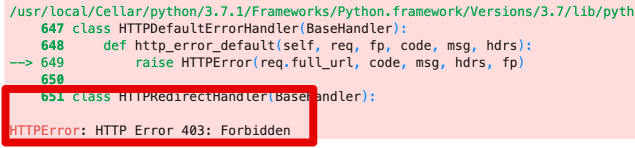
df = pd.read_csv('https://gid-staging.potholes.csv')
Được cấp quyền!
# Generate the boto3 client for interacting with S3 s3 = boto3.client('s3', region_name='us-east-1', aws_access_key_id=AWS_KEY_ID, aws_secret_access_key=AWS_SECRET)# Use client to download a file s3.download_file( Filename='potholes.csv', Bucket='gid-requests', Key='potholes.csv')


Tải tệp lên
s3.upload_file(
Filename='potholes.csv', Bucket='gid-requests', Key='potholes.csv')
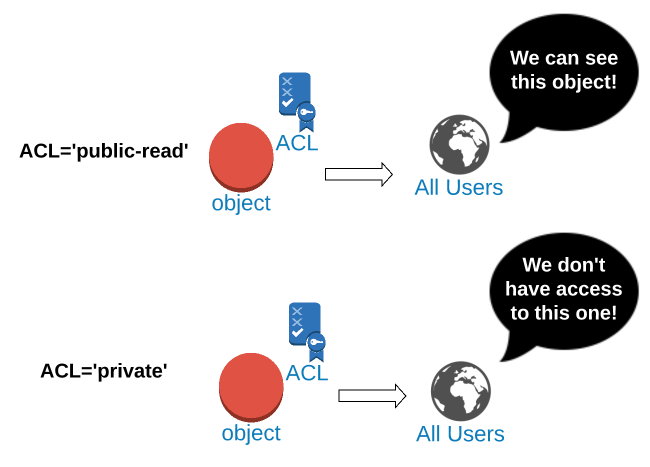
Đặt ACL thành 'public-read'
s3.put_object_acl(
Bucket='gid-requests', Key='potholes.csv', ACL='public-read')
Tải tệp với ACL 'public-read'
s3.upload_file(
Bucket='gid-requests',
Filename='potholes.csv',
Key='potholes.csv',
ExtraArgs={'ACL':'public-read'})
Mẫu URL đối tượng S3
https://{bucket}.{key}
URL cho Key='2019/potholes.csv'
https://gid-requests.2019/potholes.csv
Tạo chuỗi URL đối tượng
url = "https://{}.{}".format(
"gid-requests",
"2019/potholes.csv")
'https://gid-requests.2019/potholes.csv'
# Đọc URL vào Pandas
df = pd.read_csv(url)


Đặt ACL thành 'public-read'
s3.put_object_acl(
Bucket='gid-requests', Key='potholes.csv', ACL='public-read')
Đặt ACL thành 'private'
s3.put_object_acl(
Bucket='gid-requests', Key='potholes.csv', ACL='private')
Tải tệp với ACL 'public-read'
s3.upload_file(
Bucket='gid-requests',
Filename='potholes.csv',
Key='potholes2.csv',
ExtraArgs={'ACL':'public-read'})
Tạo chuỗi URL đối tượng
url = "https://{}.{}".format(
"gid-requests",
"2019/potholes.csv")
'https://gid-requests.2019/potholes.csv'
# Đọc URL vào Pandas
df = pd.read_csv(url)
Giới thiệu về AWS Boto trong Python