임계값 처리 시작하기

Python으로 배우는 이미지 처리

Rebeca Gonzalez

Data Engineer

임계값 처리
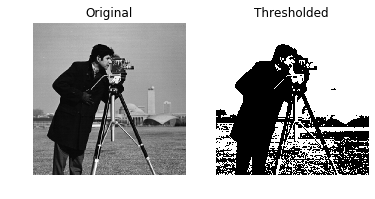
이미지를 전경과 배경으로 분할

이미지를 흑백으로 만듭니다

각 픽셀을 다음으로 설정합니다:

  • 픽셀 값이 임계값보다 큼(>$) 255(흰색)
  • 픽셀 값이 임계값보다 작음(<$) 0(검정)

카메라를 든 남성의 임계값 처리 이미지

Python으로 배우는 이미지 처리

임계값 처리

가장 간단한 영상 분할 방법

  • 객체 분리
    • 객체 탐지
    • 얼굴 탐지

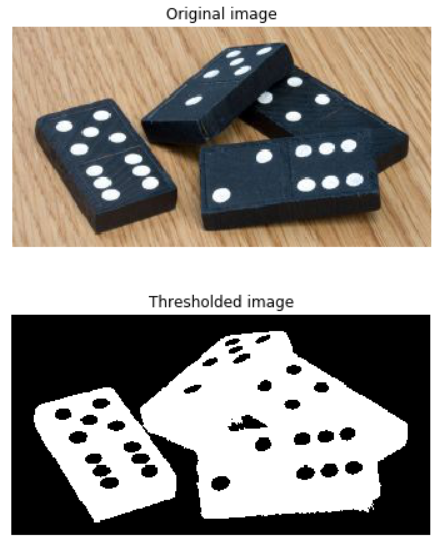
도미노 토큰의 임계값 처리 이미지

Python으로 배우는 이미지 처리

임계값 처리

반드시 그레이스케일 이미지에서만 수행

도미노 토큰으로 보여주는 임계값 처리 단계. 원본 RGB-3색, 그레이스케일, 임계값 처리 순

Python으로 배우는 이미지 처리

적용하기

# Obtain the optimal threshold value
thresh = 127

# Apply thresholding to the image binary = image > thresh
# Show the original and thresholded show_image(image, 'Original') show_image(binary, 'Thresholded')

카메라를 든 남성의 임계값 처리 이미지

Python으로 배우는 이미지 처리

반전 임계값 처리

# Obtain the optimal threshold value
thresh = 127

# Apply thresholding to the image inverted_binary = image <= thresh
# Show the original and thresholded show_image(image, 'Original') show_image(inverted_binary, 'Inverted thresholded')

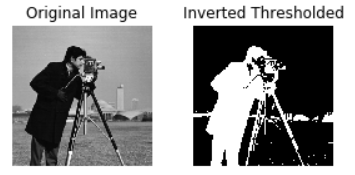
카메라를 든 남성의 반전 임계값 처리 이미지

Python으로 배우는 이미지 처리

분류

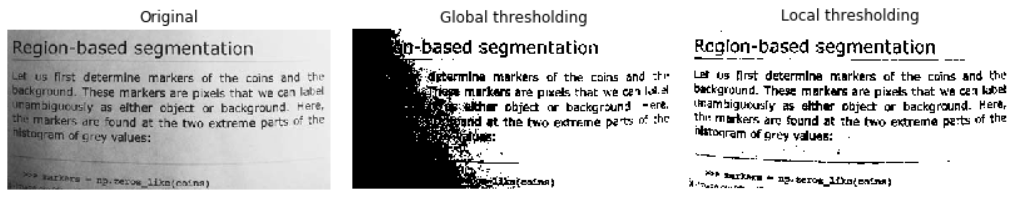
  • 전역(히스토그램 기반): 균일한 배경에 적합

  • 지역(적응형): 불균일한 조명에 적합

전역과 지역 임계값 처리 비교

Python으로 배우는 이미지 처리

다양한 임계값 알고리즘 시도

from skimage.filters import try_all_threshold

# 모든 결과 이미지 얻기 fig, ax = try_all_threshold(image, verbose=False)
# 결과 플롯 표시 show_plot(fig, ax)
Python으로 배우는 이미지 처리

다양한 임계값 알고리즘 시도

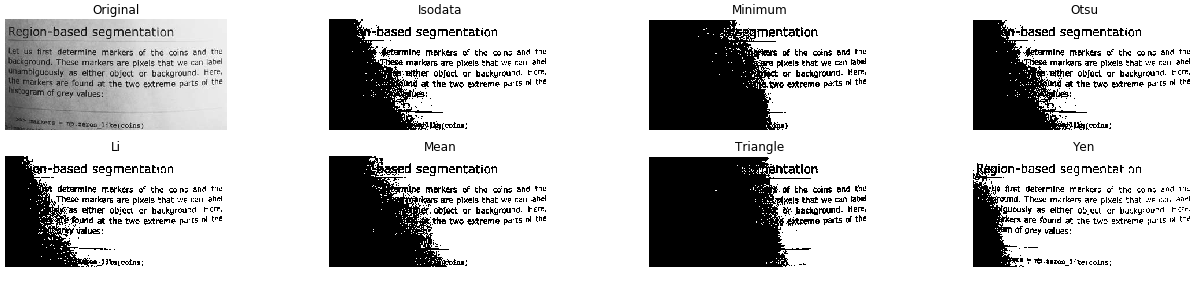
텍스트 페이지의 그레이스케일 이미지에 전역 임계값 방법을 모두 적용한 결과

Python으로 배우는 이미지 처리

최적 임계값

전역

균일한 배경
# Import the otsu threshold function
from skimage.filters import threshold_otsu

# Obtain the optimal threshold value thresh = threshold_otsu(image)
# Apply thresholding to the image binary_global = image > thresh
Python으로 배우는 이미지 처리

최적 임계값

전역

# Show the original and binarized image
show_image(image, 'Original')
show_image(binary_global, 'Global thresholding')
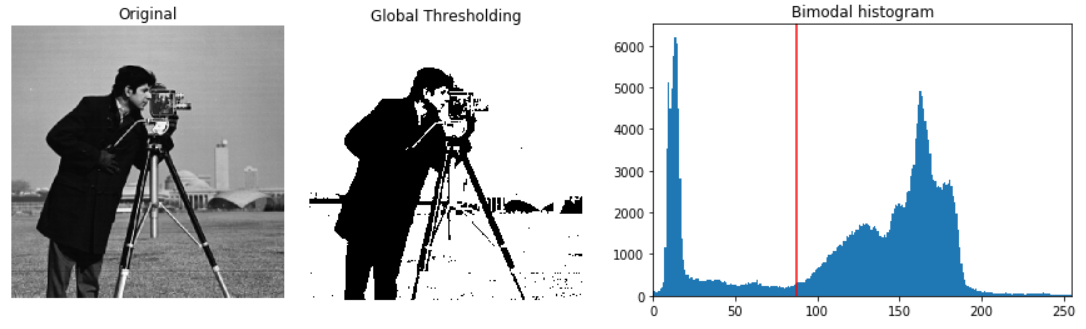
카메라를 든 남성의 원본, 임계값 처리 결과, 히스토그램(빨간선은 최적 임계값)

Python으로 배우는 이미지 처리

최적 임계값

지역

불균일한 배경
# Import the local threshold function
from skimage.filters import threshold_local

# Set the block size to 35 block_size = 35
# Obtain the optimal local thresholding local_thresh = threshold_local(text_image, block_size, offset=10)
# Apply local thresholding and obtain the binary image binary_local = text_image > local_thresh
Python으로 배우는 이미지 처리

최적 임계값

지역

# Show the original and binarized image
show_image(text_image, 'Original')
show_image(binary_local, 'Local thresholding')
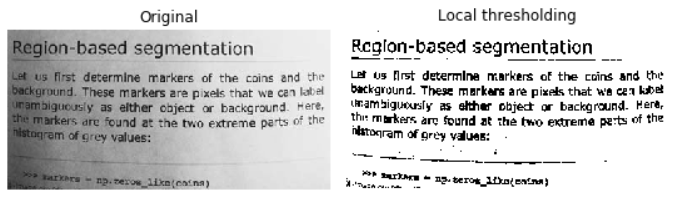
텍스트 페이지의 지역 임계값 처리 이미지

Python으로 배우는 이미지 처리

연습해 봅시다!

Python으로 배우는 이미지 처리

Preparing Video For Download...